
Installation
This guide connects a Python or JavaScript LLM application to KubeSense using the Langfuse SDK or the OpenLIT SDK.
Both SDKs are OpenTelemetry-based. They create spans around your application and export them as OTLP/HTTP to the KubeSense kubecol LLM receiver, which maps them into the kube_llm.llm_span table. KubeSense is the ingestion target; it does not replace the SDK in your application.
Before you start
Configure the LLM application in the KubeSense dashboard before installing an SDK or sending telemetry. The setup order is:
- Confirm that
kubecolis running and that the LLM collector is reachable from the application. - Create an LLM application in Settings > LLM > Applications.
- Copy the application's ID and use it as the
application.idresource attribute. - Optionally add an LLM connection for KubeSense-managed provider features such as the playground or evaluations. You can complete this step later.
- Optionally review or add model pricing patterns when you need custom pricing for models that are not already in the registry. You can complete this step later.
- Make sure the instrumented application can reach the collector port. The default LLM collector port is
31443.
The application is the container for your LLM telemetry. The application ID associates incoming spans with the correct KubeSense project. Spans without it are accepted, but are assigned to the default application and are harder to find in the UI.
Step 1: Create an LLM application
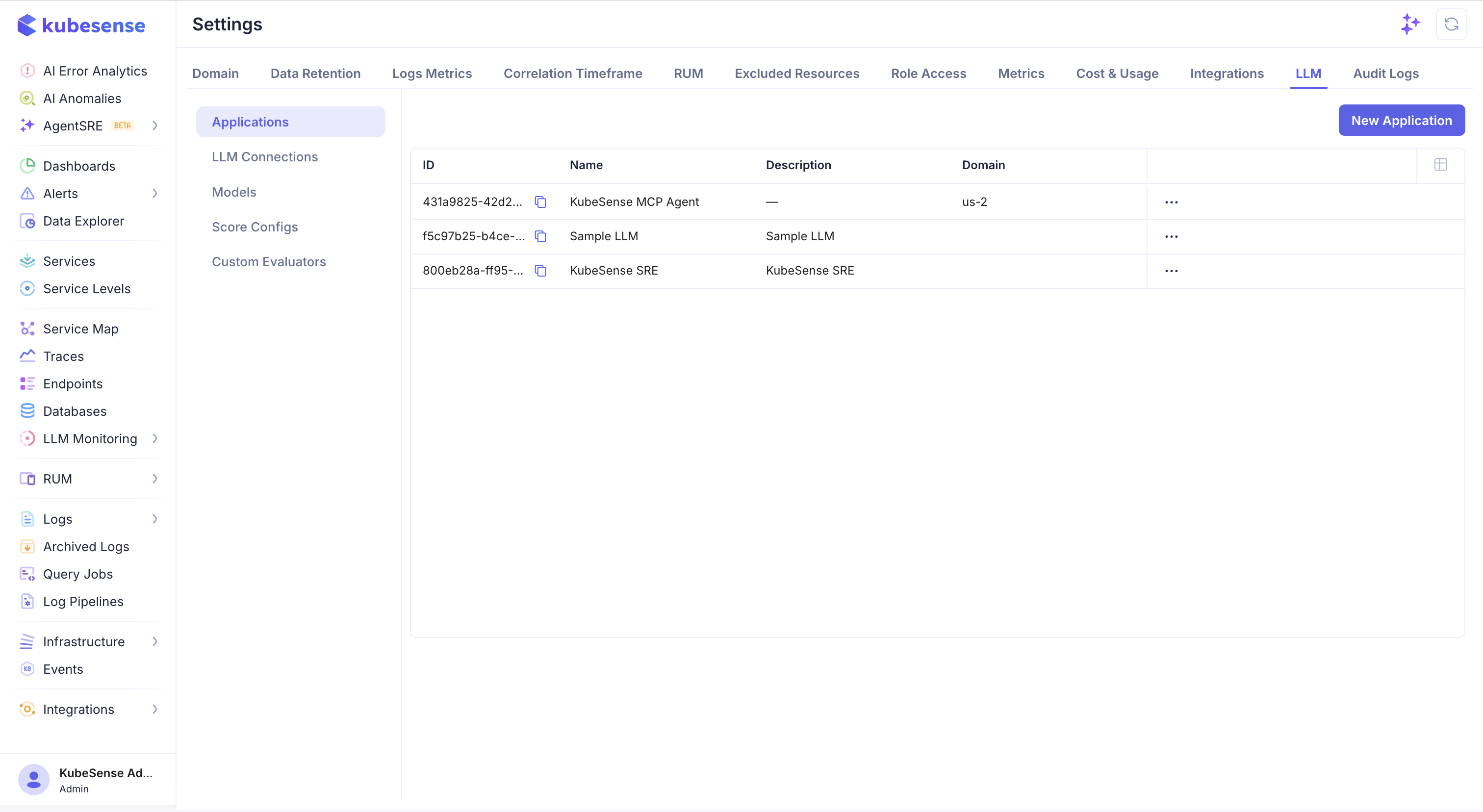
In the KubeSense dashboard, open Settings, select the LLM tab, and choose Applications. Click New Application.
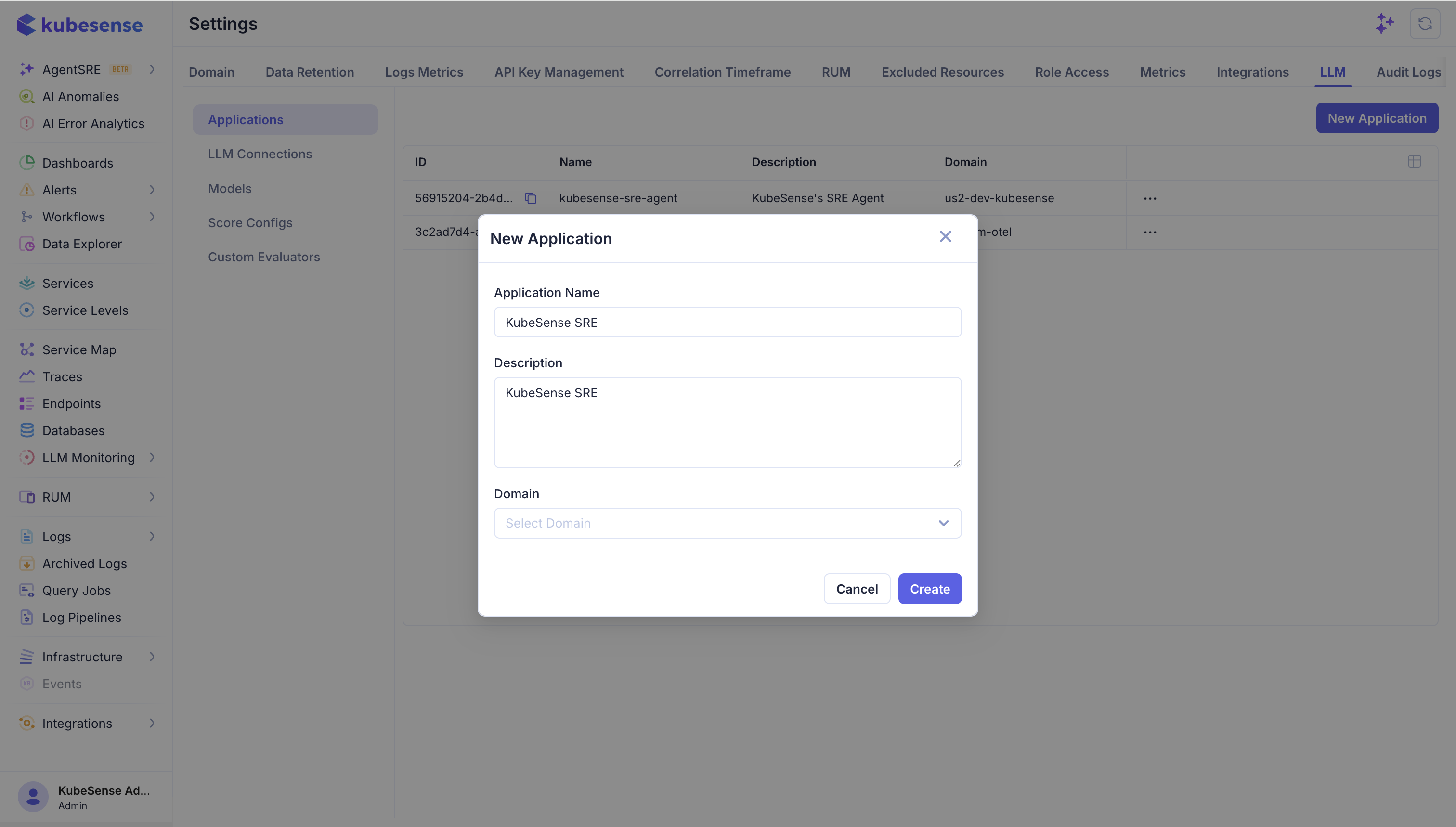
Enter an application name, an optional description, and the domain associated with the workload. The domain helps organize applications when one KubeSense installation monitors multiple teams or environments. Click Create.
After the application is created, copy its ID from the application list. You will use this value in OTEL_RESOURCE_ATTRIBUTES for every instrumented service that belongs to this application.
Step 2 (Optional): Add an LLM connection
An LLM connection stores the provider adapter, provider name, model selection, and API key used by KubeSense-managed LLM features. It is separate from the SDK connection that sends application traces to kubecol.
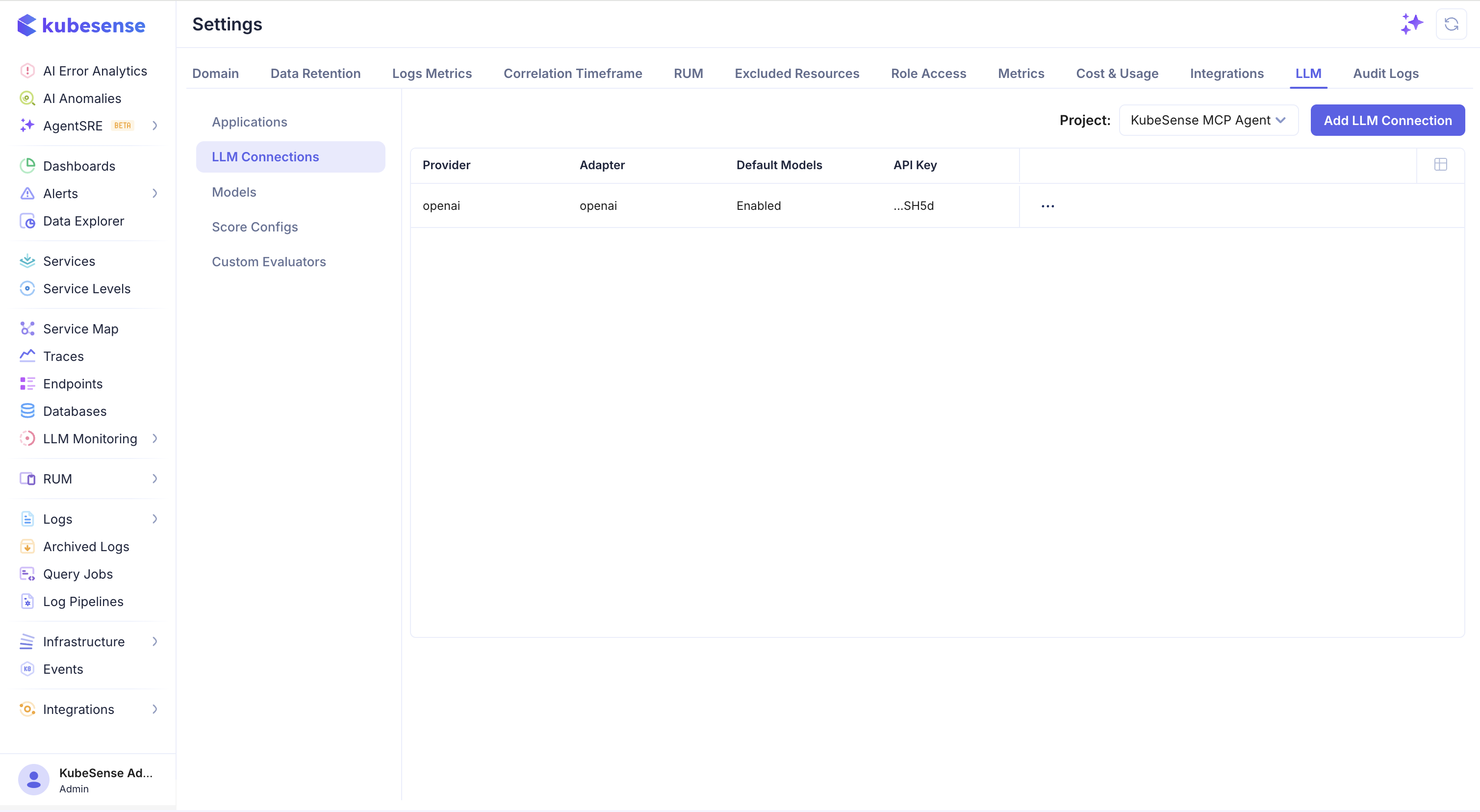
From Settings > LLM, select LLM Connections. Choose the application from the Project selector and click Add LLM Connection.
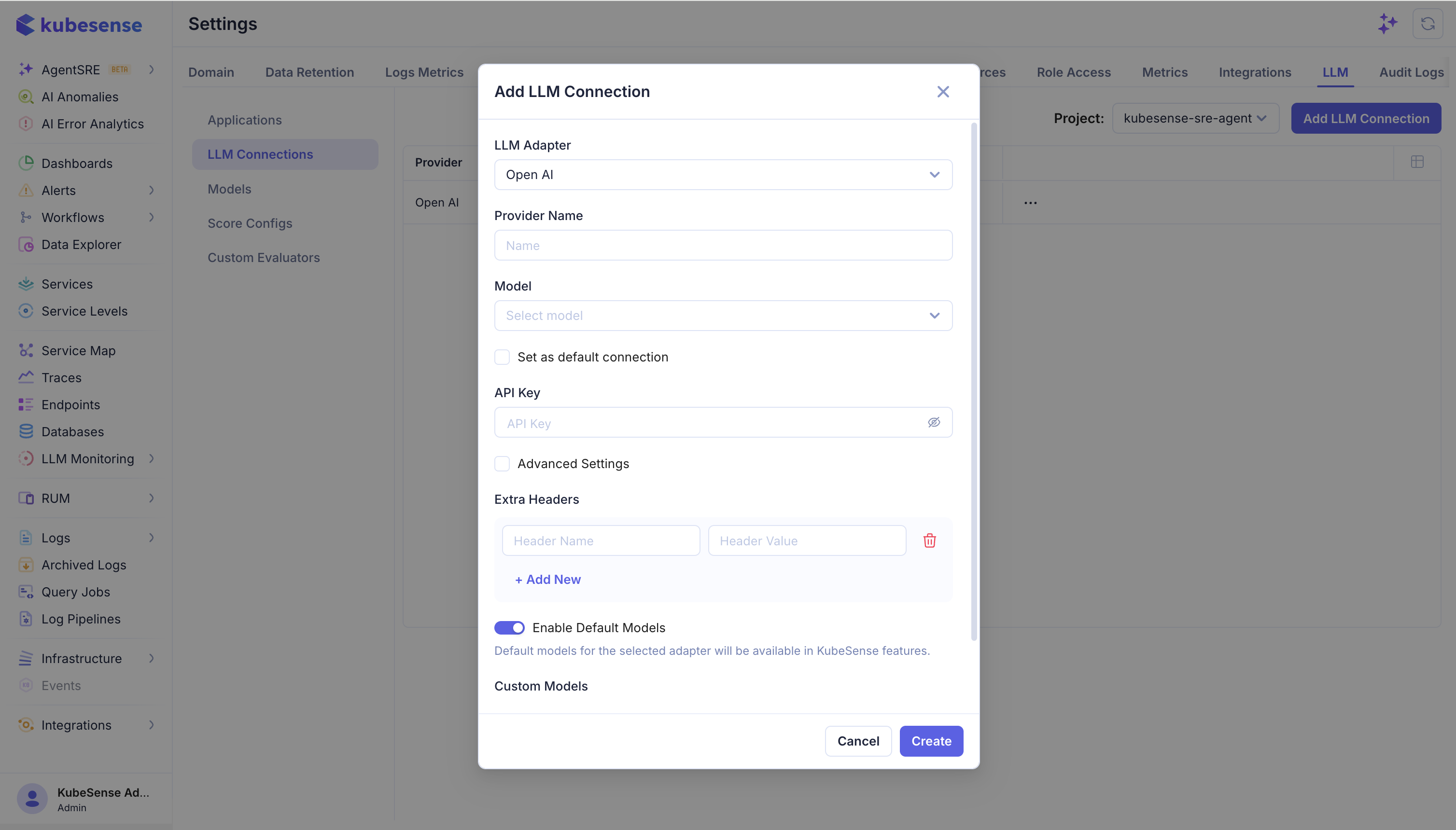
Choose the LLM adapter, enter the provider name, select the model, and enter the provider API key. Enable Set as default connection when this provider should be used by default for the selected application. Use Advanced Settings to add extra provider headers. Enable Default Models makes the adapter's default model list available to KubeSense features.
Keep provider API keys in the KubeSense connection configuration or an approved secret-management workflow. Do not put provider keys in application source code, public documentation, or client-side bundles.
Creating the connection is required only for KubeSense features that call a model on your behalf, such as the playground, LLM-as-a-Judge evaluations, and dataset experiments. It is not required for trace ingestion when Langfuse or OpenLIT exports directly from your application to kubecol. You can skip this step during initial instrumentation and add the connection later from Settings > LLM > LLM Connections.
Step 3 (Optional): Configure LLM models and pricing
The model registry maps an incoming model name to prices. kubecol uses it to fill in cost when a span carries token or media usage but no cost fields of its own — costs the SDK reports always win.
KubeSense ships pricing for thousands of models, so most workloads need nothing here. Add an entry when a model shows zero cost in the dashboard, or when your negotiated rate differs from list price.
Open Settings > LLM > Models.
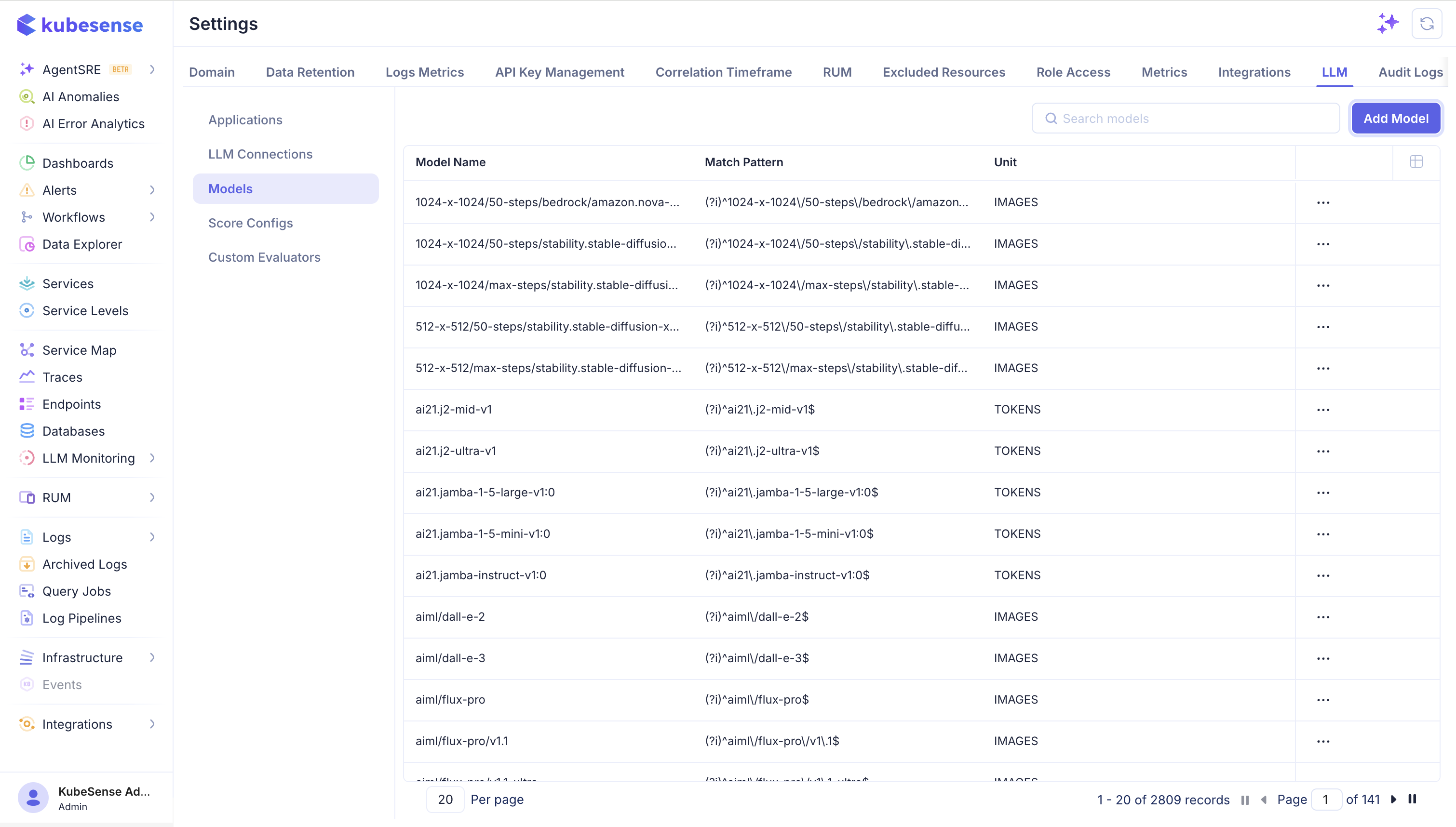
Each row shows the model name, its match pattern, and the unit that prices are quoted in — TOKENS for text, IMAGES for image generation. Use Search models to check whether a model is already covered before adding one.
Add a model
Click Add Model.
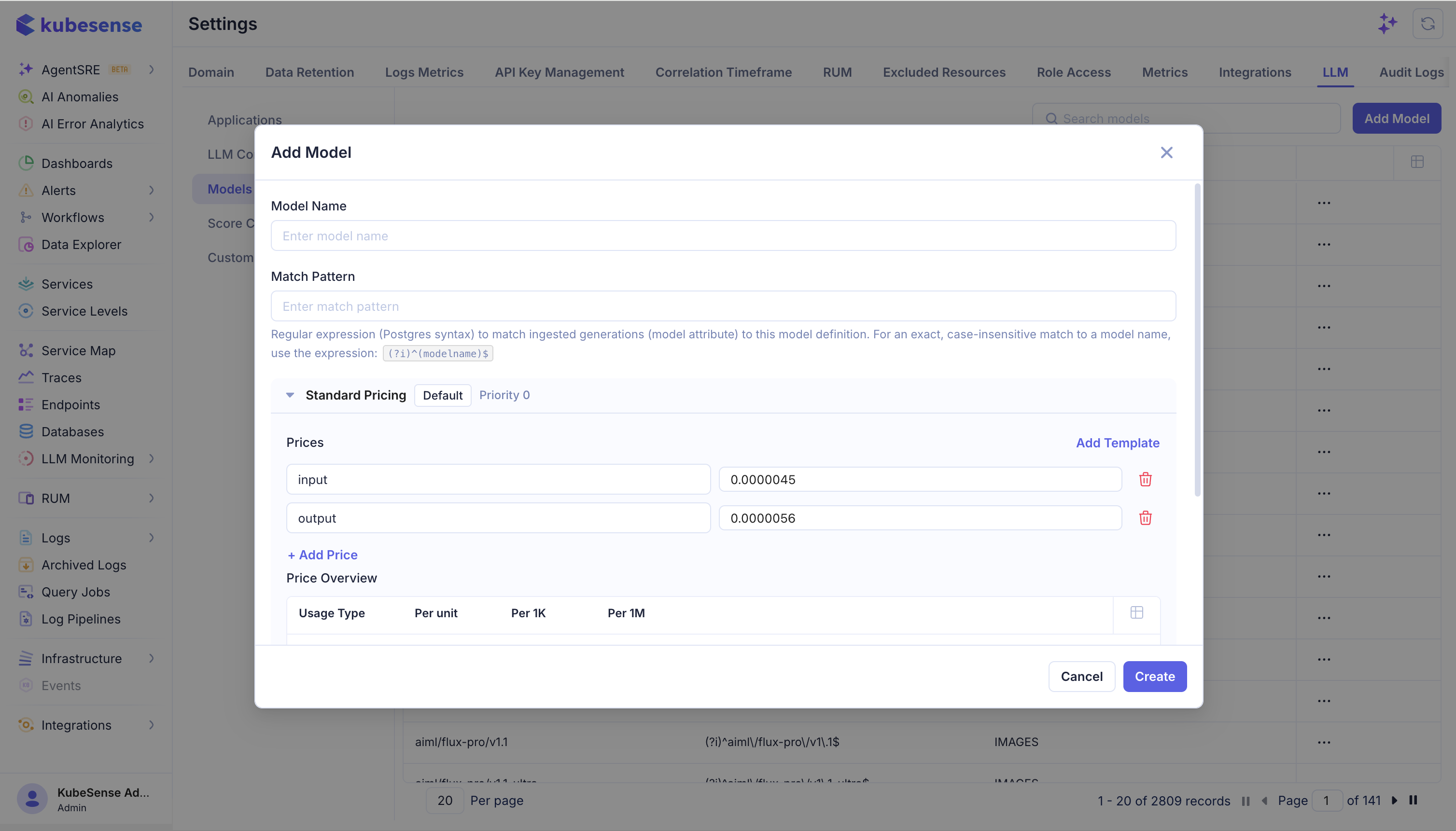
Model Name is the display label in this list. Match Pattern is what actually does the work: a regular expression tested against the model name on each incoming span.
For an exact, case-insensitive match to one model name, use:
(?i)^gpt-4o-mini$Escape the regex metacharacters that appear in real model names — . and / especially. The seeded entries show the convention:
(?i)^ai21\.j2-mid-v1$
(?i)^aiml\/flux-pro\/v1\.1$
Matching is always case-insensitive: kubecol prepends (?i) when it compiles the pattern, whether or not you included it.
warning: A pattern that fails to compile causes the whole model entry to be skipped at load time, with a warning in the collector log. The model does not fall back to a looser match — it simply has no pricing, and its spans record zero cost. Test the pattern before relying on it.
Set prices
Prices are entered per single unit — per token, or per image — not per thousand or per million.
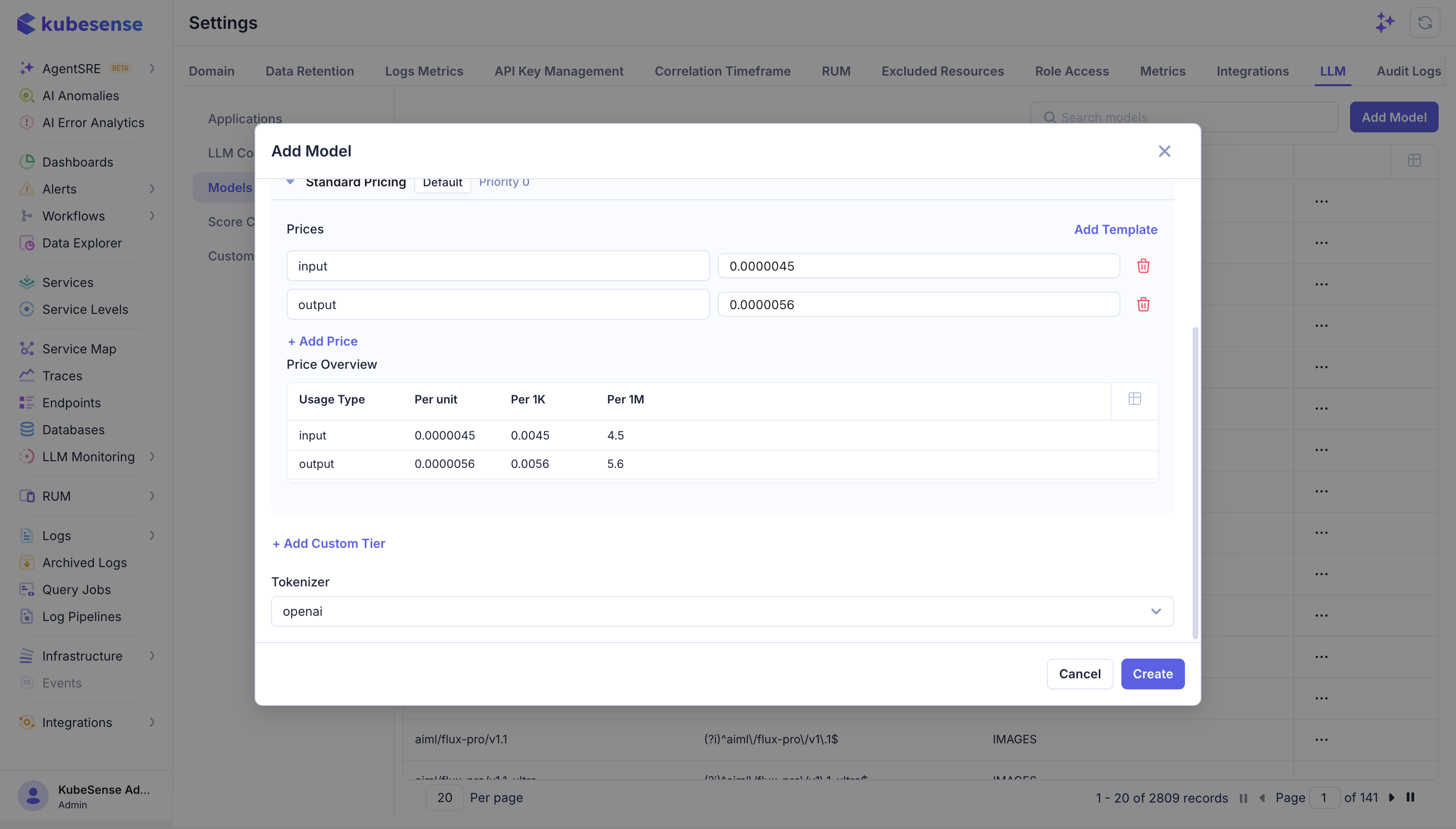
Add one row per usage type. Price Overview converts each entry to per-unit, per-1K, and per-1M as you type; use it to check your figure against the provider's pricing page, which usually quotes per million tokens.
For a model listed at $4.50 per 1M input tokens and $5.60 per 1M output tokens:
| Usage type | Price per unit | Reads as |
|---|---|---|
input | 0.0000045 | $4.50 / 1M |
output | 0.0000056 | $5.60 / 1M |
The usage types the collector recognizes:
| Usage type | Applied to |
|---|---|
input | Input / prompt tokens |
output | Output / completion tokens |
cache_read | Prompt tokens served from a provider cache |
cache_creation | Tokens spent writing a cache entry |
reasoning | Thinking tokens on reasoning models |
audio | Input and output audio tokens combined |
image | Image tokens for multimodal input |
total | All token buckets summed — see below |
A usage type you do not price contributes zero. Price at least input and output for a text model, and add cache_read and reasoning when your provider bills for them separately, or that spend will be invisible.
total is a fallback for models billed at one flat rate. It is applied only when neither input nor output produced any cost, so setting it alongside them has no effect.
The usage type is a free-text field, and only the names above are recognized. A typo such as inputs is saved without complaint and prices nothing — check the row names before saving.
Tokenizer records which tokenizer the model uses. It does not affect the cost arithmetic, which is driven entirely by the token counts already on the span.
Click Create.
Update prices for an existing model
Use the row menu on the Models list to edit, clone, or delete an entry. Cloning is the quickest route to a negotiated rate: copy the built-in entry, change the prices, and keep the pattern.
warning: Cost is calculated once, at ingestion, and stored on the span. Changing a price does not recalculate spans that have already been written — dashboards keep showing the old figure for historical traffic, and the new price applies only to spans received afterwards.Fix pricing as soon as you notice it is wrong. There is no backfill.
The registry is loaded into the collector and refreshed periodically, so a new or edited model takes effect on the next refresh rather than instantly.
How a model is matched
Every entry is tested in order and the first pattern that matches wins. Entries are ordered by model name length, longest first, so a more specific name is tried before a shorter one that might also match.
That ordering is the only tiebreak. Two patterns that can both match the same model name are ambiguous — anchor your patterns with ^ and $ so they match one model and nothing else.
To check what an incoming model is actually called before writing a pattern, open a trace in LLM Monitoring > Tracing and read the request and response model on the generation.
Custom pricing tiers
+ Add Custom Tier stores an additional named tier with its own prices and conditions, alongside the default Standard Pricing tier.
note: Cost enrichment uses one tier per model: the tier marked default, or the highest-priority tier when none is marked. Tier conditions are stored but are not currently evaluated during ingestion, so additional tiers do not change the cost written to a span.Put the rate you want applied on the default tier.
How this relates to the other settings
The three LLM settings are independent. The application scopes telemetry, the connection provides credentials for calls KubeSense makes on your behalf, and the model registry maps usage to pricing. Trace ingestion works with none of them configured beyond the application.
When to complete the optional steps
You can begin sending traces after completing Step 1 and configuring application.id. Add Step 2 later when you want to use a KubeSense-managed provider connection. Add Step 3 later when a model shows zero cost in the dashboard or when your negotiated rate differs from list price.
Choose your integration
After the required application setup, choose the tab for your application stack. All paths send OTLP/HTTP telemetry to the same KubeSense kubecol receiver.
The Langfuse Python SDK v4 is built on OpenTelemetry. It exports to {LANGFUSE_BASE_URL}/api/public/otel/v1/traces, which kubecol serves, so pointing the base URL at the collector is the whole integration.
pip install langfuseexport LANGFUSE_BASE_URL="http://<kubecol-host>:31443"
export LANGFUSE_PUBLIC_KEY="ks-public"
export LANGFUSE_SECRET_KEY="ks-secret"
export LANGFUSE_TRACING_ENVIRONMENT="prod"
export OTEL_SERVICE_NAME="my-llm-app"
export OTEL_RESOURCE_ATTRIBUTES="application.id=<application-id>,service.version=1.0.0"Instrument the request with the v4 observation API. propagate_attributes attaches the user and session to every child observation in the block:
from langfuse import get_client, propagate_attributes

langfuse = get_client()

def answer_question(user_id: str, session_id: str, question: str):
	with langfuse.start_as_current_observation(
		as_type="span",
		name="support-chat",
		input={"question": question},
	) as root:
		with propagate_attributes(user_id=user_id, session_id=session_id):
			with langfuse.start_as_current_observation(
				as_type="generation",
				name="answer",
				model="gpt-4o-mini",
				input=[{"role": "user", "content": question}],
			) as generation:
				answer = call_your_model(question)
				generation.update(
					output=answer,
					usage_details={"input": 128, "output": 64},
				)
		root.update(output=answer)
		return answer

# Required for short-lived processes, jobs, and serverless handlers.
langfuse.flush()
The @observe decorator works the same way and is convenient for existing functions:
from langfuse import observe

@observe(as_type="generation", name="answer")
def answer(question: str) -> str:
	...
Langfuse's provider integrations, such as from langfuse.openai import openai and the LangChain CallbackHandler, populate model, usage, and content attributes automatically. Nothing about them changes for KubeSense; only the base URL differs.
warning: langfuse.auth_check() calls the Langfuse management API (GET /api/public/projects), which kubecol does not implement. It fails against KubeSense even when trace ingestion is working. Verify ingestion in LLM Monitoring > Tracing instead.
The current Langfuse JavaScript and TypeScript SDK is the v5 package set. It registers a LangfuseSpanProcessor on an OpenTelemetry NodeSDK, which exports to {baseUrl}/api/public/otel/v1/traces.
npm install @langfuse/tracing @langfuse/otel @opentelemetry/sdk-nodeexport LANGFUSE_BASE_URL="http://<kubecol-host>:31443"
export LANGFUSE_PUBLIC_KEY="ks-public"
export LANGFUSE_SECRET_KEY="ks-secret"
export LANGFUSE_TRACING_ENVIRONMENT="prod"
export OTEL_SERVICE_NAME="my-llm-app"
export OTEL_RESOURCE_ATTRIBUTES="application.id=<application-id>,service.version=1.0.0"Create instrumentation.ts and import it before any application code:
import { NodeSDK } from "@opentelemetry/sdk-node";
import { LangfuseSpanProcessor } from "@langfuse/otel";

export const sdk = new NodeSDK({
	spanProcessors: [new LangfuseSpanProcessor()],
});

sdk.start();
Instrument the request:
import { propagateAttributes, startActiveObservation } from "@langfuse/tracing";

await startActiveObservation("support-chat", async (span) => {
	span.update({ input: { question } });

	const answer = await propagateAttributes(
		{ userId, sessionId },
		async () =>
			startActiveObservation(
				"answer",
				async (generation) => {
					const result = await callYourModel(question);
					generation.update({ output: result });
					return result;
				},
				{ asType: "generation" },
			),
	);

	span.update({ output: answer });
});

await sdk.shutdown(); // flush before a short-lived process exits
warning: LangfuseSpanProcessor applies a default span filter: it exports Langfuse observations, spans carrying gen_ai.* attributes, and spans from known LLM instrumentors. Plain application spans are dropped before they reach KubeSense. Pass shouldExportSpan to the processor when you want the surrounding HTTP, database, or framework spans in the same trace.
The legacy langfuse npm package (v3 line) and its new Langfuse().trace() API send data to the Langfuse ingestion API (/api/public/ingestion), not OTLP. kubecol does not implement that API, so that SDK cannot be used with KubeSense.
OpenLIT auto-instruments supported providers and frameworks and exports OTLP/HTTP. Point it at the collector base URL; the OTLP exporter appends /v1/traces.
pip install openlitexport OTEL_EXPORTER_OTLP_ENDPOINT="http://<kubecol-host>:31443"
export OTEL_EXPORTER_OTLP_PROTOCOL="http/protobuf"
export OTEL_SERVICE_NAME="my-llm-app"
export OTEL_DEPLOYMENT_ENVIRONMENT="prod"
export OTEL_RESOURCE_ATTRIBUTES="application.id=<application-id>"import openlit
openlit.init(
otlp_endpoint="http://<kubecol-host>:31443",
service_name="my-llm-app",
environment="prod",
)
# Create the provider client after openlit.init() so instrumentation is applied.
response = client.chat.completions.create(
model="gpt-4o-mini",
messages=[{"role": "user", "content": "How do I restart a deployment?"}],
)service_name is the current parameter name; application_name is still accepted for backward compatibility. Both map to the service.name resource attribute.
warning: kubecol serves OTLP over HTTP only. Leave OTEL_EXPORTER_OTLP_PROTOCOL unset or set it to http/protobuf. Setting it to grpc makes OpenLIT load the gRPC exporter, and the export fails.
Initialize OpenLIT before importing or calling the instrumented provider client:
npm install openlitexport OTEL_EXPORTER_OTLP_ENDPOINT="http://<kubecol-host>:31443"
export OTEL_EXPORTER_OTLP_PROTOCOL="http/protobuf"
export OTEL_SERVICE_NAME="my-llm-app"
export OTEL_RESOURCE_ATTRIBUTES="application.id=<application-id>"import Openlit from "openlit";
Openlit.init({
otlpEndpoint: process.env.OTEL_EXPORTER_OTLP_ENDPOINT,
applicationName: "my-llm-app",
environment: "prod",
});
// Call your instrumented provider client after OpenLIT is initialized.
await runModelAndTools("How do I restart a deployment?");For any language or SDK that emits OpenTelemetry, configure an OTLP/HTTP exporter and target:
http://<kubecol-host>:31443/v1/tracesInclude the KubeSense application ID and service name as resource attributes. kubecol maps GenAI attributes when present and stores ordinary OTel spans as surrounding workflow context, so a trace can contain HTTP, database, and application spans alongside its generations.
The receiver accepts OTLP protobuf (Content-Type: application/x-protobuf) and OTLP JSON (Content-Type: application/json). Legacy instrumentationLibrarySpans JSON payloads from pre-v0.9 SDKs are normalized automatically.
Collector endpoints
The LLM collector listens on port 31443 by default (collector.llm_collector_config.listen_port). All trace endpoints accept the same OTLP TracesData payload:
| Endpoint | Use |
|---|---|
POST /v1/traces | Standard OTLP/HTTP exporter, and the path OpenLIT uses |
POST /v1/llm/traces | KubeSense LLM endpoint |
POST /api/v1/llm/traces | Alternative LLM endpoint |
POST /api/public/otel/v1/traces | Langfuse SDK path; set LANGFUSE_BASE_URL to the collector base URL |
POST /api/public/llm/v1/traces | Langfuse public-API-compatible path |
Additional JSON endpoints support the evaluation pipeline:
| Endpoint | Use |
|---|---|
POST /v1/llm/scores | Ingest evaluation scores (single object or array) |
POST /v1/llm/experiment-items | Ingest dataset experiment items |
POST /v1/llm/experiment/spans | Ingest spans produced by server-side experiments |
GET /v1/llm/eval/metrics | Counters for the real-time LLM-as-a-Judge engine |
Set the base URL, not the full path, in SDK configuration. Langfuse appends /api/public/otel/v1/traces and raw OTLP exporters append /v1/traces.
Post a score from an external pipeline
If your quality checks run outside KubeSense, post the result directly to the collector:
curl -X POST "http://<kubecol-host>:31443/v1/llm/scores" \
	-H "Content-Type: application/json" \
	-d '{
		"application_id": "<application-id>",
		"trace_id": "<trace-id>",
		"observation_id": "<span-id>",
		"name": "answer_relevance",
		"value": 0.92,
		"data_type": "NUMERIC",
		"source": "API"
	}'
data_type is NUMERIC, CATEGORICAL, or BOOLEAN; use string_value instead of value for the last two. source is API for externally posted scores — KubeSense uses EVAL for LLM-as-a-Judge and experiment results and HUMAN_ANNOTATION for reviewer scores. The scores appear on the trace's Scores tab and in Evaluation.
Shared resource attributes
Set these once when the application starts:
export OTEL_SERVICE_NAME="my-llm-app"
export OTEL_RESOURCE_ATTRIBUTES="application.id=<application-id>,service.version=1.0.0"| Attribute | Required | Description |
|---|---|---|
application.id | Yes | UUID of the KubeSense LLM application. project.id is an accepted alias |
service.name | Yes | Logical name shown in trace and dashboard views. Set it with OTEL_SERVICE_NAME |
application.name | Optional | Display name for the application. project.name is an accepted alias |
service.version | Optional | Application release |
Both SDKs build their OTel resource with Resource.create(), which merges OTEL_SERVICE_NAME and OTEL_RESOURCE_ATTRIBUTES, so these variables apply to Langfuse and OpenLIT alike.
Environment
The Environment field and facet are populated from langfuse.environment, gen_ai.environment, env, or kubesense.env, falling back to the OpenTelemetry deployment.environment / deployment.environment.name. The explicit keys win when more than one is present.
| SDK | What to set |
|---|---|
| Langfuse | LANGFUSE_TRACING_ENVIRONMENT=prod — the SDK emits it as the langfuse.environment resource attribute |
| OpenLIT | environment="prod" in openlit.init(), or OTEL_DEPLOYMENT_ENVIRONMENT=prod — both emit deployment.environment |
| Raw OTel | deployment.environment=prod in OTEL_RESOURCE_ATTRIBUTES |
Kubernetes context
When these attributes are present, KubeSense fills the cluster, namespace, pod, node, container, workload, and region fields:
| Attribute | Alias |
|---|---|
k8s.cluster.name | kubesense.cluster |
k8s.namespace.name | kubesense.namespace |
k8s.pod.name | kubesense.pod_name |
k8s.node.name | kubesense.node_name |
k8s.container.name | container.name, kubesense.container_name |
k8s.deployment.name | kubesense.deployment_name |
cloud.region | kubesense.region |
The Kubernetes Downward API is the usual way to supply these from a Deployment manifest.
Attribute mapping reference
kubecol stores every incoming span, whether or not it carries GenAI attributes, and keeps unmapped attributes in the span's attributes map. The table below lists the keys it promotes to indexed columns. The first non-empty value wins.
| KubeSense field | Accepted attributes |
|---|---|
| Operation | gen_ai.operation.name; falls back to llm.request.type |
| Provider | gen_ai.system, gen_ai.provider.name, llm.provider, llm.system, ai.model.provider. Inferred from the model name when absent |
| Request model | gen_ai.request.model, llm.request.model, llm.model_name, langfuse.observation.model.name, ai.model.id |
| Response model | gen_ai.response.model, llm.response.model, ai.response.model |
| Input | langfuse.observation.input, gen_ai.input.messages, gen_ai.prompt, input.value, mlflow.spanInputs, llm.prompts, ai.prompt.messages; langfuse.trace.input on root spans |
| Output | langfuse.observation.output, gen_ai.output.messages, gen_ai.completion, output.value, mlflow.spanOutputs, llm.completions, ai.response.text; langfuse.trace.output on root spans |
| Token usage | langfuse.observation.usage_details, gen_ai.usage.*, llm.token_count.*, ai.usage.* |
| Cost | langfuse.observation.cost_details, gen_ai.usage.cost |
| Model parameters | langfuse.observation.model.parameters, llm.invocation_parameters, gen_ai.request.temperature, gen_ai.request.max_tokens, gen_ai.request.top_p, gen_ai.request.top_k, gen_ai.request.seed |
| Observation type / level | langfuse.observation.type, langfuse.observation.level |
| Prompt link | langfuse.observation.prompt.name, langfuse.prompt.name, gen_ai.prompt.name, langfuse.observation.prompt.version |
| User | user.id, langfuse.user.id, gen_ai.user.id, gen_ai.request.user |
| Session | session.id, langfuse.session.id, gen_ai.session.id, gen_ai.memory.session_id |
| Conversation | gen_ai.conversation.id |
| Tags | langfuse.trace.tags, langfuse.tags, tag.tags |
| Time to first token | gen_ai.server.time_to_first_token, langfuse.observation.completion_start_time |
| Tools | gen_ai.response.tool_calls, gen_ai.tool.name, tool.name, gen_ai.tool.definitions, gen_ai.request.tools, ai.prompt.tools |
| Agent | gen_ai.agent.name, traceloop.workflow.name |
| Vector DB | db.system, db.collection.name, db.operation.name, db.query.text, db.response.returned_rows |
| Finish reasons | gen_ai.response.finish_reasons, llm.response.finish_reasons, ai.response.finishReason |
| Environment | langfuse.environment, gen_ai.environment, env, kubesense.env, then deployment.environment |
Per-message attributes emitted by Traceloop (gen_ai.prompt.N.*, gen_ai.completion.N.*) and OpenInference (llm.input_messages.N.*, llm.output_messages.N.*) are reassembled into the input and output columns.
Langfuse's own OTel attributes map one to one, so a Langfuse-instrumented application populates the input, output, usage, cost, model parameters, prompt link, level, and status-message fields without any extra configuration.
Trace source
The Source label is derived from resource attributes only:
| Value | Condition |
|---|---|
openlit | telemetry.sdk.name=openlit, which OpenLIT sets automatically |
langfuse | telemetry.sdk.name=langfuse or langfuse.sdk.name is present |
otel | Anything else |
The Langfuse SDK does not override telemetry.sdk.name, so Langfuse traffic is labelled otel by default. Add telemetry.sdk.name=langfuse to OTEL_RESOURCE_ATTRIBUTES if you want the langfuse label. Either way, filter on the langfuse.* attributes or on service name to separate workloads; the source label is a convenience, not the identity of the application.
Authentication
Authentication is disabled by default (collector.llm_collector_config.enable_authentication: false). TLS is also off by default on the LLM listener; enable is_tls_enabled with a certificate and key when the collector is reachable outside the cluster.
When authentication is enabled, kubecol parses the Authorization header as HTTP Basic and validates the decoded value against KubeSense access credentials. The Langfuse SDKs already send Basic auth built from LANGFUSE_PUBLIC_KEY and LANGFUSE_SECRET_KEY, so set those to valid KubeSense credentials. For raw OTLP exporters, pass the header explicitly:
export OTEL_EXPORTER_OTLP_HEADERS="Authorization=Basic $(printf '%s' 'public:secret' | base64)"When authentication is enabled, a request with a missing, malformed, or unrecognized Authorization header is rejected with 401.
The gate covers the trace endpoints only. The score, experiment, and eval-metrics endpoints are unauthenticated because kubeapi posts experiment items and spans to the collector without a credential. Keep the LLM listener on an internal address and restrict it with network policy.
Verify ingestion
- Generate one LLM request in the instrumented application.
- Check the
kubecollogs for LLM ingestion errors. - Open LLM Monitoring > Tracing in KubeSense and filter by the application or service name.
If the process exits immediately after a request, call the SDK flush method (langfuse.flush(), await sdk.shutdown()). A successful HTTP response only confirms that the collector accepted the payload; it does not confirm that a short-lived SDK process finished exporting its batch.
Configuration reference
Langfuse
| Variable | Description |
|---|---|
LANGFUSE_BASE_URL | Collector base URL, for example http://<kubecol-host>:31443 |
LANGFUSE_HOST | Deprecated alias for LANGFUSE_BASE_URL; still read as a fallback |
LANGFUSE_PUBLIC_KEY / LANGFUSE_SECRET_KEY | Credentials sent as HTTP Basic auth |
LANGFUSE_TRACING_ENVIRONMENT | Emitted as the langfuse.environment resource attribute |
LANGFUSE_RELEASE | Emitted as the langfuse.release resource attribute |
LANGFUSE_TRACING_ENABLED | Set to false to disable tracing without removing instrumentation |
LANGFUSE_SAMPLE_RATE | Head sampling ratio from 0.0 to 1.0 |
LANGFUSE_FLUSH_AT | Spans batched before an export |
LANGFUSE_FLUSH_INTERVAL | Maximum flush interval in seconds |
LANGFUSE_TIMEOUT | Export request timeout in seconds |
LANGFUSE_OTEL_TRACES_EXPORT_PATH | Overrides the default api/public/otel/v1/traces path |
LANGFUSE_MEDIA_UPLOAD_ENABLED | Set to false to keep base64 media inline instead of attempting an upload API call |
LANGFUSE_DEBUG | Verbose SDK logging while troubleshooting |
OpenLIT
| Variable | openlit.init() parameter | Description |
|---|---|---|
OTEL_EXPORTER_OTLP_ENDPOINT | otlp_endpoint | Collector base URL. Without it, OpenLIT prints spans to the console |
OTEL_EXPORTER_OTLP_HEADERS | otlp_headers | Optional export headers |
OTEL_SERVICE_NAME | service_name / application_name | Service name |
OTEL_DEPLOYMENT_ENVIRONMENT | environment | Sets deployment.environment; see Environment |
OTEL_INSTRUMENTATION_GENAI_CAPTURE_MESSAGE_CONTENT | capture_message_content | Default true. Set to false to stop exporting prompt and completion content |
OPENLIT_MAX_CONTENT_LENGTH | max_content_length | Truncates captured content |
OPENLIT_DISABLE_BATCH | disable_batch | Exports each span immediately; useful for short scripts and debugging |
OPENLIT_DISABLED_INSTRUMENTORS | disabled_instrumentors | Comma-separated instrumentors to skip |
OPENLIT_PRICING_JSON | pricing_json | Custom pricing file used for SDK-side cost calculation |
Environment variables take precedence over openlit.init() arguments.
Kubernetes deployment checklist
- Use the collector's Kubernetes service DNS name instead of
localhostwhen the app runs in another pod. - Allow egress from the application namespace to the collector service and port
31443. - Store SDK keys and provider keys in Kubernetes Secrets, not in a container image or manifest ConfigMap.
- Set
application.idandservice.namethrough deployment environment variables so every replica uses the same identity. - Supply the Kubernetes attributes through the Downward API when you want cluster, namespace, and pod filters in the trace views.
- Keep the SDK batch processor enabled for long-running services and flush during graceful shutdown.
Send a raw OTLP test request
Confirm network reachability before debugging SDK configuration. An empty OTLP payload is accepted and returns 200:
curl -i -X POST "http://<kubecol-host>:31443/v1/traces" \
	-H "Content-Type: application/json" \
	-d '{"resourceSpans":[]}'
A 200 proves the collector is reachable and parsing OTLP JSON. A 413 means the request body exceeded the collector's decompressed-body cap. Anything else points at networking, TLS, or the listener configuration.
Troubleshooting
| Symptom | Check |
|---|---|
| No trace appears | Confirm the SDK flushed, the collector host resolves, and the application can reach port 31443 |
| Trace appears under the wrong application | Check that application.id is a valid existing KubeSense application UUID |
auth_check() fails but traces arrive | Expected. kubecol implements OTLP ingestion, not the Langfuse management API |
Environment column shows default | No environment attribute was exported. Set LANGFUSE_TRACING_ENVIRONMENT, OpenLIT's environment, or deployment.environment |
Source shows otel for Langfuse traffic | Expected. The Langfuse SDK does not set telemetry.sdk.name; add it to OTEL_RESOURCE_ATTRIBUTES if you need the label |
| Non-LLM spans missing in a Node app | LangfuseSpanProcessor filters them out by default; supply shouldExportSpan |
| Provider or system is unknown | Inspect the GenAI provider attributes on the span. KubeSense infers the provider from the model name only for recognized model families |
| Cost is zero | Confirm the model name and token usage are exported and that the model exists in the pricing registry |
| Trace tree has orphan spans | Preserve the active OTel context across async tasks and worker boundaries |
| Export fails with a transport error | kubecol serves OTLP over HTTP only; remove OTEL_EXPORTER_OTLP_PROTOCOL=grpc |