
Variables
Variables let you create dynamic, reusable dashboards. Define variables at the dashboard level, then reference them in panel queries using $variableName syntax. When a variable value changes, all panels that reference it update automatically.
Overview
Variables appear as dropdowns or text inputs at the top of the dashboard. On a dashboard with tabs, the variables apply to every tab. They allow users to filter and slice dashboard data without editing individual panel queries. For example, you might create variables for workload, protocol, node, or version to let users dynamically scope the entire dashboard.
Variable Types
Traces, Logs, and Metrics
These variable types are dynamically populated from your observability data:
| Type | Configuration |
|---|---|
| Traces | Select a trace Field — the variable is populated with all distinct values for that field |
| Logs | Select a log Field — the variable is populated with all distinct values for that field |
| Metrics | Select a Metric and a Label — the variable is populated with all distinct values of that label for the chosen metric |
Use these when you want the variable options to reflect live data (e.g., all available service names, namespaces, or status codes).
Textbox
A free-text input field. The user types any value, which is then substituted into queries. Use this for ad-hoc filtering where the set of possible values is not known in advance (e.g., a specific pod name or custom tag).
Static
A predefined list of values that you define when creating the variable. The user selects from this fixed set of options. Use this when the possible values are known and unlikely to change (e.g., environment names like production, staging, development).
Single Select vs Multi Select
Each variable can be configured as Single Select or Multi Select:
| Mode | Behavior |
|---|---|
| Single Select | User picks exactly one value. A default value must be provided when creating or editing the variable. |
| Multi Select | User can pick one or more values from the dropdown. |
Choosing the Right Query Operator
The selection mode determines which query operators you should use in your panel queries:
| Selection Mode | Operator |
|---|---|
| Single select | EQ, NEQ |
| Multi select (single value selected) | EQ, NEQ |
| Multi select (multiple values selected) | IN, NOT_IN |
Creating a Variable
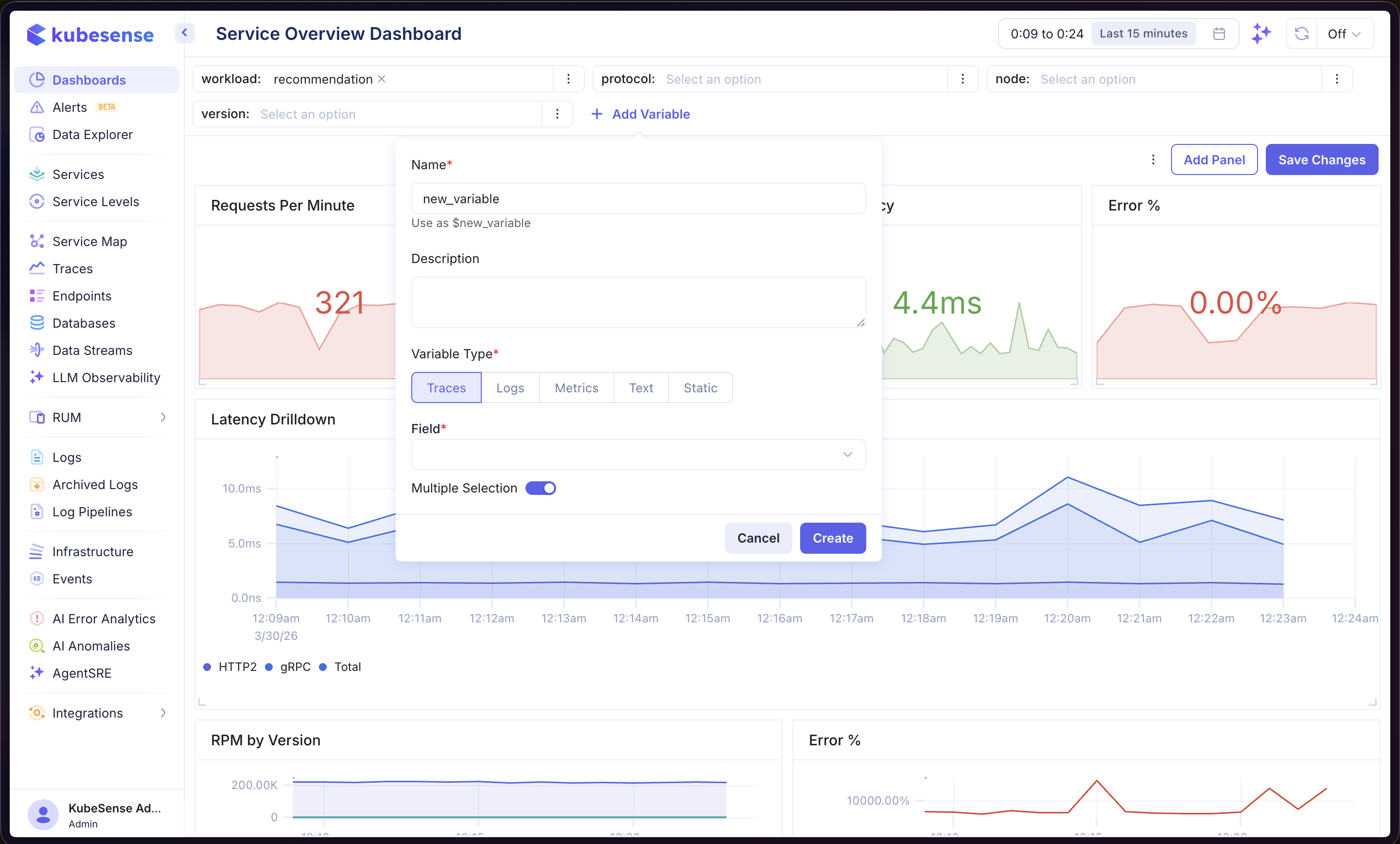
- Open a dashboard and click Add Variable at the top of the page
- Enter a Name (used to reference the variable as
$namein queries) - Optionally add a Description
- Select the Variable Type (Traces, Logs, Metrics, Textbox, or Static)
- Configure the type-specific fields (e.g., select a Field for Traces/Logs, or a Metric and Label for Metrics)
- Choose Single Select or Multi Select
- If Single Select is enabled, provide a Default Value
- Click Create
Using Variables in Queries
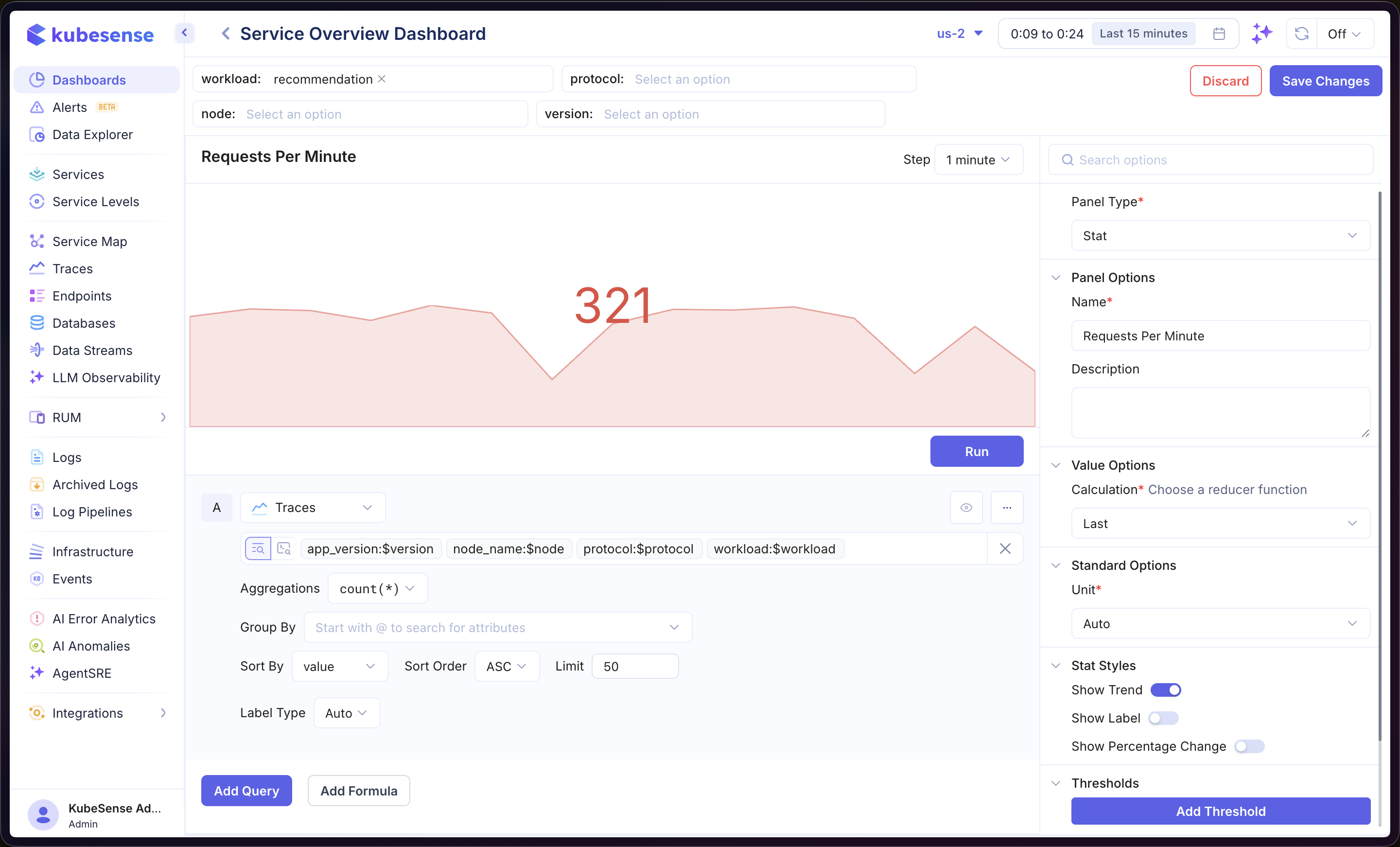
Once created, variables can be referenced in any panel query using the $variableName syntax. In the example above, the Traces query filter includes $version, $node, $protocol, and $workload — all defined as dashboard variables. Changing any variable value at the top of the dashboard instantly re-runs the query with the new filter values.