
MCP Server
The KubeSense MCP (Model Context Protocol) Server enables AI assistants like Claude, ChatGPT, and other MCP-compatible clients to query and analyze your Kubernetes telemetry and infrastructure — logs, traces, metrics, workloads, issues, and alerts — using natural language.
Overview
The MCP server exposes a set of tools over the MCP protocol that let AI assistants discover available fields, search raw data, run aggregated analyses, inspect the cluster inventory, review issues and alerts, and read and edit dashboards across your entire observability stack. Most tools are read-only; the few that change state are marked as write tools. It is available over HTTP at /mcp on your KubeSense host.
Key capabilities:
- Search and filter logs and traces with a SQL-style WHERE clause
- Run aggregated analyses with grouping, percentiles, and time-series breakdowns
- Execute PromQL queries against your metrics
- Combine multiple datasources (logs, traces, metrics) in a single query with formula support
- Run raw ClickHouse SQL against logs and traces, or SPL over logs, for questions the structured tools cannot express
- Browse the live system inventory — clusters, nodes, pods, and workloads with health and golden-signal summaries
- Review platform-detected application issues, recent deploys/scaling changes, and infrastructure failures
- Inspect firing alerts, alert rules, and alert history
- Read a dashboard's panels and the queries behind them, and create or edit dashboards
- Discover available fields, metrics, and labels dynamically
Authentication
Connect to the MCP server with a KubeSense API key, passed in the x-api-key header:
x-api-key: <your-kubesense-api-key>Each request is scoped to the permissions of the API key. A tool will return a permission error if the key does not have access to the corresponding data (logs, traces, infrastructure, workloads, or alerts).
Generating an API Key
To connect an AI client to the MCP server, you need a KubeSense API key. Navigate to Settings > API Key Management and click Generate API Key.
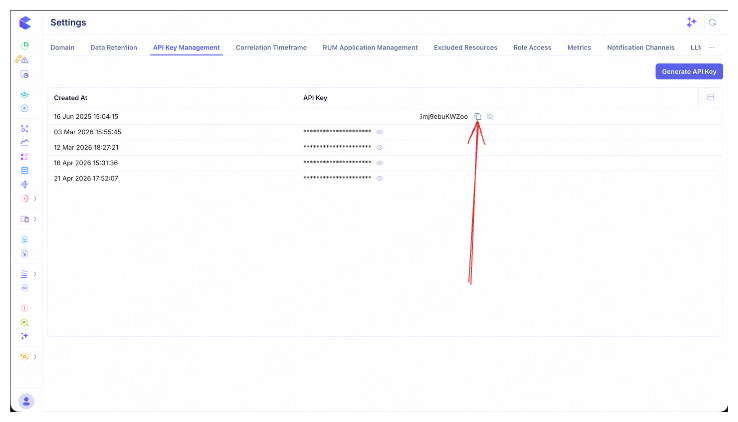
Copy the generated key and use it as the x-api-key header value when configuring your AI client.
Available Tools
Tools are grouped by intent. All tools are read-only except create-alert, create-dashboard and update-dashboard, which change state. They are not marked read-only, so MCP clients that gate write tools ask you to approve each call.
Discovery Tools
Call these first to understand what data is available before querying.
get-fields
Discovers the fields you can filter on for logs, traces or custom events in a time window, including dynamic attributes. Always call this before writing a WHERE clause, using the same time window you plan to query, because attribute keys change from one window to the next. Field names in your filters must be the catalog labels this tool returns. Raw storage column names are rejected.
Each returned field lists:
- the catalog label to use in filters, projections and groupings
- its type (
string,float,int,boolordatetime) - whether it is a dynamic attribute, which takes an
@prefix in a filter - the operators the field accepts
- the allowed values, for fields with a fixed set, with the exact casing to use
- a copy-pasteable example filter, mainly for fields with a fixed set of values
Use signal: "events" for custom events such as deploys, CI runs, incidents and source-control activity. Their fields are plain columns (source, category, type, severity, status, repository, service, environment and others) plus @-prefixed attributes.
Parameters:
| Parameter | Type | Description |
|---|---|---|
signal | "logs" | "traces" | "events" | Required. The telemetry surface to describe |
from_time | string | Required. Window start (RFC3339, e.g. 2026-05-01T00:00:00Z) |
to_time | string | Required. Window end (RFC3339) |
clusters | array (optional) | Restrict attribute discovery to specific clusters |
search | string (optional) | Case-insensitive substring filter on field names (e.g. http) |
limit | int (optional) | Cap the number of returned fields (0 = no cap) |
get-trace-or-log-fields (deprecated)
warning: get-trace-or-log-fields is deprecated. Use get-fields instead. The old name stays available as an alias, with the same arguments and the same output, so existing clients keep working.
get-available-metrics
Searches for available metric names for PromQL queries. Keywords are AND-matched as case-insensitive substrings.
Parameters:
| Parameter | Type | Description |
|---|---|---|
search_keywords | array (optional) | Substring keywords to AND-filter metric names |
from_time | string (optional) | Window start (RFC3339). Defaults to now-1h |
to_time | string (optional) | Window end (RFC3339). Defaults to now |
limit | int (optional) | Cap the returned metric count (0 = no cap) |
get-metric-labels
Fetches available label names for a specific metric, useful for building PromQL queries.
Parameters:
| Parameter | Type | Description |
|---|---|---|
name | string | Required. The metric to get labels for |
from_time | string (optional) | Window start (RFC3339). Defaults to now-1h |
to_time | string (optional) | Window end (RFC3339). Defaults to now |
Search Tools
Search tools return raw records (a small page of rows) and accept a SQL-style WHERE clause filter.
search-logs
Browse raw log records with filtering and field selection. Queries stored logs only.
search-traces
Browse raw trace/span records with filtering and field selection. Queries stored traces only.
Parameters (both tools):
| Parameter | Type | Description |
|---|---|---|
from_time | string | Start time (RFC3339) |
to_time | string | End time (RFC3339) |
where | string (optional) | SQL-style WHERE clause. Empty = match everything in the window |
clusters | array (optional) | Restrict to specific clusters |
required_fields | array (optional) | Fields to include in results |
page_size | int (optional) | Number of rows to return |
Analysis Tools
Analysis tools run aggregated queries and return summarized results. They support both range (time-series) and instant (single point-in-time) query types.
analyze-logs
Run aggregated analysis over logs — count, avg, sum, min, max, percentiles — with optional group-by.
analyze-traces
Run aggregated analysis over traces, useful for latency statistics (p95/p99), error rates, and status-code breakdowns.
Parameters (both tools):
| Parameter | Type | Description |
|---|---|---|
from_time | string | Start time (RFC3339) |
to_time | string | End time (RFC3339) |
query_type | "range" | "instant" | Type of query |
where | string (optional) | SQL-style WHERE clause |
value_operation | string | Aggregation function (e.g. row_count, avg, sum, min, max, p95, p99) |
fields | array (optional) | Fields to aggregate over, e.g. [{field: "duration"}] |
group_by_fields | array (optional) | Fields to group results by, e.g. [{field: "service"}] |
sort_direction | "ASC" | "DESC" (optional) | Sort direction (defaults to ASC) |
limit | int (optional) | Top-N series cap for range queries (server default 20) |
analyze-metrics
Execute a PromQL query against your metrics with summary statistics.
Parameters:
| Parameter | Type | Description |
|---|---|---|
from_time | string | Start time (RFC3339) |
to_time | string | End time (RFC3339) |
query_type | "range" | "instant" | Type of query |
promql | string | PromQL expression |
analyze-telemetry
The most powerful analysis tool — combines multiple datasources (logs, traces, metrics) in a single request with formula composition.
Parameters:
| Parameter | Type | Description |
|---|---|---|
from_time | string | Start time (RFC3339) |
to_time | string | End time (RFC3339) |
query_type | "range" | "instant" | Type of query |
queries | object | Map of query labels (A, B, C...) to datasource queries |
Each query in the queries map is a logs, traces, metrics, or formula query. Formulas reference other queries by label, e.g., (A/B)*100.
SQL Tools
For questions the analyze-* argument shape cannot express — a join between two result sets, a CTE chain, a window function, arithmetic between two aggregates, a UNION. For plain filter/group-by/aggregate work prefer analyze-logs / analyze-traces: they are cheaper and their arguments are checked more strictly.
execute-sql
Runs a single ClickHouse SELECT against the logs or traces table and returns the rows.
validate-sql
Checks a query without running it, and returns the SQL that would actually execute. It scans no data, so it costs far less than a failed execute-sql. Two things are checked: the query rewrite (parse, statement type, table access, blocked functions, column names), then ClickHouse's own analysis of the rewritten query.
The rewritten SQL it returns is the quickest way to confirm a field name resolved to the column you meant — it shows the real storage column behind each label, e.g. level AS type.
Parameters (both tools):
| Parameter | Type | Description |
|---|---|---|
signal | "logs" | "traces" | Required. Must match the table the query selects FROM |
query | string | Required. A single ClickHouse SELECT |
from_time | string | Required. Window start (RFC3339). Supplies $__timeFilter and $__fromTime |
to_time | string | Required. Window end (RFC3339). Supplies $__timeFilter and $__toTime |
clusters | array (optional) | Restrict to specific clusters. Also what $__clusters expands to |
Writing the query:
- Tables —
FROM logsorFROM tracesonly. The underlying database tables are not addressable. - Field names — the same catalog labels every other tool takes, from
get-fields. Raw storage column names are rejected: writetypenotlevel,instancenotpod_name,servicenotapp_service,status_codenotreturn_code,methodnotsubtype,rolenotkind,resourcenotclustered_resource,domainnotcluster,timestampnotstart_timestamp, andduration_ms(milliseconds) notduration.SELECT *expands to the catalog columns. - Macros —
$__timeFilter(timestamp)applies the time window (use the column nametimestampon both signals),$__fromTime/$__toTimeare the bounds as scalars, and$__clustersis the cluster filter. - Custom attributes —
@-prefixed, as everywhere else:@http.status_code, or@"key.with spaces". Attributes are not validated — a misspelled key returns nulls rather than an error, so confirm it withget-fieldsfirst. Cast before comparing numerically:toFloat64OrNull(@latency_ms) > 500. - Limits — results are capped at 1000 rows unless the query carries its own
LIMIT. Execution is read-only;INSERT,DROPand friends, and functions that reach outside the table (sleep,url,s3,file,remote), are rejected.
SELECT service, count(*) AS errors
FROM traces
WHERE $__timeFilter(timestamp) AND $__clusters AND status = 'error'
GROUP BY service
ORDER BY errors DESC
warning: These two tools are unavailable to API keys and roles restricted to specific clusters, namespaces or workloads. The SQL endpoints apply a cluster filter only, so they cannot enforce namespace- and workload-level access rules — a scoped caller gets a clear error pointing to search-logs / analyze-logs, which do enforce them. Unrestricted roles are unaffected.
SPL Tools
SPL is the piped log query language behind the Logs explorer's SPL tab — filter, stats, timechart and friends, separated by |. Logs only; there is no SPL for traces or metrics.
execute-spl
Runs an SPL pipeline over logs and returns the rows.
validate-spl
Checks a pipeline without running it, and returns the ClickHouse SQL it compiles to. It scans no data.
Calling it first is not a formality. SPL's parser accepts an unknown field and an unknown function alike, so a query with a wrong name compiles cleanly and fails only at run time — after the scan has been paid for. validate-spl resolves every identifier against the real log table, which is the only way to find out beforehand. The commonest case: stats p95(x) compiles and is wrong; the percentile function is perc95(x).
The translated SQL it returns is how you confirm a field name resolved to the column you meant.
Parameters (both tools):
| Parameter | Type | Description |
|---|---|---|
query | string | Required. One SPL pipeline |
clusters | array | Required for execute-spl, optional for validate-spl |
from_time | string | Required for execute-spl, optional for validate-spl (RFC3339) |
to_time | string | Required for execute-spl, optional for validate-spl (RFC3339) |
The window is optional for validation because identifier resolution does not depend on it. It is required for execution, because a run without one scans the full retention.
Writing the query:
- Field names are the opposite of every other tool. SPL takes storage column names, not catalog labels:
levelnottype,pod_namenotinstance,clusternotdomain. The full set istimestamp(or@timestamp),body(or@message),level,cluster,namespace,workload,pod_name(or@logstream),container_name(orcontainer),node_name(ornode),host,service,source,format,env_type,raw,@loggroup. SPL has noregion,app_version,instance,typeordomain— anything else is passed to ClickHouse as a bare column name and fails at run time. - Parsed JSON fields — reached as
log_processed.<key>, SPL's equivalent of SQL's@attr. - Command order is semantic — a
filterbeforestatsbecomes aWHERE; the same filter afterstatsbecomes aHAVINGover the aggregate. - Time and clusters are applied by the server. Do not write a timestamp filter into the pipeline.
- Limits — capped at 1000 rows unless the pipeline ends with
| head N,| tail Nor| limit N.
filter level = "ERROR"
| stats count(*) as errors by workload
| sort errors desc
| head 10
warning: Like the SQL tools, both SPL tools are unavailable to API keys and to roles restricted to specific clusters, namespaces, workloads, nodes or regions — the SPL endpoints apply a cluster filter only. A scoped caller gets an error pointing to search-logs / analyze-logs, which enforce those rules. Unrestricted roles are unaffected.
System Inventory Tools
Browse the live cluster inventory — what exists, its health, and its resource pressure.
| Tool | Purpose | Key parameters |
|---|---|---|
list-clusters | List the Kubernetes clusters this deployment monitors | (none) |
list-nodes | List nodes with health and resource pressure | clusters, sort_by, sort_direction, page, page_size, time window |
get-node-detail | Full detail for one node — addresses, conditions, taints, capacity/usage, versions | name (required), clusters |
list-pods | List pods with phase, restart counts, and usage — the primary tool for crash-loop / OOM / pending-pod triage | clusters, namespace, status, sort_by, page, page_size, time window |
get-pod-detail | Full detail for one pod — container statuses, restart reason, exit code, conditions, QoS, IPs, requests/limits | name, namespace, cluster (all required) |
list-workloads | List workloads (Deployments, StatefulSets, DaemonSets, …) with health and golden-signal summaries | clusters, namespace, kind, sort_by (rps, p95, errors, error_rate, restarts), time window |
get-workload-detail | Detail for one workload — replicas, restarts, 4xx/5xx counts, RPS, protocols | workload, namespace (required), cluster, time window |
Issues & Changes Tools
Surface problems and recent changes for incident triage.
| Tool | Purpose | Key parameters |
|---|---|---|
list-issues | Problems KubeSense has already detected — errors, latency, connectivity issues between workloads | clusters, page, page_size, limit, time window |
get-recent-changes | Recent deploys and scaling affecting a workload — image updates and replica changes (from Kubernetes events) | namespace, workload, cluster, kind (image_update | scaling), time window, limit |
get-infra-issues | Infrastructure failures for a workload — crashes (with exit code), OOM kills, restart backoffs, probe failures, scheduling/mount failures, image-pull errors, node problems (from Kubernetes events) | namespace, workload, cluster, reason (e.g. OOMKilling, BackOff, ImagePullBackOff), time window, limit |
Alert Tools
Inspect firing alerts and alert rule definitions.
| Tool | Purpose | Key parameters |
|---|---|---|
list-alerts | Currently-firing alerts from your Prometheus Alertmanager integration (when enabled) | state, include_silences |
list-active-alerts | Currently-firing KubeSense alerts across all rules | fingerprint, acknowledged, assignee, include_resolved, time window, limit, offset |
list-alert-rules | Browse alert rule definitions (the parent rules) | enabled, state (firing | normal), severity, query_type, search, limit, offset |
get-alert-details | Full definition and current firing state of a rule | alert_rule_id (required), fingerprint |
get-alert-history | Recent firing/resolved event history of a rule | alert_rule_id (required), fingerprint, limit |
Dashboard Tools
Find a dashboard, read the queries behind its panels, and create or edit dashboards. The agent acts as the user who owns the API key: it sees only the dashboards that user can see, and edits only the dashboards that user can edit.
| Tool | Purpose | Key parameters |
|---|---|---|
list-dashboards | List dashboards by name — id, name and description only. The discovery step for get-dashboard-details | search, limit (default 50, max 200) |
get-dashboard-details | A dashboard's panels, the queries behind them, its variables, and the addresses update-dashboard needs | dashboard_id (required), raw |
validate-dashboard-json | Check a dashboard preset against the schema without saving it | document |
create-dashboard | Create a dashboard from a preset. Write tool | name, preset (required), description |
update-dashboard | Edit an existing dashboard — rename it, edit individual panels, or replace the whole preset. Write tool | dashboard_id (required), name, description, panel_operations, preset_version, preset |
get-dashboard-details
Returns a record for the dashboard, then a ## panels table with one row per panel, then a ## tabs table when the dashboard has tabs, then a ## variables table when the dashboard defines variables.
Parameters:
| Parameter | Type | Description |
|---|---|---|
dashboard_id | string | Required. The dashboard's UUID, from list-dashboards |
raw | boolean (optional) | Also return the whole stored preset as one JSON line. Use it only before a whole-preset rewrite with update-dashboard. Defaults to false |
Output:
| Field | Description |
|---|---|
name, description, status, panel_count, tab_count | The dashboard's details. panel_count counts the panels on every tab |
preset_version | A token that identifies the stored version of the dashboard. Pass it to update-dashboard unchanged |
preset | The whole stored preset. Returned only with raw=true |
## panels | One row per panel: tab_id, tab_title, position, sub_grid_id, name, section, panel type, and its queries as JSON |
## tabs | One row per tab: tab_id, title and panel_count. Returned only for a tabbed dashboard |
tab_id, sub_grid_id and position are the panel's address. Panels have no id of their own, so update-dashboard finds a panel by the tab and section it is in and its position within that section:
tab_id— the id of the tab that holds the panel. Empty on a dashboard without tabs, and required on every panel operation of a dashboard with tabs.sub_grid_id— the id of the sub-grid (collapsible section) that holds the panel. Empty for a panel that is not in a sub-grid.position— the panel's index within that section, counting from 0.
The panels table shows what each panel measures. It does not include layout, colours, axes or thresholds. update-dashboard keeps those settings when it edits a panel, and the raw preset includes them.
update-dashboard
Edits an existing dashboard. Every parameter except dashboard_id is optional; a parameter you leave out keeps its stored value. Supply at least one of name, description, panel_operations or preset.
Parameters:
| Parameter | Type | Description |
|---|---|---|
dashboard_id | string | Required. The dashboard's UUID |
name | string (optional) | New title |
description | string (optional) | New description. An empty value keeps the current one |
panel_operations | array (optional) | Panel edits, applied in order in one write. See Editing panels |
preset_version | string | Required with panel_operations, optional with preset. The preset_version from get-dashboard-details |
preset | object or string (optional) | The whole replacement preset. Cannot be combined with panel_operations |
On success the tool returns the dashboard's id, its name and the new preset_version. The agent can use that version for a further edit in the same conversation without reading the dashboard again.
Edits go through the same access check, schema check and audit trail as a save from the dashboard editor. The audit entry records the edit as made by the user via the AI agent.
Editing panels
Use panel_operations to change one or more panels. The server edits the stored dashboard in place, so every setting the operation does not mention — layout, colours, axes, thresholds — is kept.
Each operation is an object with an op and the fields that op takes:
op | Fields | Effect |
|---|---|---|
update_panel | position (required), panel, grid_layout, tab_id, sub_grid_id | Merges panel into the panel at position. Needs panel, grid_layout, or both |
add_panel | panel (required), grid_layout, tab_id, sub_grid_id | Appends a new panel. Without grid_layout, the panel goes in a new row below the others, sized like the section's first panel |
remove_panel | position (required), tab_id, sub_grid_id | Removes the panel and its layout cell |
panel— foradd_panel, the whole new panel. Forupdate_panel, only the fields to change, applied as a JSON merge patch (RFC 7386): objects merge key by key,nulldeletes a key, and arrays such asqueriesare replaced whole. Send it as a JSON object or as a JSON string.grid_layout— the panel's cell, with any ofx,y(offset in grid units),w(width in columns) andh(height in rows).update_panelchanges only the values you give;add_panelfills in the rest.tab_id— required on a dashboard with tabs, and omitted otherwise. A missing or unknowntab_idis refused, and the error lists the valid ids.sub_grid_id— omit it for a panel that is not in a sub-grid.
The operations follow these rules:
- Positions refer to the dashboard as you read it. They do not shift when an earlier operation in the same call removes a panel. To remove the panels you saw at positions 1 and 3, send
remove_panelfor 1 and for 3. - Each panel can be targeted once per call. Combine two changes to the same panel into one
update_panel. - All or nothing. If any operation is invalid, nothing is written, and the error names the operation, for example
panel_operations[1] (update_panel): ….
This call sets the y-axis minimum of the third panel in a sub-grid and removes the first top-level panel. The rest of the third panel's config is kept:
{
  "dashboard_id": "3f6c1d2e-8a4b-4c7d-9e21-5b0a7f9c4d13",
  "preset_version": "<preset_version from get-dashboard-details>",
  "panel_operations": [
    {
      "op": "update_panel",
      "sub_grid_id": "<sub_grid_id from get-dashboard-details>",
      "position": 2,
      "panel": { "config": { "yAxisMin": 0 } }
    },
    { "op": "remove_panel", "position": 0 }
  ]
}
Replacing the whole preset
Use preset only when the change cannot be written as panel operations. Call get-dashboard-details with raw=true, change the returned preset, and send the whole preset back. Anything you leave out of preset is deleted. Do not build preset from the panels table: that table leaves out layout and display settings, so a preset built from it loses them.
panel_operations is refused in two cases where preset still works: a section whose panels and layout cells no longer line up, and two sub-grids that share one id.
Adding, renaming, reordering or deleting a tab, and moving a panel to another tab, are whole-preset changes. On a dashboard with tabs, the preset you send must keep its tabs array. A preset without one is refused with this dashboard has tabs and the preset has no tabs key, so saving it would delete them, so a rewrite cannot drop tabs by accident.
Concurrent edits
preset_version stops an edit from overwriting a change the agent has not seen. If someone saves the dashboard after the agent read it, the update is refused and nothing is written:
cannot update dashboard: the dashboard changed since it was read: call get-dashboard-details again and rebuild the edit against what it returnsRead the dashboard again and rebuild the edit against the new version. The same check applies when a save lands while the edit is being written. Edits to name or description alone do not need preset_version.
Errors
| Error | Cause |
|---|---|
dashboard not found | No dashboard has that id, or the user cannot see it |
you do not have edit access to this dashboard | The user can see the dashboard but cannot edit it |
preset and panel_operations cannot be combined | Both were sent. Send one |
preset_version is required with panel_operations | preset_version is missing |
the dashboard changed since it was read | The dashboard was saved after the agent read it. See Concurrent edits |
invalid dashboard: … | The edited dashboard fails the schema check. Each finding names the JSON Pointer to fix |
Filter Syntax
The log and trace tools (search-logs, search-traces, analyze-logs, analyze-traces) accept a SQL-style WHERE clause in their where argument:
namespace = default AND type = ERROR
protocol = HTTP OR status = error
instance IN ("service-a", "service-b")
body ILIKE "%timeout%"
Supported operators: =, !=, <, >, <=, >=, LIKE, ILIKE, SUBSTR_ILIKE, IN — combined with AND, OR, NOT and parentheses.
Field names: Use the catalog labels returned by get-fields verbatim. Raw storage column names (e.g. level, pod_name, return_code, app_service) are rejected in favor of their catalog labels (e.g. type, instance, status_code, service). For trace app identity, prefer service (the cross-platform identifier) over workload (K8s-specific).
Values: Strings without special characters can be bare (type = ERROR); strings with spaces or punctuation use double quotes (body ILIKE "%timeout%"). Enum values are case-sensitive — check the example snippet returned by discovery for the exact casing.
Custom attributes: Prefix dynamic attribute keys with @ — @http.method = GET, @db.system = postgres. Trace attributes use the same syntax.
Migrating from the Legacy MCP Server
The MCP server was rewritten in Go, replacing the earlier TypeScript implementation. The query language is unchanged — filters are still a SQL-style WHERE clause string, not a structured object — but several argument names changed, along with the authentication header.
warning: If your client sends filters, queryType, groupBy, aggregation or sorting, those arguments are no longer recognized and the call will be rejected. Update to the names below.
Authentication
The API key now travels in an x-api-key header. Authorization: Bearer <token> is no longer accepted — a request using it fails with 401 Unauthorized, due to token is malformed. See Connecting AI Clients for the full configuration block.
Renamed arguments
search-logs, search-traces:
| Legacy | Current | Notes |
|---|---|---|
filters | where | Still a string. Same WHERE-clause syntax |
fields (required) | required_fields | Now optional |
analyze-logs, analyze-traces:
| Legacy | Current | Notes |
|---|---|---|
filters | where | Still a string |
queryType | query_type | Same range / instant values |
groupBy | group_by_fields | |
aggregation.function | value_operation | Object flattened into two arguments |
aggregation.fields | fields | Required for every operation except row_count |
sorting.sortOrder | sort_direction | ASC / DESC |
get-trace-or-log-fields, now get-fields:
| Legacy | Current | Notes |
|---|---|---|
datasource | signal | Same logs / traces values. get-fields also accepts events |
Renamed fields inside the WHERE clause
Field names in the clause itself also changed. The server rejects raw storage column names in favor of their catalog labels:
| Legacy | Current |
|---|---|
level | type |
pod_name | instance |
host | node |
app_service | service |
return_code | status_code |
kind | role |
Call get-fields to get the authoritative list for your tenant — these are the common cases, not the complete set.
Example
A legacy analyze-logs call:
{
  "queryType": "range",
  "filters": "level IN ('ERROR','WARN')",
  "groupBy": [{ "field": "namespace", "type": "string" }],
  "aggregation": { "function": "row_count" }
}
becomes:
{
  "query_type": "range",
  "where": "type IN (ERROR, WARN)",
  "group_by_fields": [{ "field": "namespace" }],
  "value_operation": "row_count"
}
info: Clients that read the tool list at connect time pick these changes up automatically. If yours constructs request bodies from a hardcoded schema, it needs the updates above — and is worth pointing at the live tools/list output so future changes arrive on their own.
Connecting AI Clients
Claude Desktop
Add the following to your Claude Desktop MCP configuration:
{
  "mcpServers": {
    "kubesense": {
      "url": "https://<kubesense-host>/mcp",
      "headers": {
        "x-api-key": "<your-kubesense-api-key>"
      }
    }
  }
}
Claude Code
Add the MCP server to your Claude Code configuration:
claude mcp add --transport http kubesense-mcp "https://<kubesense-host>/mcp" --header "x-api-key: <your-kubesense-api-key>" --scope userSee MCP installation scopes for more on the --scope option.
Cursor
Add the MCP server in Cursor via Settings > Tools & Integrations > MCP Tools > Add new global MCP server, or add it directly to ~/.cursor/mcp.json:
{
  "mcpServers": {
    "kubesense-mcp": {
      "url": "https://<kubesense-host>/mcp",
      "headers": {
        "x-api-key": "<your-kubesense-api-key>"
      }
    }
  }
}
Other MCP Clients
Any MCP-compatible client can connect to the endpoint at /mcp using MCP's Streamable HTTP transport. Send your KubeSense API key in the x-api-key header.
Example Queries
Once connected, you can ask your AI assistant natural language questions like:
- "Show me all error logs from the payments namespace in the last hour"
- "What's the p99 latency for the checkout service over the past 24 hours?"
- "Which pods are crash-looping right now, and why?"
- "Compare error rates between the canary and stable deployments"
- "Find traces where duration is over 5 seconds and group by service"
- "Using SQL, compare each service's p95 latency this hour against the same hour yesterday"
- "Show me the ratio of 5xx errors to total requests as a percentage"
- "What changed for the orders workload before this alert started firing?"
- "List the alert rules that are currently firing and their history"
- "On the checkout dashboard, change the latency panel to show p99 instead of p95"
MCP Skills
KubeSense provides a set of pre-built MCP skills that extend your AI assistant with ready-to-use Kubernetes troubleshooting and analysis workflows. These skills act as prompt templates that guide the AI through common operational tasks using the MCP tools described above.
Explore the available skills and installation instructions in the kubesense-mcp-skills repository.