
Triggers
Every workflow has exactly one trigger. It decides when a run happens and what data the steps below it can read.
Alert trigger
Runs when an alert rule starts firing.
Pick one or more alert rules; any of them beginning to fire starts the workflow. Each firing series produces its own run, so a rule grouped by workload fires one workflow per breaching workload, each carrying that series' labels.
Once per incident, not once per evaluation
An alert that stays firing is re-evaluated continuously — every minute, for as long as the incident lasts. Workflows do not run on each of those evaluations. A run is keyed to the firing episode, so the second and subsequent notifications for the same incident are recorded as Skipped · duplicate rather than filing a second ticket.
A genuinely new incident — the alert resolves and fires again — is a new episode and runs again.
An acknowledged alert does not trigger workflows. Someone owns the incident; re-running the automation would page or file against work already in hand.
What the steps receive
| Path | What it is |
|---|---|
.Trigger.alert.rule_name | The rule that fired |
.Trigger.alert.severity | critical, warning, … |
.Trigger.alert.value | The value that breached the threshold |
.Trigger.alert.labels.<name> | The labels this alert carries — and only those |
.Trigger.alert.starts_at | When the incident began, not when this evaluation ran |
.Trigger.alert.time_window | The rule's evaluation window, e.g. 6h |
.Trigger.alert.eval_start / .eval_end | The exact interval the rule judged |
warning: .Trigger.alert.labels.<name> only contains labels the alert actually has. Asking for one it doesn't carry renders as <no value> in the message — check a firing instance under Alerts → Alert Events to see the real labels, and use | default for anything optional.
Setting a query step to From the trigger's window makes it re-query the interval the rule judged, so the evidence you post matches the data that fired the alert rather than a window that merely ends near it.
Schedule trigger
Runs on a cron schedule in a timezone you pick.
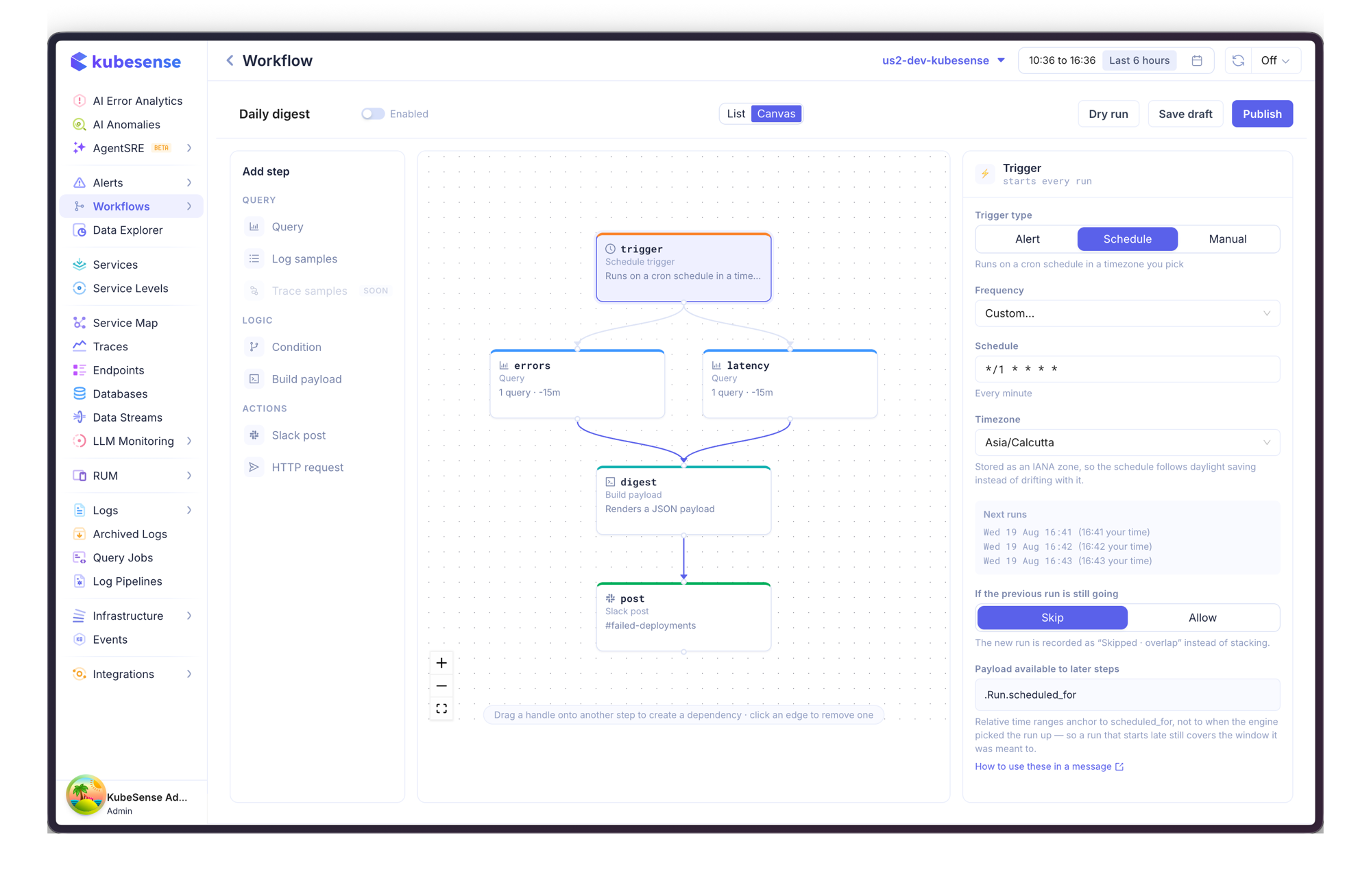
Choose a preset frequency or write a cron expression. The panel shows the next three fire times in both the schedule's timezone and yours, which is the quickest way to confirm an expression means what you think.
Timezone is stored as an IANA zone (Asia/Calcutta, Europe/London), so a schedule follows daylight saving instead of drifting an hour with it.
If the previous run is still going:
- Skip (default) — the new run is recorded as Skipped · overlap instead of stacking. Right for a daily report that occasionally runs long.
- Allow — runs may overlap. Only pick this if the workflow is safe to run twice at once.
A schedule fires once for each due time and never backfills: a workflow published today does not run the schedules it "missed" while it didn't exist, and an engine restart doesn't replay the window it was down for.
Steps read .Run.scheduled_for — the time the run was meant to happen. Relative time ranges anchor to it, so a run picked up three minutes late still covers the intended window.
Manual trigger
Runs when someone presses Run, from the workflow list or the builder.
Useful while you are building, and for workflows that are genuinely on-demand — a diagnostic bundle someone asks for during an incident. Manual runs can declare inputs with defaults, read as .Inputs.<name>.
Manual runs are not deduplicated: pressing Run twice runs it twice.
Changing a trigger
The trigger is part of the workflow spec, so changing it takes effect when you publish, not when you save. Until then the published version keeps running on its old trigger — which is what you want when you are mid-edit.