
Templates & Import
Alert rule templates
Clicking Create New Alert Rule opens a template picker so you don't start from a blank query.
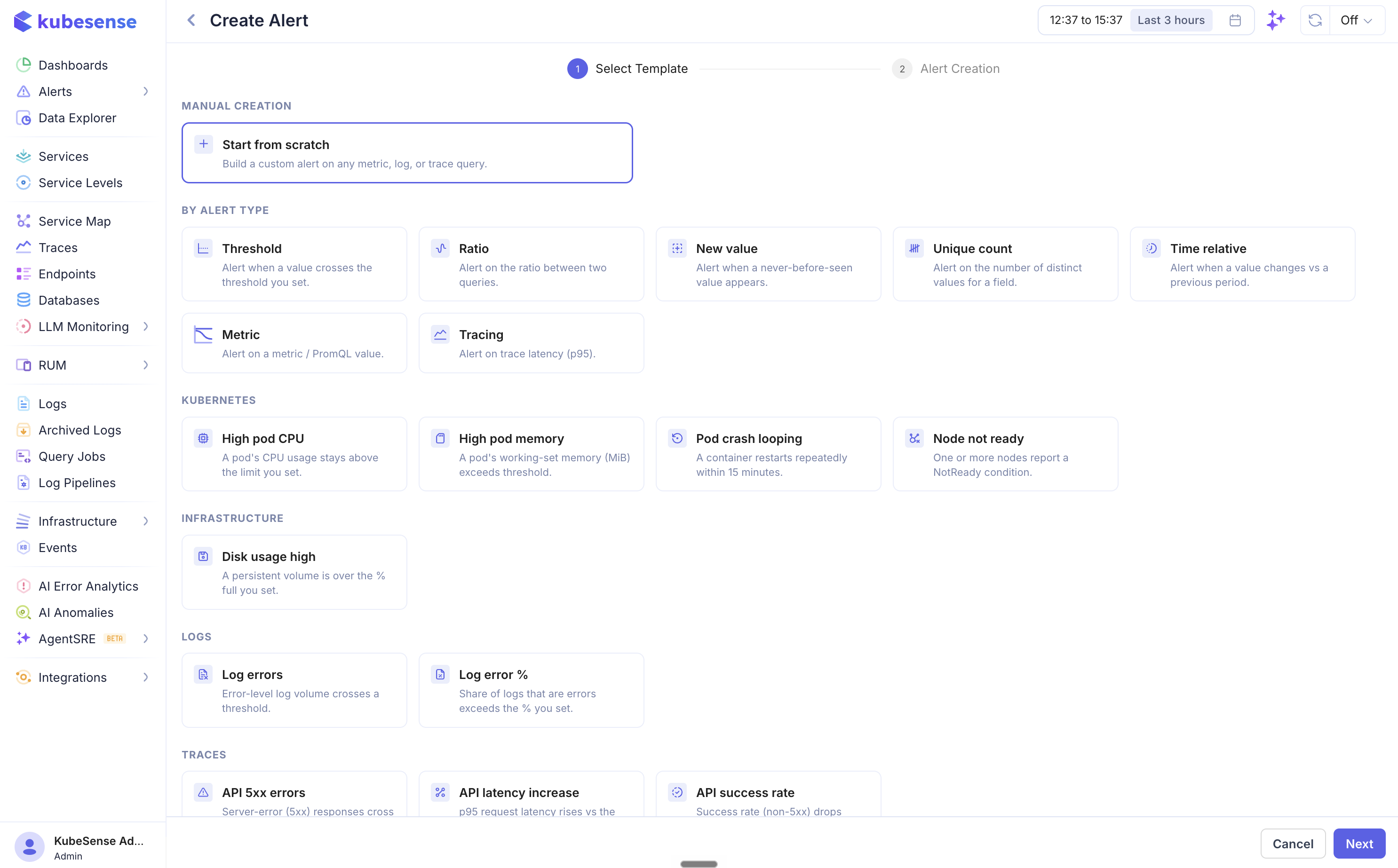
Recipes are complete, ready-to-tune rules organised by category:
| Category | Examples |
|---|---|
| Kubernetes | High pod CPU (sustained CPU above threshold, per pod) |
| Logs | Log errors (error count), Log error % (errors as a percentage of all logs, per workload) |
| Traces | API 5xx errors (HTTP server errors per workload), API latency increase (p95 vs an hour ago), API success rate (non-5xx percentage per workload) |
Recipes come pre-configured with the right filters and grouping — for example, the trace templates scope to HTTP traffic and group by workload so each service alerts independently — and land you in the editor with everything filled in, ready to adjust the threshold and pick channels.
Alert type starters pre-configure just the condition shape — Threshold, Ratio, Change, New Value — and leave the query to you.
Markdown in descriptions
The description is the runbook a responder reads when the alert fires — what it means, and what to do about it. It accepts markdown, so it can be more than one line:
## What's happening

Error rate above threshold on {{workload}}.

## First checks

1. One pod or all of them? Group by `pod` on the alert page.
2. Check recent deploys — this usually follows one.

```sh
kubectl rollout history deploy/{{workload}} -n {{namespace}}
```
Headings, bold, italic, lists, tables, links, inline code, fenced code blocks and horizontal rules all work. The editor has a formatting toolbar and an Edit / Preview toggle; Preview renders exactly what the alert pages show, so check a long runbook there before saving.
Descriptions appear rendered on the alert event and alert rule detail pages, collapsed behind a Show more toggle when long, so a three-screen runbook doesn't push the timeline off the page.
note: Notification channels receive the markdown as you typed it, not as rendered HTML — and Slack's formatting is not markdown. (A channel using a custom message template is the exception: that template decides the message, so the description appears only if it asks for one.) In Slack, *single asterisks* are bold, while **double**, # headings, tables, - lists and [text](url) links all render literally. If Slack is your main delivery path, keep the first line or two meaningful on their own and prefer plain prose and code blocks over tables and headings.
Placeholders in names and descriptions
Rule names and descriptions support {{label}} placeholders that resolve per instance in notifications and on the alert pages — e.g. High CPU on {{pod}} in {{namespace}} becomes High CPU on checkout-6f7b… in production. Any label on the alert works: group-by values, static rule labels, and built-ins like severity. A placeholder that doesn't match a label is left as-is, so double-check spelling against your group-by fields.
Importing and exporting rules
- Import — the Import button on the Alert Rules tab accepts one rule or an array of rules as JSON. Every rule is validated upfront (query fields, group-by columns, filters) with a dry-run summary showing what passes and what fails — nothing is created until you confirm.
- Export — every rule's detail page has an Export action that downloads it as re-importable JSON (live state stripped), useful for promoting rules between environments or checking them into git.
- Migrating from Datadog? See Datadog Alert Migration for converting Datadog monitors into KubeSense alert rules in bulk.
Notification message templates
The Alert Templates tab customises what notifications look like, per channel type — overriding the built-in message layout for Slack, Teams, Email, Google Chat, and Webhook deliveries.
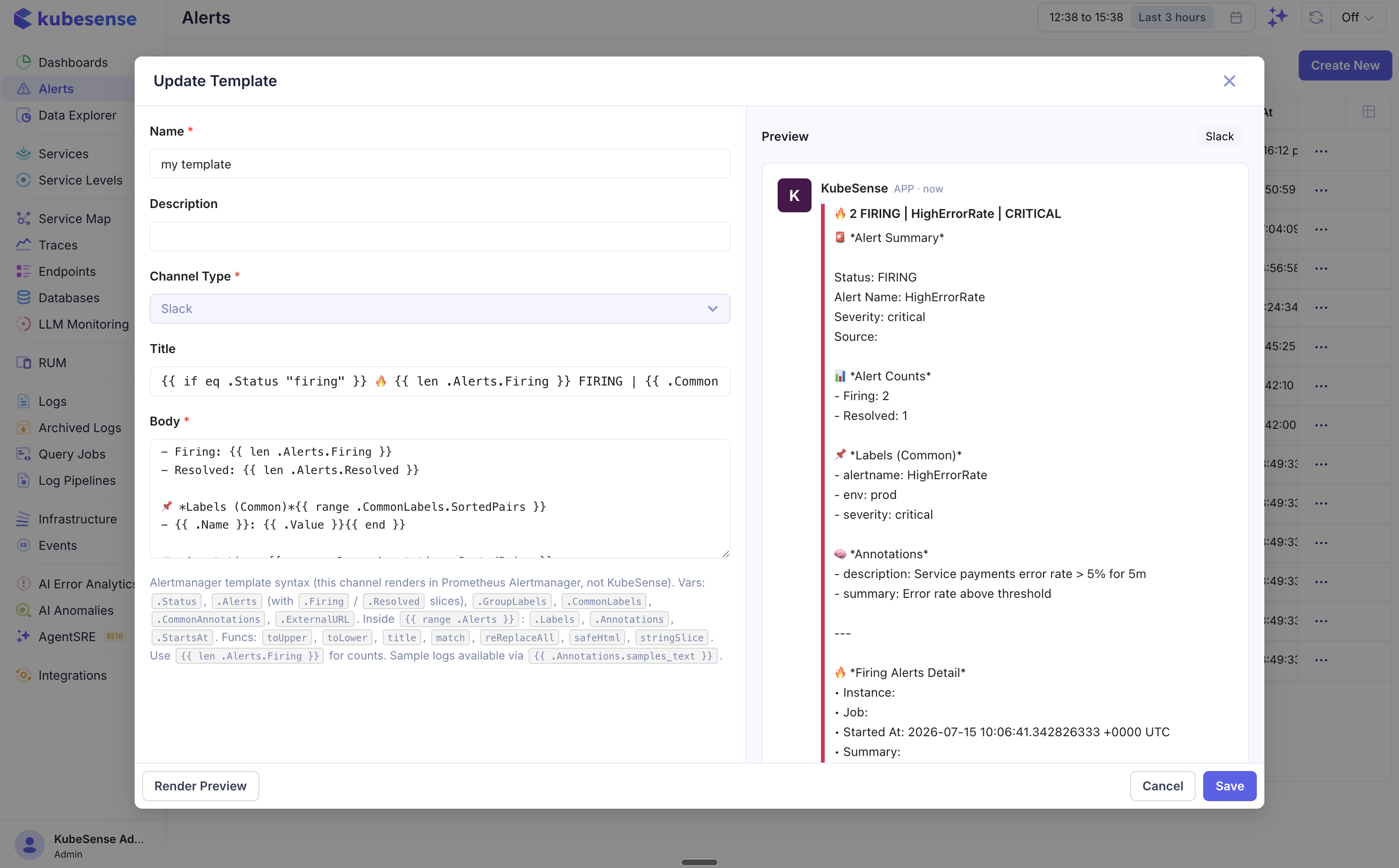
- Create a template for a channel type, edit the message fields it exposes (title, body, etc.), and use the same
{{label}}placeholders plus alert fields (value, threshold, status) in the content. - Preview renders the template with sample alert data before you save.
- Clone an existing template to iterate on a variant.
Without a custom template, channels use the built-in layout described in Integrations — including the per-alert View in Kubesense deep link to the exact firing instance.
note: Datadog On-Call doesn't support templates — its paging API mandates a fixed JSON schema, so the template picker is hidden for that channel type. Every other channel type, including Jira Service Management, is templatable.