
Users
Attaching a user ID to your traces turns raw LLM traffic into per-customer numbers: who is driving token spend, whose requests are failing, and which tenant a regression belongs to.
A user is the person, tenant, or service account responsible for an interaction. One user has many sessions, and one session has many traces.
The Users view
LLM Monitoring > Users groups activity by user_id for the selected application and time range.
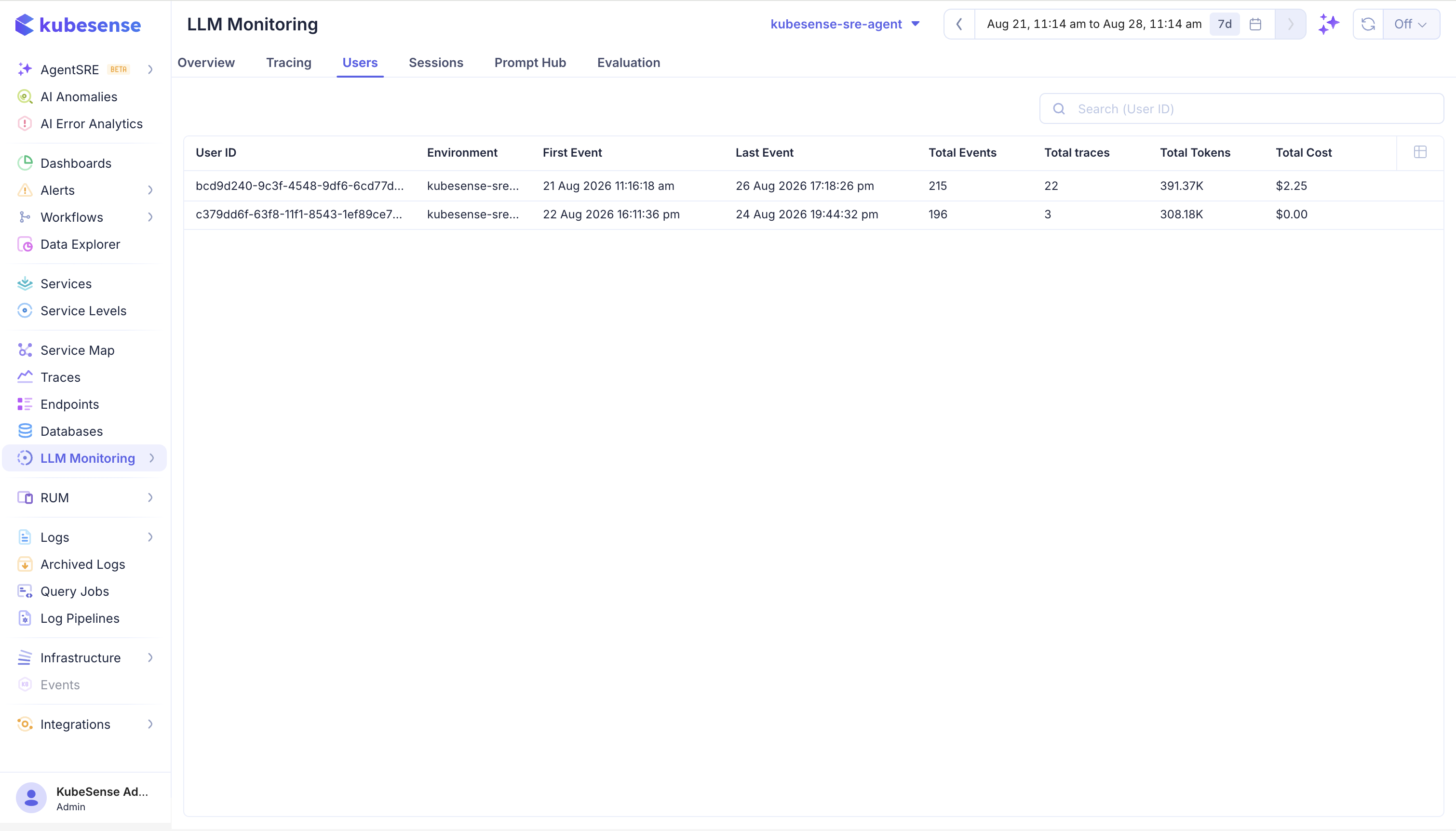
| Column | Meaning |
|---|---|
| User ID | Stable identifier attached to the user or tenant |
| Environment | Environment in which the user's activity was recorded |
| First Event | Timestamp of the earliest observation in the selected range |
| Last Event | Timestamp of the latest observation in the selected range |
| Total Events | Number of observations recorded for the user |
| Total Traces | Number of distinct traces associated with the user |
| Total Tokens | Combined token usage for the user |
| Total Cost | Estimated cost of the user's LLM activity |
Use Search (User ID) to find a specific user. The table follows the application selector and global time range, so First Event and Last Event describe the current query window rather than the user's entire history.
User details
Select a user to open the detail view. It summarizes total tokens, events, traces, and cost, then provides Traces, Sessions, and Scores tabs.
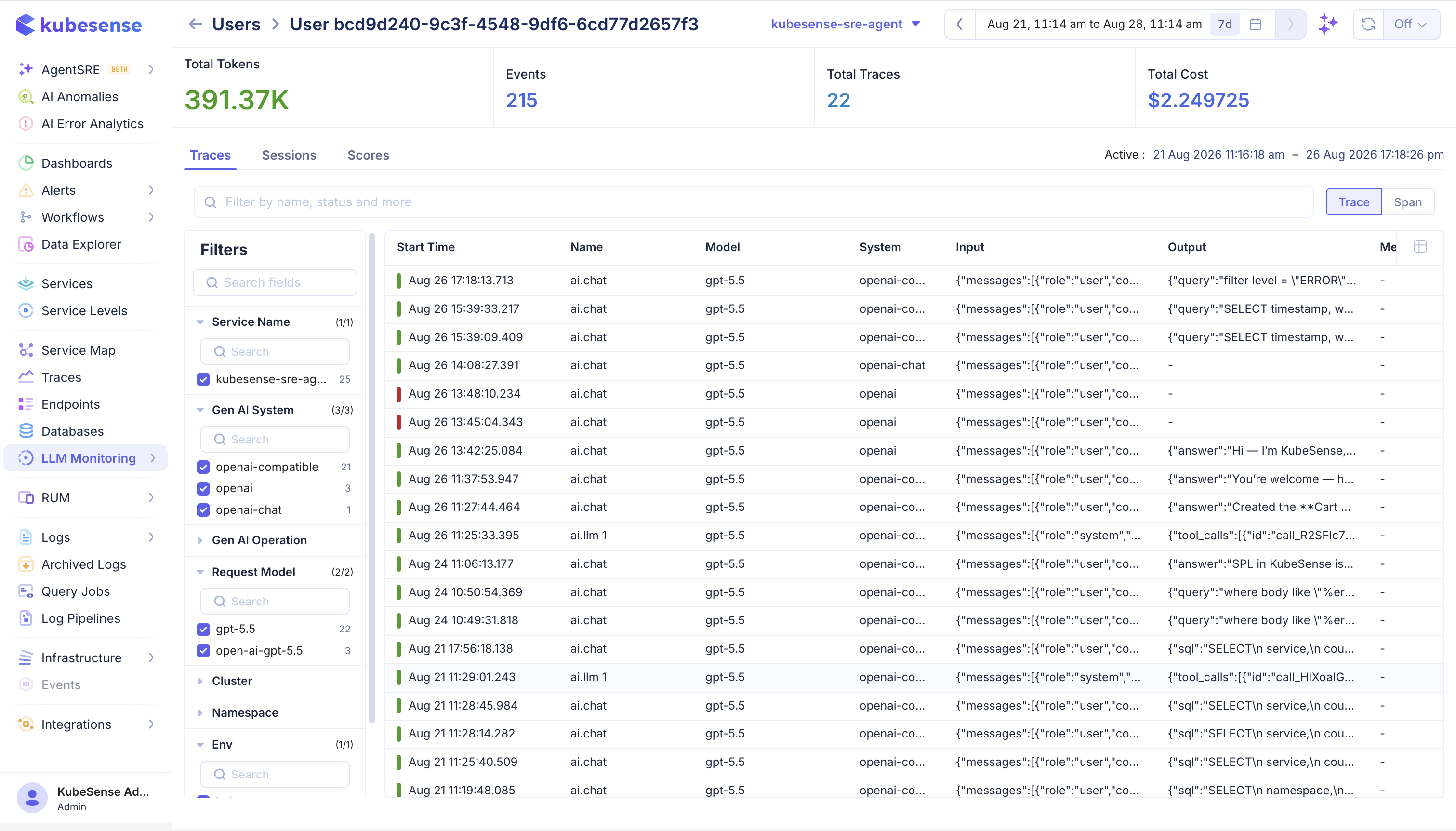
Use Traces to inspect individual requests, Sessions to follow their conversations, and Scores to review quality results attached to their activity. This is how you get from an aggregate cost signal to the exact prompts that produced it.
How the totals are calculated
KubeSense aggregates the Users view directly over stored observations: it groups every span carrying a user_id and sums their tokens and cost.
warning: The user ID is not inherited from a parent span. A generation whose own span has no user_id is counted against the built-in unknown user, not against the caller — even when its parent span is correctly tagged.Set the ID on every span in the request, not just on a wrapper. The Langfuse SDKs do this automatically; for OpenLIT and raw OpenTelemetry you need the span processor shown below.
This also means Total Events counts observations, not requests. A trace with one model call and three tool spans contributes four events and one trace.
Set the user ID
The user ID changes per request, so it does not belong in OTEL_RESOURCE_ATTRIBUTES — resource attributes identify the service, not the caller. Set it on the request's spans instead.
propagate_attributes writes the user ID onto every span opened inside the block, including spans created by Langfuse's provider integrations:
from langfuse import get_client, observe, propagate_attributes

langfuse = get_client()

@observe(name="support-chat")
def answer_question(user_id: str, question: str) -> str:
	with propagate_attributes(user_id=user_id):
		return call_your_model(question)
It composes with the drop-in provider integrations, so the generation span is tagged without any extra work:
from langfuse import get_client, propagate_attributes
from langfuse.openai import openai

langfuse = get_client()

def answer_question(user_id: str, question: str):
	with propagate_attributes(user_id=user_id):
		return openai.chat.completions.create(
			model="gpt-4o-mini",
			messages=[{"role": "user", "content": question}],
		)
propagateAttributes applies the user ID to every observation created inside the callback:
import { observe, propagateAttributes } from "@langfuse/tracing";

export const answerQuestion = observe(
	async (userId: string, question: string) =>
		propagateAttributes({ userId }, async () => {
			return await callYourModel(question);
		}),
	{ name: "support-chat" },
);
OpenLIT does not set a user ID. Register a span processor that copies it from the OpenTelemetry context onto every span as the span starts — the same approach the Langfuse SDK takes internally:
import contextvars
import openlit
from opentelemetry import trace
from opentelemetry.sdk.trace import SpanProcessor, TracerProvider

current_user_id = contextvars.ContextVar("current_user_id", default=None)

class UserAttributeProcessor(SpanProcessor):
	def on_start(self, span, parent_context=None):
		user_id = current_user_id.get()
		if user_id:
			span.set_attribute("user.id", user_id)

provider = TracerProvider()
provider.add_span_processor(UserAttributeProcessor())
trace.set_tracer_provider(provider)

# OpenLIT reuses the existing provider, so initialize it after the processor.
openlit.init(otlp_endpoint="http://<kubecol-host>:31443", service_name="my-llm-app")

def answer_question(user_id: str, question: str):
	token = current_user_id.set(user_id)
	try:
		return client.chat.completions.create(
			model="gpt-4o-mini",
			messages=[{"role": "user", "content": question}],
		)
	finally:
		current_user_id.reset(token)
Setting user.id only on a wrapper span you create yourself is not enough: OpenLIT's generation span is a separate span, and its tokens and cost would be attributed to unknown.
Use the same pattern in Node: a span processor that stamps every span from the active context.
import { context, createContextKey, trace } from "@opentelemetry/api";
import { NodeTracerProvider } from "@opentelemetry/sdk-trace-node";
import Openlit from "openlit";

const USER_ID_KEY = createContextKey("kubesense.user_id");

const provider = new NodeTracerProvider();
provider.addSpanProcessor({
	onStart(span, parentContext) {
		const userId = parentContext.getValue(USER_ID_KEY) as string | undefined;
		if (userId) span.setAttribute("user.id", userId);
	},
	onEnd() {},
	shutdown: async () => {},
	forceFlush: async () => {},
});
provider.register();

Openlit.init({
	otlpEndpoint: process.env.OTEL_EXPORTER_OTLP_ENDPOINT,
	applicationName: "my-llm-app",
});

export async function answerQuestion(userId: string, question: string) {
	return context.with(context.active().setValue(USER_ID_KEY, userId), () =>
		callYourModel(question),
	);
}
Any OpenTelemetry SDK works the same way. Either set user.id on each span you create, or register a span processor that stamps it from the active context so auto-instrumented spans are covered too:
from opentelemetry import trace

span = trace.get_current_span()
span.set_attribute("user.id", user_id)
The direct form only tags the current span. Use it when your application creates the generation spans itself; use a span processor when a library creates them for you.
Accepted attributes
KubeSense reads the user ID from the first of these present on a span:
| Attribute | Set by |
|---|---|
user.id | Langfuse SDKs, and the recommended key for OpenLIT and raw OTel |
langfuse.user.id | Older Langfuse instrumentation |
gen_ai.user.id | Some OpenTelemetry GenAI instrumentation |
gen_ai.request.user | Providers that forward an end-user identifier |
Observations that arrive with none of these are grouped under unknown rather than dropped.
note: The Langfuse SDKs validate propagated values: a user ID must be a US-ASCII string of 200 characters or fewer. Longer or non-string values are dropped with a warning, not truncated — the trace arrives with no user attached.
Verify
- Send two requests with the same
user_id. - Open LLM Monitoring > Users and search for that ID. Its event, trace, token, and cost totals should include both requests.
- Open the user and check the Traces tab.
- Open one trace and confirm the generation span itself carries the user — not only the root span. If tokens are landing under
unknown, the ID is not reaching child spans.
Choosing user IDs
Use a stable internal identifier for the person, tenant, or service account. Prefer an opaque ID that stays constant across sessions, so a user's history stays connected.
Do not put email addresses, access tokens, or full user profiles into the field. It is indexed, displayed in the UI, and retained with your traces; treat it as data that will be widely visible within your organization. Put any additional context in metadata, and only when its collection is approved.
Troubleshooting
| Symptom | Check |
|---|---|
| No users listed | Confirm the SDK exported the attribute and that the application and time range match |
Tokens and cost under unknown | The ID is on a wrapper span only; propagate it to every span in the request |
| Total Events looks too high | It counts observations, not requests — a trace with tool and retrieval spans contributes several |
| A user's history is split | The application is generating a new ID per session; use a stable identifier |
| User missing after a code change | A value over 200 characters or a non-string is dropped by the Langfuse SDK with a warning in its logs |