
Sessions
A session groups related traces into one conversation, workflow run, or agent execution. Where a trace answers "what happened in this request", a session answers "how did this whole interaction go" — which is the level most LLM quality problems actually live at.
Use a session when one user interaction spans several requests: a chat thread, a support ticket, a multi-step agent run.
The Sessions view
LLM Monitoring > Sessions groups traces by session_id for the selected application and time range.
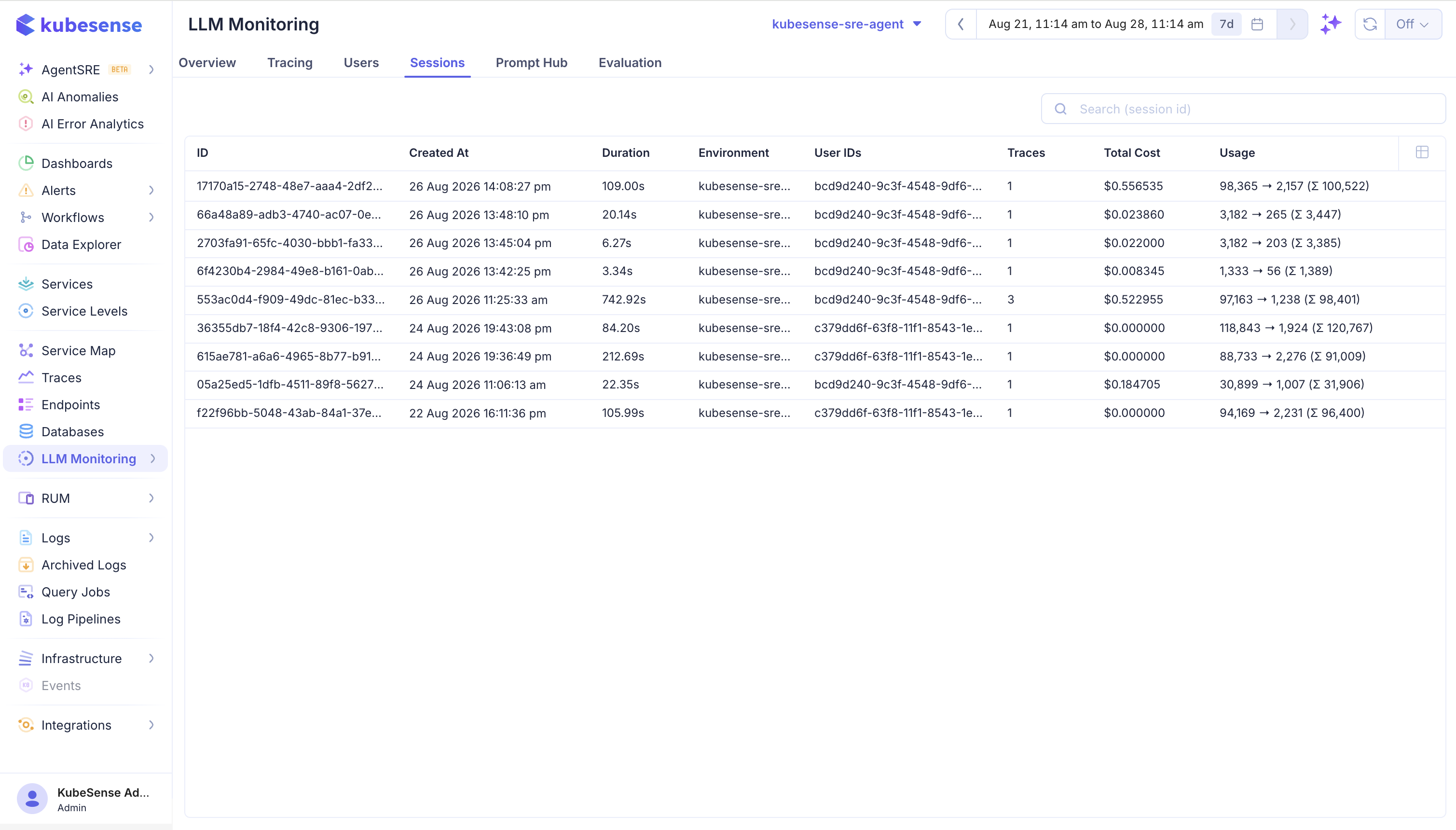
| Column | Meaning |
|---|---|
| ID | Session identifier supplied by the application |
| Created At | Time the session's earliest observation was recorded |
| Duration | Time between the first and last observation in the session |
| Environment | Environment associated with the session |
| User IDs | Distinct users seen on the session's traces |
| Traces | Number of distinct traces in the session |
| Total Cost | Estimated cost across the session |
| Usage | Input-to-output token usage and the combined total |
Use Search (session id) to find a conversation or workflow run. Because a session spans several traces, its duration and total cost can exceed any individual trace.
Session details
Open a session to follow the conversation in order.
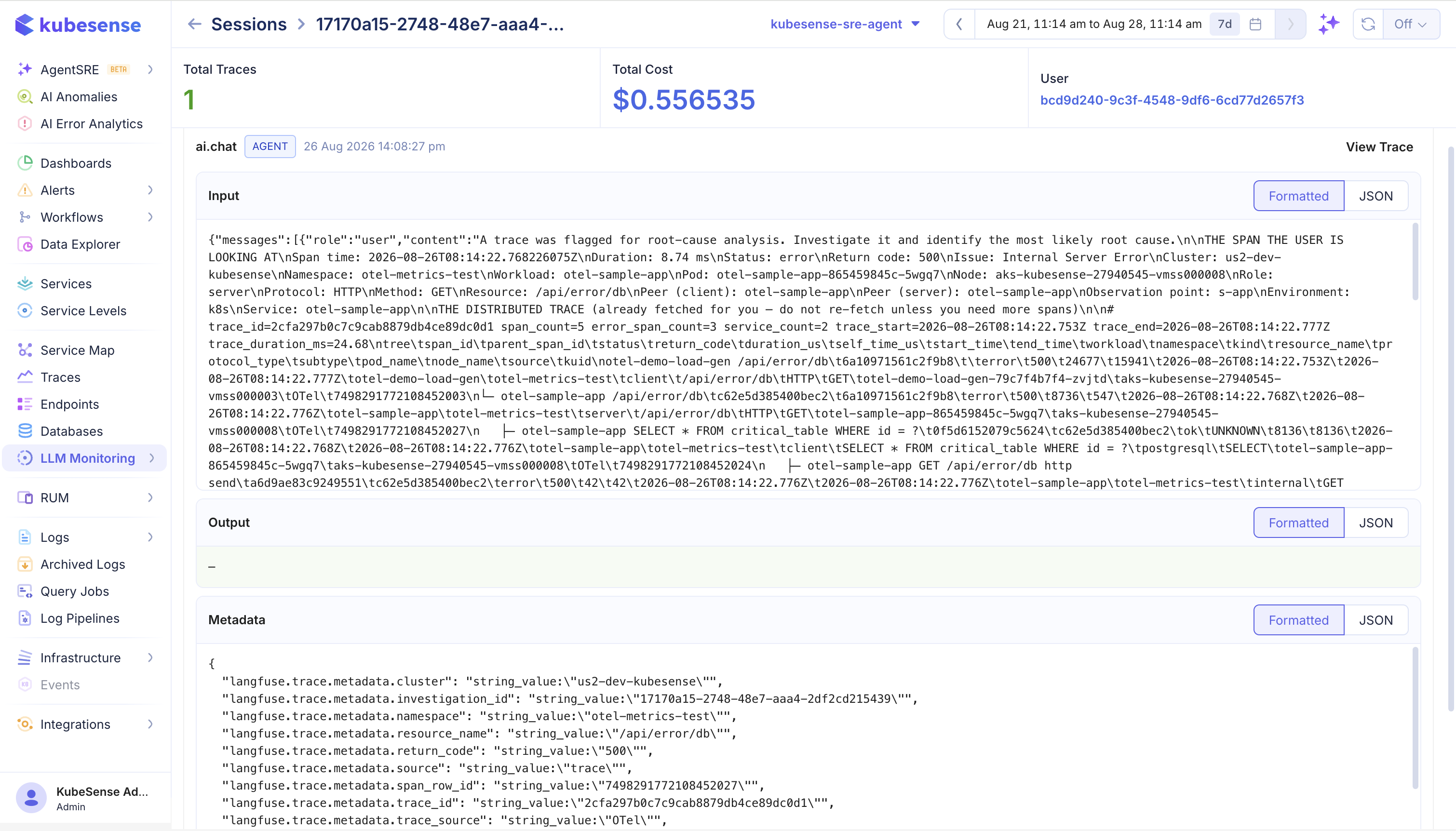
The page shows total traces, total cost, and the associated user, then lists each trace with its operation name, type, timestamp, and a View Trace action. Open a trace to reach the full span hierarchy.
Input, Output, and Metadata sections render with a Formatted view for readability and a JSON view for the original payload. An empty output is valid for a turn that failed before the model responded — inspect the input and metadata, then open the trace to find the failed span.
Reading a session in order is what exposes conversational failures: a retrieval that returned nothing on turn three, an agent that lost context after a tool error, a prompt that drifts as history accumulates. None of those are visible in a single trace.
How the totals are calculated
KubeSense aggregates the Sessions view directly over stored observations: it groups every span carrying a session_id and sums their tokens and cost. Duration is the span from the earliest start to the latest end.
warning: The session ID is not inherited from a parent span. A generation whose own span has no session_id is excluded from the session's cost and token totals, and its trace may not appear in the session at all.Set the ID on every span in the request. The Langfuse SDKs do this automatically; for OpenLIT and raw OpenTelemetry you need the span processor shown below.
Set the session ID
The session ID changes per conversation, so it does not belong in OTEL_RESOURCE_ATTRIBUTES. Set it on the request's spans, using the same ID for every turn.
propagate_attributes accepts the user and session together, and writes both onto every span opened inside the block:
from langfuse import get_client, observe, propagate_attributes

langfuse = get_client()

@observe(name="support-chat")
def answer_turn(user_id: str, session_id: str, question: str) -> str:
	with propagate_attributes(user_id=user_id, session_id=session_id):
		return call_your_model(question)
Call it once per turn with the same session_id. Each turn produces its own trace; the session is what ties them together:
session_id = "conversation-456"

for question in conversation:
	answer_turn(user_id="user-123", session_id=session_id, question=question)

langfuse.flush()
propagateAttributes takes userId and sessionId together:
import { observe, propagateAttributes } from "@langfuse/tracing";

export const answerTurn = observe(
	async (userId: string, sessionId: string, question: string) =>
		propagateAttributes({ userId, sessionId }, async () => {
			return await callYourModel(question);
		}),
	{ name: "support-chat" },
);
Reuse one sessionId for every turn of the conversation, and flush with await sdk.shutdown() before a short-lived process exits.
OpenLIT does not set a session ID. Register a span processor that copies it from the OpenTelemetry context onto every span as the span starts:
import contextvars
import openlit
from opentelemetry import trace
from opentelemetry.sdk.trace import SpanProcessor, TracerProvider

current_session_id = contextvars.ContextVar("current_session_id", default=None)

class SessionAttributeProcessor(SpanProcessor):
	def on_start(self, span, parent_context=None):
		session_id = current_session_id.get()
		if session_id:
			span.set_attribute("session.id", session_id)

provider = TracerProvider()
provider.add_span_processor(SessionAttributeProcessor())
trace.set_tracer_provider(provider)

# OpenLIT reuses the existing provider, so initialize it after the processor.
openlit.init(otlp_endpoint="http://<kubecol-host>:31443", service_name="my-llm-app")

def answer_turn(session_id: str, question: str):
	token = current_session_id.set(session_id)
	try:
		return client.chat.completions.create(
			model="gpt-4o-mini",
			messages=[{"role": "user", "content": question}],
		)
	finally:
		current_session_id.reset(token)
Extend the same processor to stamp user.id as well — see Users for that half.
import { context, createContextKey } from "@opentelemetry/api";
import { NodeTracerProvider } from "@opentelemetry/sdk-trace-node";
import Openlit from "openlit";

const SESSION_ID_KEY = createContextKey("kubesense.session_id");

const provider = new NodeTracerProvider();
provider.addSpanProcessor({
	onStart(span, parentContext) {
		const sessionId = parentContext.getValue(SESSION_ID_KEY) as string | undefined;
		if (sessionId) span.setAttribute("session.id", sessionId);
	},
	onEnd() {},
	shutdown: async () => {},
	forceFlush: async () => {},
});
provider.register();

Openlit.init({
	otlpEndpoint: process.env.OTEL_EXPORTER_OTLP_ENDPOINT,
	applicationName: "my-llm-app",
});

export async function answerTurn(sessionId: string, question: string) {
	return context.with(context.active().setValue(SESSION_ID_KEY, sessionId), () =>
		callYourModel(question),
	);
}
Set session.id on each span you create, or register a span processor that stamps it from the active context so auto-instrumented spans are covered:
from opentelemetry import trace

span = trace.get_current_span()
span.set_attribute("session.id", session_id)
Accepted attributes
KubeSense reads the session ID from the first of these present on a span:
| Attribute | Set by |
|---|---|
session.id | Langfuse SDKs, and the recommended key for OpenLIT and raw OTel |
langfuse.session.id | Older Langfuse instrumentation |
gen_ai.session.id | Some OpenTelemetry GenAI instrumentation |
gen_ai.memory.session_id | Memory-aware agent frameworks |
note: The Langfuse SDKs validate propagated values: a session ID must be a US-ASCII string of 200 characters or fewer. Longer or non-string values are dropped with a warning, not truncated.
Conversation ID
KubeSense records a separate conversation ID from gen_ai.conversation.id. Use it when a durable thread outlives a single session — for example a support ticket that a customer returns to across days, where each visit is its own session but the thread is continuous.
Most applications need only users and sessions.
Choosing session IDs
Use one session for one conversation, support ticket, workflow run, or agent execution. A session should have a natural beginning and end.
- Generate the ID once when the interaction starts and reuse it for every turn.
- Do not generate a new ID per model call — that produces one session per request and defeats the grouping.
- Do not reuse a session ID across different users. The view lists distinct users on a session, so a shared ID silently merges unrelated conversations.
- A trace should not move between sessions during its lifetime.
If your application already has a conversation or thread identifier, use it directly rather than inventing a parallel one.
Multi-service applications
When a request crosses service boundaries, propagate the OpenTelemetry context and the session ID together. Context propagation alone keeps the spans in one trace; it does not carry the session attribute, because that lives on the spans rather than in the trace header.
Pass the session ID explicitly to downstream services — through a header, a message attribute, or the request body — and apply the same propagation pattern there. Otherwise the orchestration service's spans join the session and the retrieval or model service's spans do not, splitting the session's cost.
Verify
- Send two requests with the same
session_id, then a third with a different one. - Open LLM Monitoring > Sessions and search for the first ID. Only the first two requests should be grouped there.
- Open the session and confirm the trace count and total cost match what you sent.
- If cost looks low, open a trace and check that the generation span itself carries the session ID.
Troubleshooting
| Symptom | Check |
|---|---|
| Every request is its own session | A new ID is generated per call; create it once per conversation |
| Session cost is lower than the sum of its traces | The ID is on a wrapper span only; propagate it to every span |
| A trace is missing from its session | That trace's spans carry no session attribute |
| Unrelated conversations merged | A session ID is being reused across users or interactions |
| Session split across services | The downstream service never received the ID; pass it explicitly |