
Creating & Managing Pipelines
This guide walks you through creating a log pipeline from scratch and covers best practices for combining rules effectively.
Creating a Pipeline
-
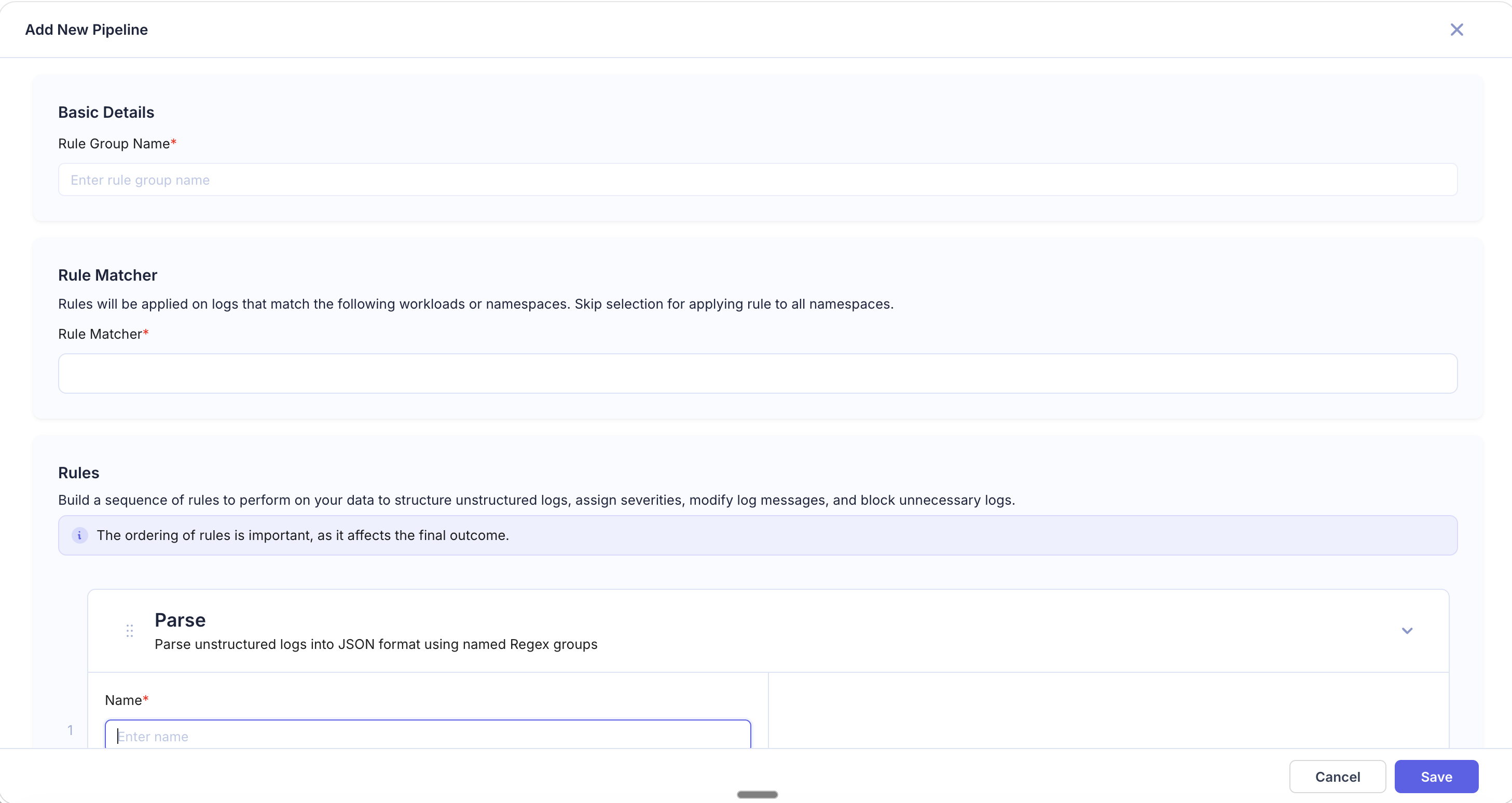
Navigate to Logs > Log Pipelines and click Add Pipeline in the top right.
-
Basic Details — Enter a Rule Group Name that describes the pipeline's purpose (e.g.,
redact-pii-api-gateway,parse-nginx-logs). -
Rule Matcher — Define which logs this pipeline applies to:
- Enter a workload or namespace pattern (e.g.,
us-2/log-printer/*,prod/api-gateway/*) - Use
*wildcards to match multiple workloads within a namespace - Skip the selection to apply the pipeline to all namespaces
- Enter a workload or namespace pattern (e.g.,
-
Add Rules — Click + Add Rule and choose a rule type. Configure the rule fields, then repeat to add more rules as needed.
-
Reorder Rules — Drag rules to change their execution order. Rules run top-to-bottom, and each rule operates on the output of the previous one.
-
Preview — The right panel shows how the rules affect your logs. Use this to validate behavior before saving.
-
Click Save to activate the pipeline.
Editing a Pipeline
Click on any pipeline in the list to open it for editing. You can:
- Modify existing rules or their configuration
- Add new rules or remove existing ones
- Reorder rules by dragging
- Update the Rule Matcher to target different workloads
Click Save to apply changes. Updated pipelines take effect on newly ingested logs.
Restricting who can change a pipeline
Every pipeline is open by default: anyone whose role has Log Pipeline at Editor can change it. Restricting a pipeline narrows that to its owner and the people the owner names. The pipeline stays visible to everyone with log pipelines access. Only changing it is restricted.
Opening the dialog
In the pipeline list, open the pipeline's actions menu and choose Access. Anyone who can see the pipeline can open the dialog and read who may change it. Only the pipeline's owner or a Log Pipeline Admin can change it.
Restricting a pipeline
- Click Restrict Editing.
- Under People with access, add people by name or email. Each person gets a level, Viewer or Editor. The owner is pinned at the top and cannot be removed.
- Under Everyone else, choose what anyone with log pipelines access who is not named gets. Viewer is the default.
- Click Save. Nothing is saved until you do.
| Level | What they can do |
|---|---|
| Viewer | See the pipeline and its rules |
| Editor | Also edit it, enable or disable it, delete it, and move it in the pipeline order |
Restore Full Access removes the restriction and the list of people with it.
A restricted pipeline shows a lock beside its name. For someone who may not change it, the enable toggle, Delete and saving the editor are disabled, with a tooltip saying why.
What a restriction does not cover
warning: A restriction protects one pipeline's own rules, state and position. It does not protect what that pipeline receives.
- Other pipelines in the chain. Enabled pipelines run in order, each on the output of the one before. Someone who can change an earlier pipeline can still change what a restricted pipeline receives.
- Reference tables. A table is shared by every pipeline that looks it up, and stays editable by anyone with log pipelines write access.
- New pipelines. Anyone with log pipelines write access can still create a pipeline.
Owners and Log Pipeline Admins
Whoever creates a pipeline owns it. Pipelines that existed before this feature are owned by their creator where that was recorded and the user still exists, and otherwise have no owner.
Log Pipeline Admin is a role permission (see Role Access). Someone who holds it, along with Log Pipeline at Editor, can change any restricted pipeline and who has access to it. Each time they change access on a pipeline they do not own, the audit log records it as an admin override. A pipeline with no owner can only be restricted by a Log Pipeline Admin, who becomes its owner.
Things to know
- A grant never gives more than the person's role allows. Someone whose role has Log Pipeline at Viewer cannot change a pipeline, whatever level they are given on it.
- The address you add must belong to an existing user. Saving is refused otherwise, and the message names the addresses that did not match.
- If someone else changes the pipeline's access while you have the dialog open, your save is refused and the dialog shows their version.
- The API enforces the restriction, so it applies to direct API calls and API keys as well as the page.
- Every access change is recorded in Settings → Audit Logs.
note: If the dialog says changing access is not enabled on this deployment, an administrator needs to set LOG_PIPELINE_ACCESS_CONTROL_ENABLED=true on the KubeSense API. Restrictions that already exist are enforced either way.
Rule Ordering Best Practices
Since rules execute sequentially, the order you place them in matters:
- Parse first — If your logs are unstructured, place Parse rules at the top so subsequent rules can operate on the extracted fields.
- Extract and enrich next — Extract, JSON Extract, Add Field, and Timestamp Extract rules work best after the log has been structured.
- Replace before Block — Redact sensitive data before deciding whether to drop a log, so even blocked logs have their PII removed during the processing window.
- Block last — Place Block rules toward the end so they evaluate against the fully processed log.
- Remove Fields at the end — Strip unwanted fields as the final step, after all other transformations are complete.
Recommended order:
Parse → Extract / JSON Extract → Timestamp Extract → Add Field → Replace → Block → Remove FieldsCommon Pipeline Patterns
Structuring and Enriching Application Logs
Goal: Parse unstructured Node.js logs and tag with team ownership.
| Order | Rule Type | Configuration |
|---|---|---|
| 1 | Parse | Regex: \[(?P<level>\w+)\] (?P<timestamp>[\d\-T:\.Z]+) (?P<message>.+) |
| 2 | Timestamp Extract | Source Field: timestamp, Format: 2006-01-02T15:04:05.000Z |
| 3 | Add Field | New Field: team, Value: backend |
| 4 | Remove Fields | Exclude: raw_stacktrace |
PII Redaction Pipeline
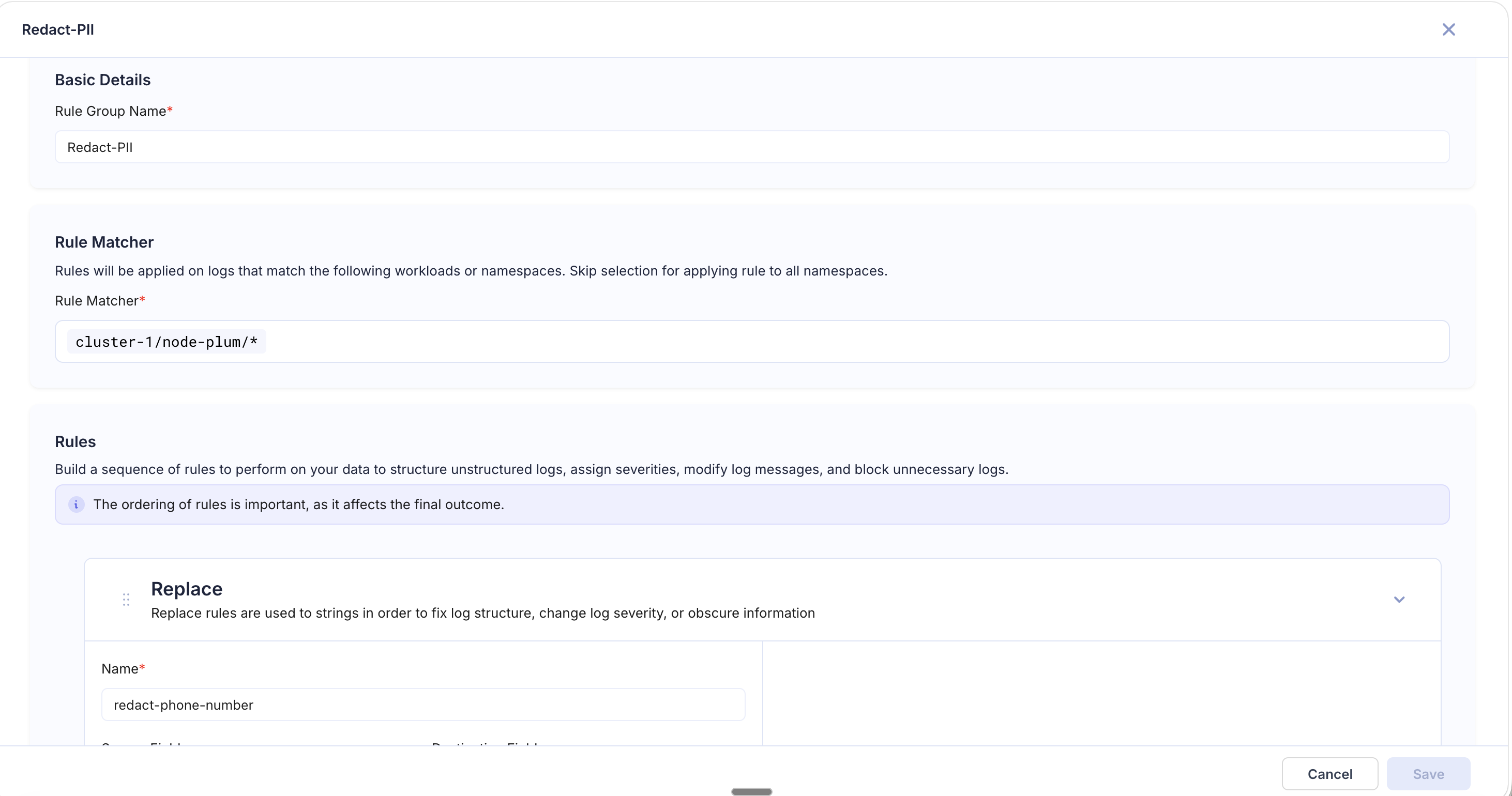
Goal: Ensure no personally identifiable information is stored in logs. The example below shows a "Redact-PII" pipeline scoped to cluster-1/node-plum/* with a Replace rule that masks phone numbers using a regex pattern.
| Order | Rule Type | Configuration |
|---|---|---|
| 1 | Replace | Regex: \S+@\S+\.\S+ → [EMAIL_REDACTED] |
| 2 | Replace | Regex: \d{3}-\d{3}-\d{4} → [PHONE_REDACTED] |
| 3 | Replace | Regex: \d{4}[- ]?\d{4}[- ]?\d{4}[- ]?\d{4} → [CC_REDACTED] |
| 4 | Replace | Regex: api_key=\S+ → api_key=[REDACTED] |
Noise Reduction Pipeline
Goal: Cut log volume and costs by filtering out low-value logs.
| Order | Rule Type | Configuration |
|---|---|---|
| 1 | Block | Regex: GET /healthz|GET /readyz, Logic: Block all matching |
| 2 | Block | Source: severity, Regex: DEBUG|TRACE, Logic: Block all matching |
| 3 | Remove Fields | Exclude: x-request-headers, raw_body |
JSON Log Enrichment Pipeline
Goal: Extract key fields from structured JSON logs and add routing metadata.
| Order | Rule Type | Configuration |
|---|---|---|
| 1 | JSON Extract | Json Key: context.userId, Destination: user_id |
| 2 | JSON Extract | Json Key: error.code, Destination: error_code |
| 3 | Add Field | Regex: ERROR|FATAL on level, New Field: pagerduty_route, Value: critical |
| 4 | Remove Fields | Exclude: context.internalDebug |