
Token Limits
Cap how many model tokens each user and the whole organisation can spend on Agent SRE per month
Token limits bound how much of the model budget Agent SRE can spend, per calendar month. An admin sets them under Settings → Agent SRE → Token Limits. Every Agent SRE surface counts against them: Conversations, Investigations, the follow-up chat on an investigation, AI RCA, and query generation in the log and trace editors.
Limits are in tokens, the unit the model provider bills. The number counted is the provider's total for each response, so it is the same whichever provider the deployment runs.
Three levels
| Level | What it bounds |
|---|---|
| Organization monthly limit | Everyone's usage combined. The one limit that is shared. |
| Default monthly limit per user | What each user gets when no override names them. |
| User override | One person's limit. |
A user's own limit is their user override if one exists, else the default. With neither the user is unlimited. The organization limit is checked separately, on top: a request is refused when either the user's own limit or the organization limit is spent.
User overrides win in both directions: A user override replaces the default whether it is higher or lower. That is what lets an admin raise one person's budget for a busy week, or cap one person without touching everyone else.
Setting a limit
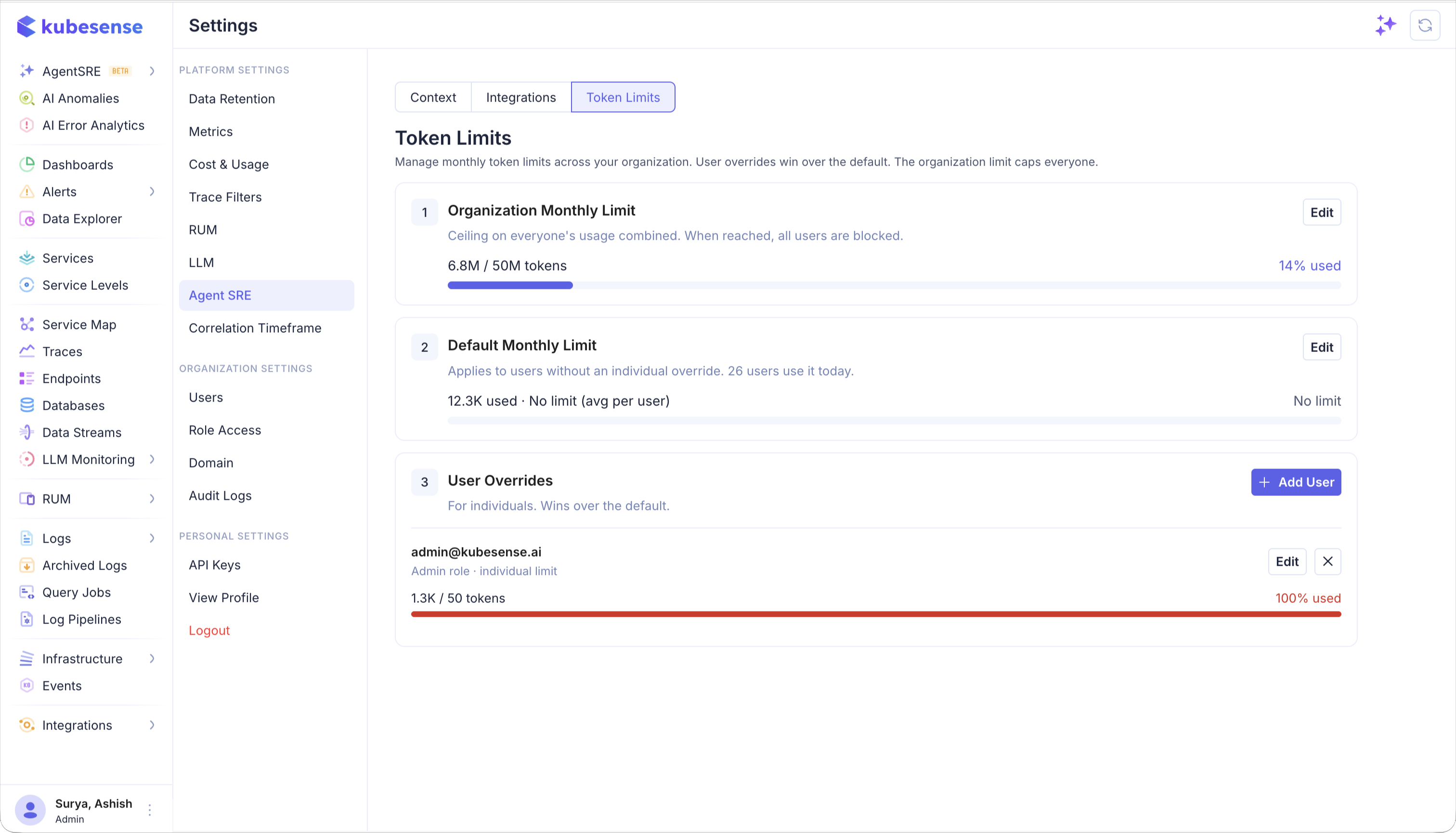
The page has three cards, one per level. Each card has its own Edit button and saves on its own, so changing one limit never touches another.
-
Organization Monthly Limit and Default Monthly Limit each have a No Limit switch. Turn it on to remove that limit. A blank field is not saved; enter a token count or turn on No Limit.
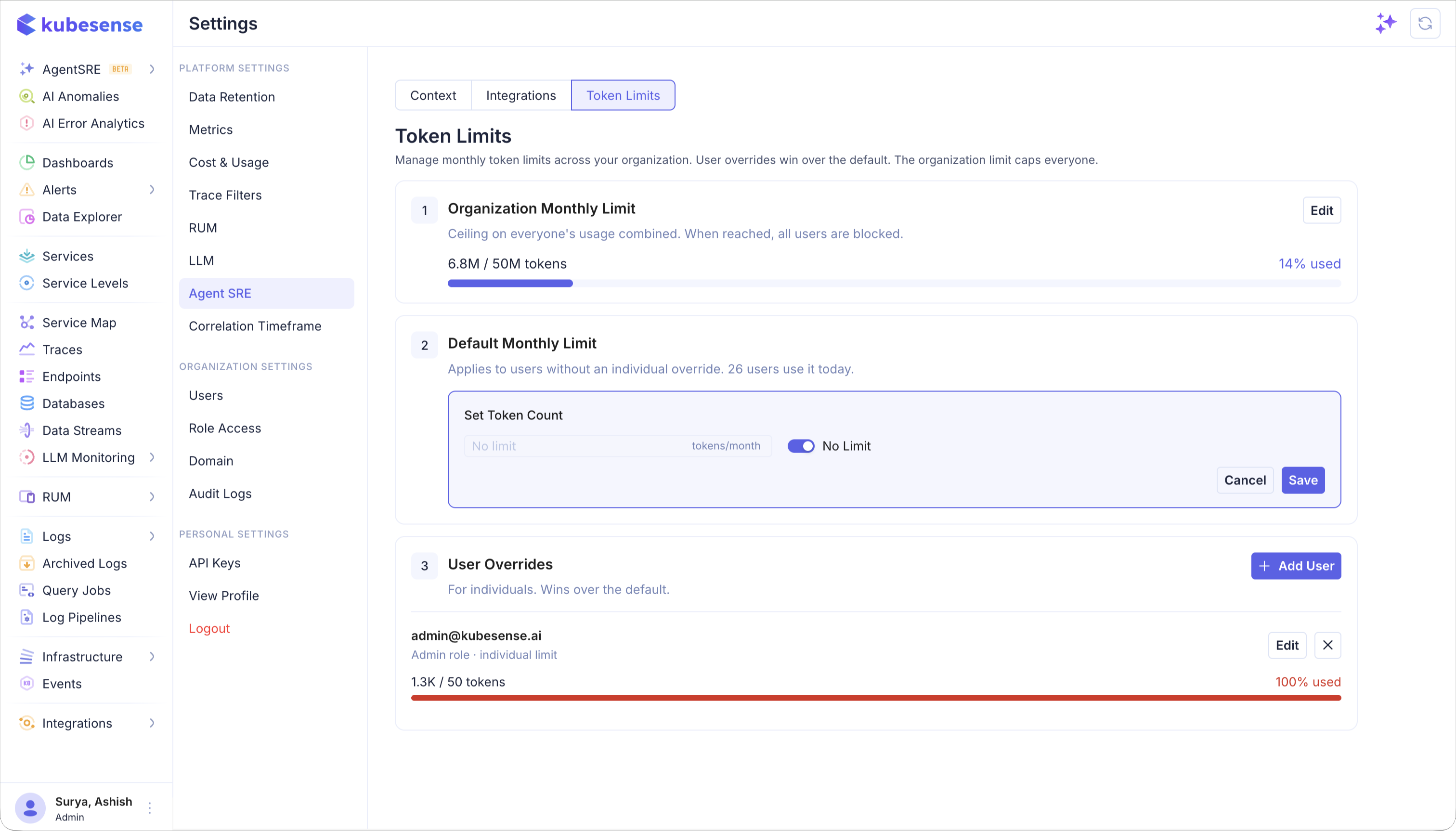
-
User Overrides lists one row per person. Add User picks anyone in the organization and sets their monthly limit. Edit changes it, and the remove button drops the override. The confirmation names the default the user falls back to.
Only one save runs at a time. While a save is in progress, the other Edit, Add User and remove buttons are disabled.
What happens at the limit
- A new request is refused with a message that names the limit that was reached and the date it resets.
- A run that is already in progress, such as a long investigation, is stopped at its next step rather than left to finish. It ends the same way a cancelled run does.
- An AI RCA that already exists is still shown. Opening it spends no tokens, so only starting a new RCA or re-running one is refused.
- Nothing is queued or retried. The next request after the reset goes through as normal.
Usage can end slightly above a limit: A run is stopped between model calls, not during one. If a user has several Agent SRE tasks running when a limit is reached, each of them finishes the model call it is waiting on before it stops, and those tokens are counted. Usage can therefore end a little above the limit: at most one model response for each task that was running. The organization limit behaves the same way.
Usage resets at the start of each calendar month in UTC, so every replica of the service resets at the same instant regardless of where the admin is.
Reading the page
- Organization Monthly Limit shows everyone's usage this month against the limit.
- Default Monthly Limit says how many users are on the default today, and its bar shows their average usage per user.
- Each User Overrides row shows the person's email and role, and their own usage this month against their override.
Editing needs write access to the Settings entry under AI in Role Access. Read access shows the page without the ability to save.
What users see
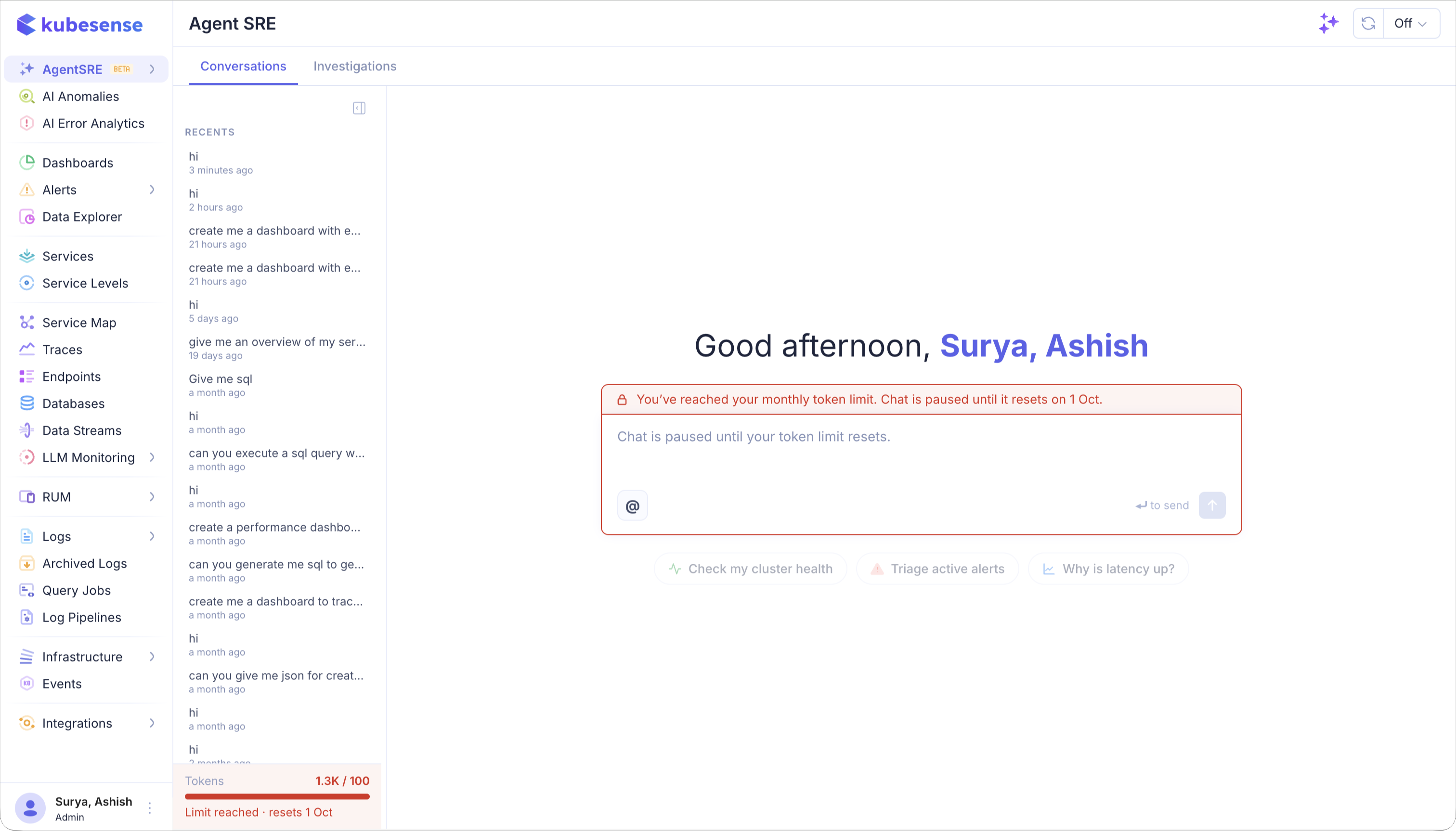
Every Agent SRE user sees their own usage in the Tokens row under the Recents list. The row shows the limit that applies to them:
- Their own limit, from a user override or the default: their usage against it.
- Only an organization limit: everyone's usage against the organization limit.
- No limit at all: just their token count, marked No limit.
The row tints amber from 80% of the limit, with roughly how many days are left and the reset date. It turns red with Limit reached once the limit is spent.
On Ask:
- From 80% of their own limit, a banner reads "You've used N% of your monthly tokens." The user can dismiss it.
- Once a limit is spent, the banner says so and gives the reset date, and the message box is disabled until the reset. When the organization limit is the one reached, the banner says Agent SRE is paused for everyone.
What counts
Every model response Agent SRE makes writes one usage record with its user, its source, its model, and the provider's token counts. Where the provider reports them, the record also keeps the prompt, completion, cached and reasoning breakdown. That is what the admin page sums.
Two details worth knowing:
- Cancelled runs still count. The provider billed the tokens, so the ledger records them.
- A gateway that reports no usage records zero. If the deployment reaches its model through an OpenAI-compatible gateway, the gateway has to be configured to return usage on streamed responses. Until it is, the counters do not move. KubeSense records the zero rather than estimating, so an admin can see the gateway is silent.
Not yet
- Notifying admins. Users are warned at 80% of their own limit, but nothing tells an admin when a user or the organization is close to a limit or has reached it.
- Per-rule windows. Every limit is a calendar month.
- Currency. Limits are tokens, not a spend figure.