
LLM as a Judge
LLM-as-a-Judge applies a rubric to live traffic automatically. You write a judge prompt, bind it to the observations you care about, and KubeSense runs it as spans arrive and writes the result as a score with source EVAL.
It is the only evaluation method that scales to all production traffic. It is also the least trustworthy in isolation — calibrate it against Annotations before acting on its output.
See Concepts for the template, config, and job objects.
How it works
The judge is given three things: the input your application received, the output it produced, and a rubric describing what "good" means. It returns a score in the shape you asked for — a number, a category, or a boolean — together with its reasoning.
That reasoning is the point. A bare number tells you a response scored 0.7; the reasoning tells you why, which is what you need to decide whether the judge is right or the rubric is vague.
Three properties make this worth doing:
- Scale. A rubric can be applied to every request; people cannot.
- Nuance. Dimensions like relevance, tone, and faithfulness have no deterministic check.
- Repeatability. A fixed rubric judges Tuesday's traffic the same way it judged Monday's, which is what makes a trend line meaningful.
The cost is that a judge is itself a model, with a model's failure modes. It is a measurement instrument that needs calibrating against human annotation before you trust it.
The evaluators list
LLM Monitoring > Evaluation > LLM as a Judge lists the evaluators configured for the selected application.
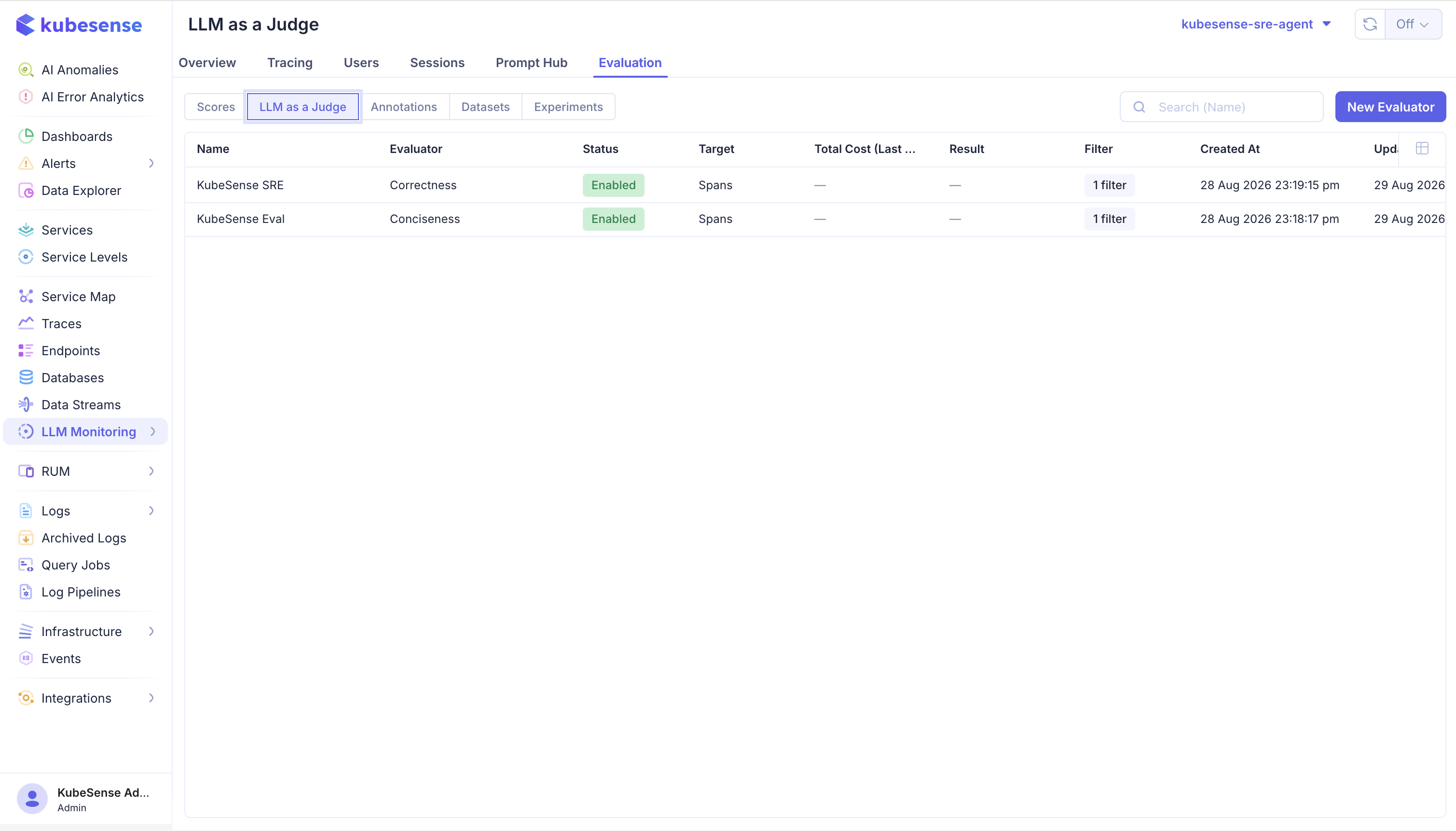
| Column | Meaning |
|---|---|
| Name | The evaluator configuration, such as KubeSense SRE |
| Evaluator | The rubric it runs — the template, such as Correctness or Conciseness |
| Status | Enabled or disabled; a disabled evaluator stays configured but stops running |
| Target | What it evaluates. Spans — individual observations, not whole traces |
| Total Cost | What the judge itself has spent over the recent window |
| Result | The most recent outcome |
| Filter | How many filter conditions narrow the traffic it matches |
| Created / Updated | Configuration history |
The split between the Name and Evaluator columns is the split between the two objects behind them: one rubric can back several configurations, each pointed at different traffic with its own filter and sampling rate.
Total Cost is the column to watch after enabling something new. Judging is a model call per matched span, so a broad filter at full sampling can outspend the traffic it measures.
Use New Evaluator to create one.
Before you start
An evaluator needs two things that must exist first:
- An LLM connection for the application, so KubeSense can call the judge model. See Installation.
- A score config defining the dimension the judge emits, so its results share a vocabulary with human review. See Scores.
Create a custom evaluator
After the score config exists, open Settings > LLM > Custom Evaluators and select Create Evaluator. Select the application from the Project selector.
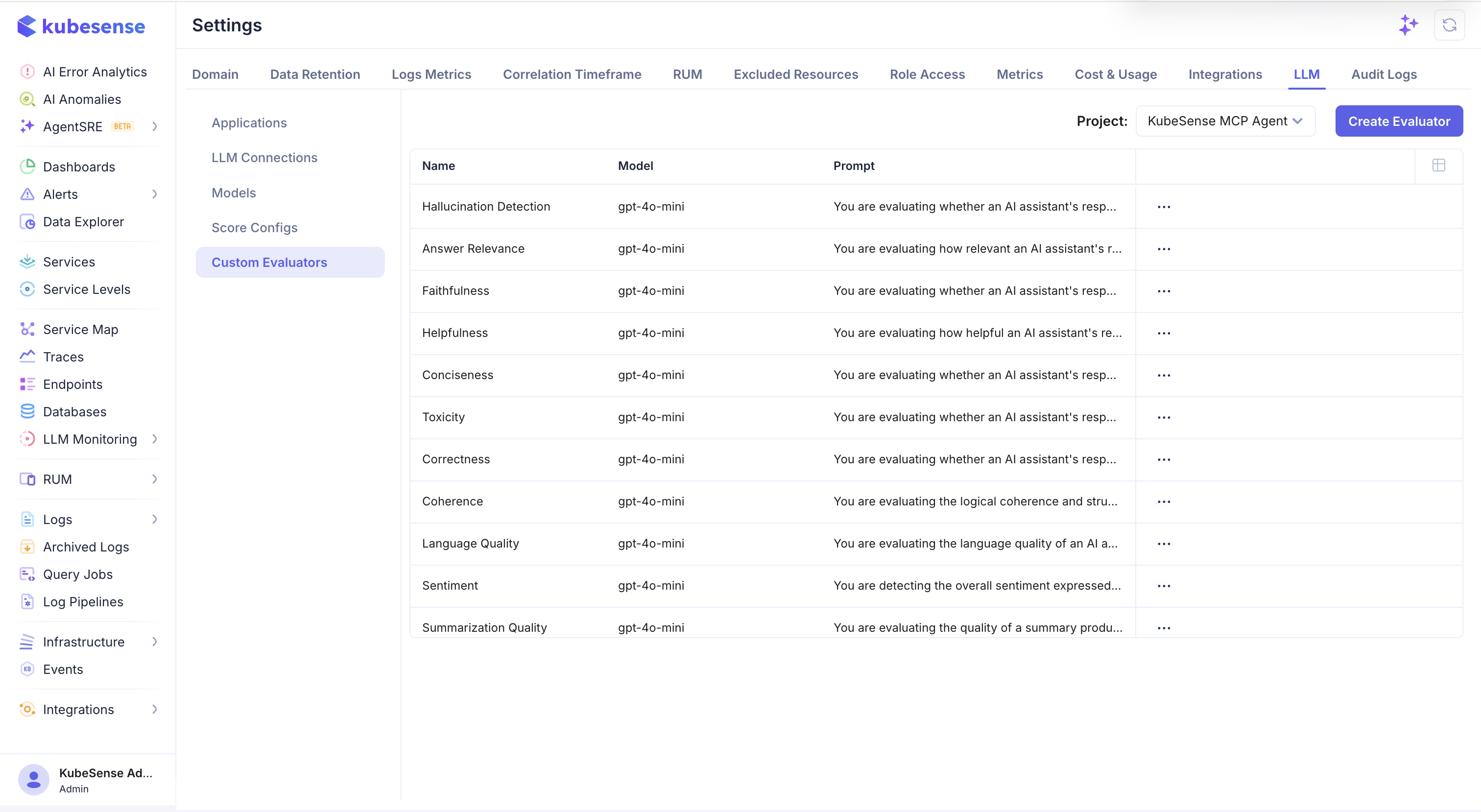
Enter an evaluator name, select the judge model from an LLM connection, and write the evaluation prompt. The prompt should include the criterion, the input and output to evaluate, and clear instructions for the expected score. Use variables such as {{input}} and {{output}} to map trace data into the prompt.
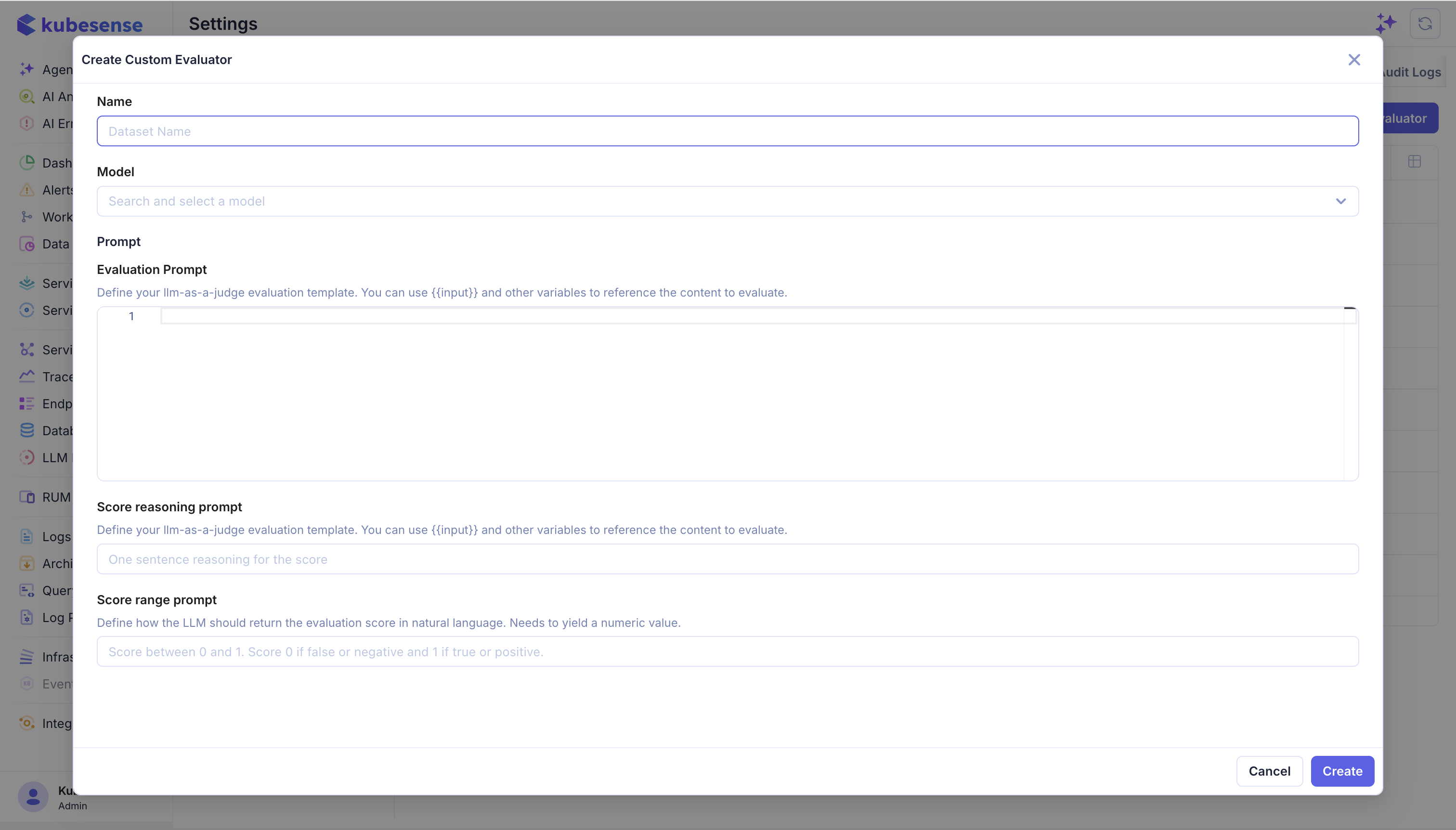
The evaluator form supports:
- Name: A stable name for the evaluation rule, such as
Answer Relevance. - Model: The judge model from the application's configured LLM connections.
- Evaluation Prompt: The rubric and the content being evaluated.
- Score Reasoning Prompt: Instructions for a concise explanation of the result.
- Score Range Prompt: Instructions that constrain the returned score to the configured range or categories.
- Target and filters: Whether the evaluator runs on observations or dataset items, and which service, model, operation, environment, or application spans match.
- Variable mappings: Which trace, span, generation, tool, retriever, or dataset item fields populate each prompt variable.
Create the Score Config before creating the evaluator so the evaluator's score name, type, range, and categories match the dimensions used elsewhere in the project. For annotation workflows, the Score Config must exist before it can be attached to an annotation queue. The Custom Evaluator form defines its own emitted score name and instructions, so make those values agree with the Score Config instead of creating unrelated names.
Walkthrough
Writing a judge prompt
The rubric decides whether the scores mean anything. A few things matter more than the rest:
- Define the scale explicitly. "Rate helpfulness 0 to 1" invites drift. Say what 0 means, what 1 means, and what sits between them.
- Give the judge only what it needs. Map the input and output it must read; extra context invites the judge to grade something you did not ask about.
- Ask for reasoning. It lands in the score's comment and is the only way to audit a disagreement later.
- Cover the borderline cases. Include an example of a response that just passes and one that just fails — that is where a vague rubric produces noise.
- Use a capable judge model. A small model is cheap per call and expensive in wrong conclusions. Judge quality bounds everything downstream.
Constrain the output to the score config's type and range. A numeric config with a 0–1 range and a judge that occasionally answers "high" produces gaps in your data rather than an error.
How evaluation runs
Evaluation happens inside the collector, as spans arrive. A matching span is dispatched to a worker pool before the write to ClickHouse, so a slow judge provider can never delay ingestion — the trace lands regardless of what the judge does.
Work is queued, and the queue drops when full rather than blocking. A dropped evaluation means no score was produced for that span; the span itself is unaffected.
Evaluators target individual observations. Use the filters to match only spans that actually carry what the rubric needs — a rubric that reads input and output should not be matched against retrieval or tool spans that have neither.
Define the score type and range before writing the evaluator prompt. Make the rubric explicit, require structured output, and include examples for borderline cases. Match only observations that contain the fields required by the evaluator.
For example, an evaluator can match gen_ai_operation=chat, a particular model, and a production environment. It can then use the trace input and output to produce a quality score without evaluating retrieval or tool spans that do not contain a response.
Operating asynchronous evaluation
The evaluator runs after the incoming span has been accepted. Watch the evaluation metrics endpoint for enqueued, succeeded, failed, and dropped counts. A failed judge call affects the score, while a dropped evaluation indicates queue or worker capacity pressure; neither should be confused with loss of the original trace.
Sizing rule of thumb for the collector's eval_engine block:
queue_size ≳ workers × per_call_timeout_sec × span_rate_per_sec × config_match_rateLower the sampling rate on the eval config before enlarging the pool — judging every span is rarely worth the spend.
Cost
Judging is a model call and bills like one. Each job records the tokens and cost it consumed, so evaluator spend is visible separately from application spend. A broad filter at full sampling can cost more than the traffic it evaluates.
Data handling
Evaluation prompts can include trace input, output, model, user, and other mapped fields. Limit evaluator matches and avoid sending sensitive content to a third-party judge provider unless that processing is approved for your environment.
Where to next
- Annotations — establish ground truth to calibrate the rubric
- Scores — where judge results land
- Experiments — apply a rubric to a dataset instead of live traffic