
Annotations
Annotation is human review: a person opens a trace, judges it against agreed criteria, and records a score. It is slower than automated judging and it is the only method that produces ground truth.
Use annotations to calibrate an LLM judge, to settle cases a rubric cannot, and to build labelled examples for a dataset.
See Concepts for the queue and item objects.
Why annotate
Automated scoring answers "did this match the rubric". Only a person answers "is the rubric right", and only a person can judge the cases a rubric never anticipated.
Annotation gives you three things nothing else does:
- Ground truth — the reference set an LLM judge is measured against
- Domain judgement — a support lead or clinician catching what a generic rubric misses
- Labelled examples — reviewed traces become dataset items and then regression tests
The queues list
LLM Monitoring > Evaluation > Annotations lists the review queues for the selected application.
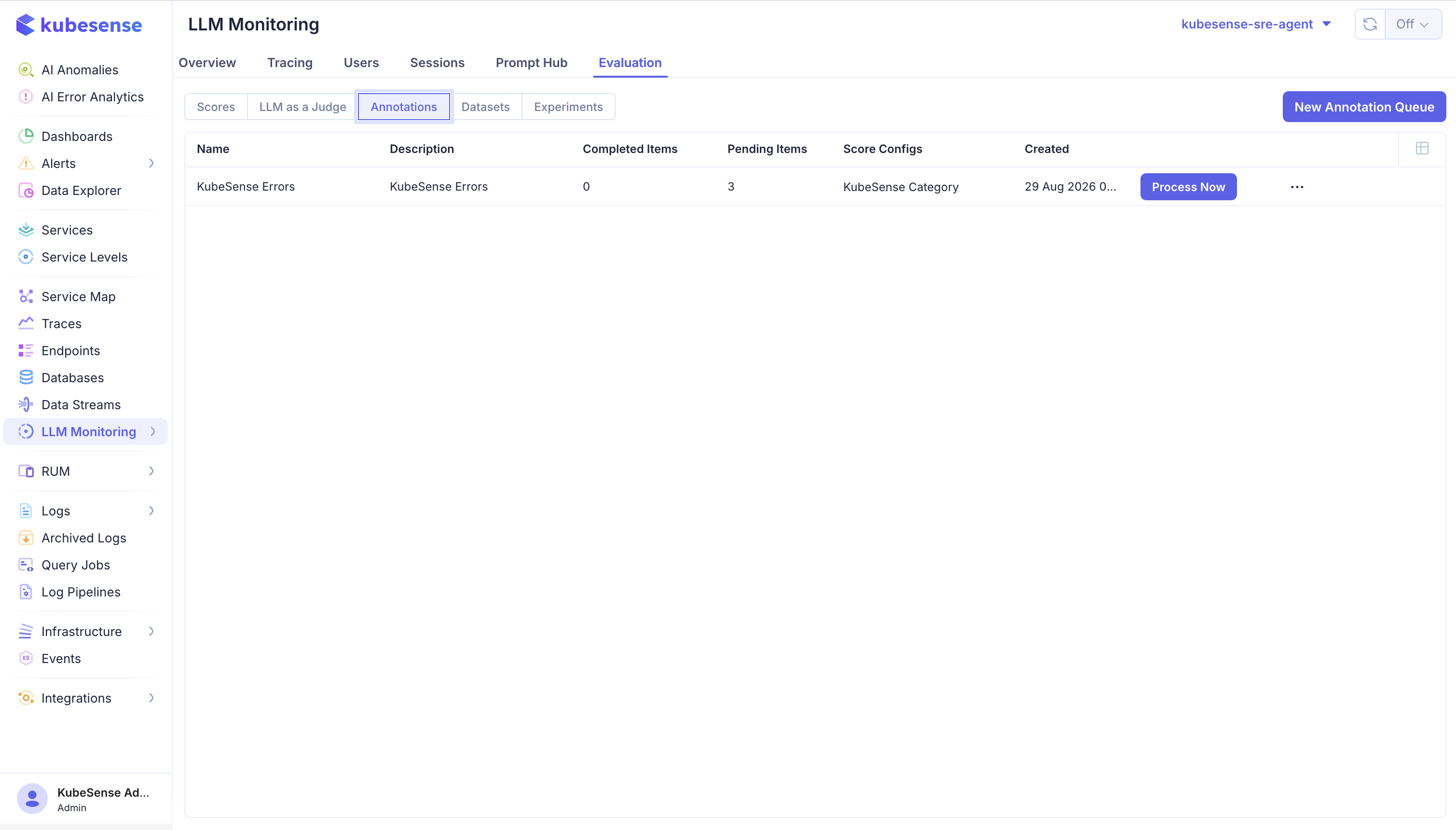
| Column | Meaning |
|---|---|
| Name | The queue, such as KubeSense Errors |
| Description | What this queue is for |
| Completed Items | Items reviewers have finished |
| Pending Items | Items still waiting |
| Score Configs | The dimensions reviewers may apply in this queue |
| Created | When the queue was created |
Process Now opens the queue and drops you straight into the next pending item. The row menu handles editing and deleting the queue.
Pending against completed is the number to watch. A queue whose pending count only grows is either too broad or has no one assigned — both are worth fixing before the backlog makes the queue useless.
Create a queue
Click New Annotation Queue.
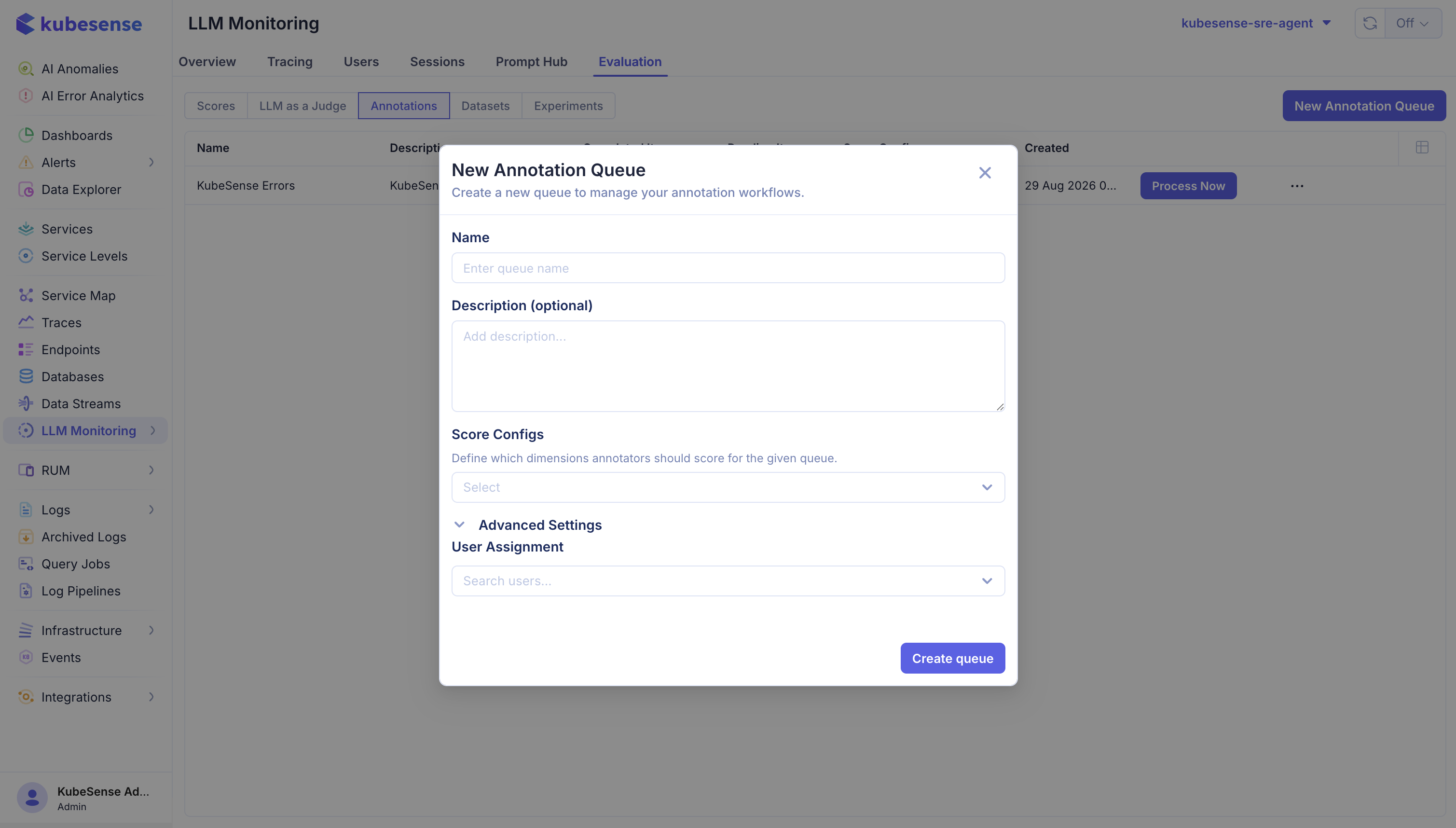
| Field | Purpose |
|---|---|
| Name | Identifies the queue in the list and on its items |
| Description | Optional — what reviewers are being asked to judge |
| Score Configs | The dimensions annotators score in this queue. This is the queue's rubric |
| User Assignment | Under Advanced Settings — the reviewers who work this queue |
Score Configs is the field that matters. It is what stops two reviewers recording the same judgement on different scales, and it is why the score config has to exist before the queue does. A queue with no configs attached gives reviewers nothing to record.
Attach as many as the review needs, in any mix of types — a categorical rating, a boolean "was this correct", and a numeric score can all sit on the same queue.
Create one queue per review question. "Refund policy compliance" and "answer quality" need different criteria, different reviewers, and different configs; merging them produces a backlog nobody is qualified to clear.
Add items to a queue
Most items arrive one at a time, from someone reading a trace and deciding it needs a second opinion.
From the trace detail page
Open a trace in Traces and use Annotate in the trace detail panel.
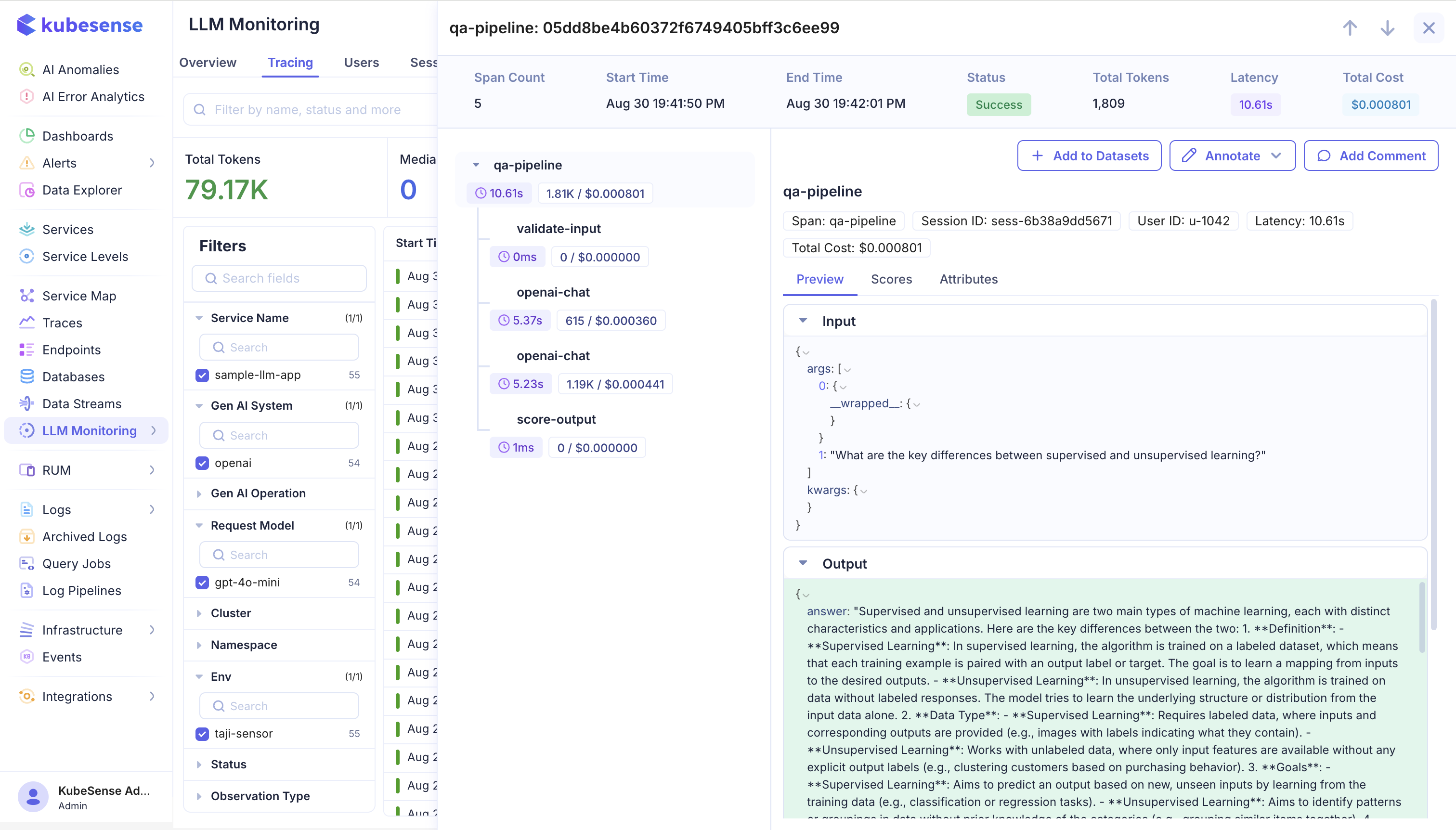
The panel gives you the whole picture before you decide: the span tree on the left with each step's duration and cost, the summary bar with span count, status, tokens, latency and total cost, and the selected span's Preview, Scores, and Attributes tabs on the right.
Annotate opens a dropdown listing the queues for this application; picking one adds the trace as a pending item. The queue's own score configs decide what a reviewer can then record, so the same trace sent to two queues is judged on two different rubrics.
Select a span in the tree before using Annotate to queue that observation rather than the whole trace — see Scoring a span rather than the whole trace.
The two buttons beside it complete the loop from this one panel: Add to Datasets turns the trace into a dataset item, and Add Comment leaves a note for whoever picks it up.
In bulk
Populate a queue from filters to add every trace matching a query. This is how you assemble a representative sample rather than only the traces someone happened to open — a queue built entirely from traces that caught someone's eye is a biased sample, and a judge calibrated against it inherits the bias.
A queue holds each item once, so adding the same one twice is a no-op.
Review an item
Process Now opens the review screen, one item at a time.
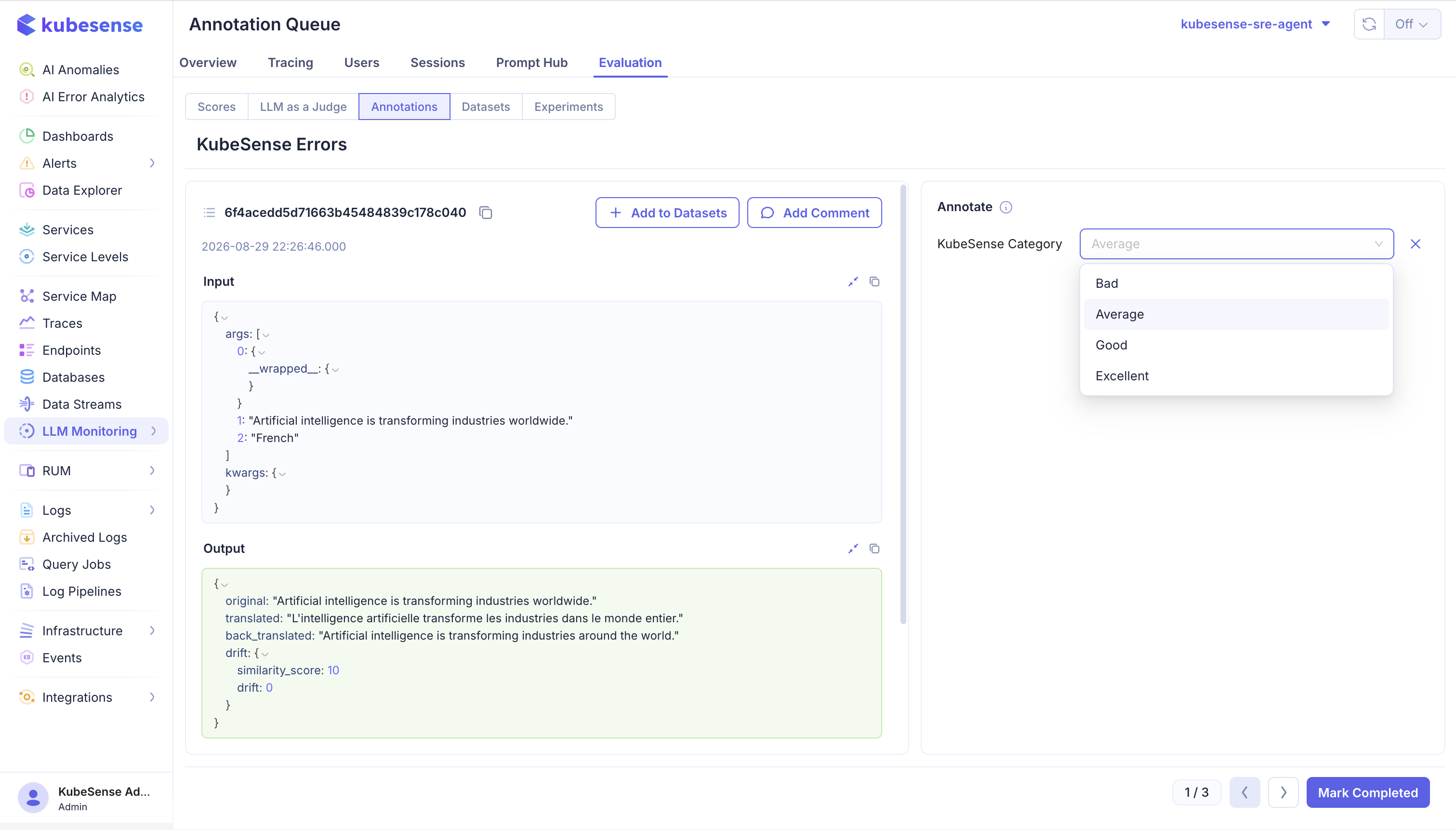
The left side shows what is being judged: the identifier, its timestamp, and the full Input and Output as structured JSON you can expand.
The right side is the Annotate panel. It holds one control per score config attached to the queue, and the control depends on that config's data type:
| Data type | Control | What the reviewer does |
|---|---|---|
CATEGORICAL | A dropdown of the config's labels | Picks one label, such as Bad, Average, Good, or Excellent |
BOOLEAN | A two-option toggle, True (1) and False (0) | Answers a yes/no question — was this correct, did it follow policy, was it safe |
NUMERIC | A number input bounded by the config's minimum and maximum | Enters a value on the scale the config defines |
The screenshot above shows a categorical config, because that queue has one attached. A queue with several configs shows several controls stacked in the panel, so a reviewer can record a category, a pass/fail, and a rating on the same item in one pass.
What gets stored differs slightly by type, which is what you see later in the Scores view. A boolean records 1 or 0 alongside the label True or False. A categorical records the label together with the numeric value defined for that category in the score config, so categorical results can still be averaged and charted.
The counter at the bottom right tracks progress through the queue, with arrows to move between items and Mark Completed to record the scores and finish the item.
Scoring a span rather than the whole trace
A queue item can target one observation inside a trace instead of the trace as a whole. When it does, the scores a reviewer records are written against that specific span.
This matters for anything with more than one step. In a RAG pipeline the retrieval step and the final generation fail in different ways and deserve separate judgements — retrieval can return the wrong documents while the generation faithfully summarises them, or retrieval can be perfect while the generation ignores it. A single score on the trace cannot express either case.
Scoring at the span level also lines up human review with LLM as a Judge, which targets spans too, so the two can be compared on exactly the same unit when you calibrate the judge.
| Action | Result |
|---|---|
| Score and Mark Completed | Scores are written with source HUMAN_ANNOTATION; the item is marked COMPLETED with the reviewer and timestamp |
| Move on without scoring | The item is marked SKIPPED |
| Add Comment | Leaves a note on the trace for other reviewers |
| Add to Datasets | Promotes the trace into a dataset as a test case |
Add to Datasets on this screen is the shortest path from "this answer was wrong" to "this can never regress again" — the reviewer who found the failure turns it into a permanent test case without leaving the queue.
Skipping is a real signal, not a failure. A high skip rate usually means the criteria are ambiguous or the sample contains traces the rubric was never meant to cover. Fix the criteria rather than pressing reviewers to guess.
Using annotations to calibrate a judge
- Build a queue from a representative sample of production traffic.
- Have reviewers score it against the score configs.
- Run the LLM judge over the same traces.
- Compare the two sets of scores by trace.
- Where they disagree, read the traces. Usually the rubric is underspecified rather than the model being wrong.
- Revise the judge prompt and repeat.
Agreement between reviewer and judge is what earns the right to trust automated scores on traffic no one will ever read.
Where to next
- Scores — the score configs reviewers apply
- LLM as a Judge — scale a calibrated rubric to all traffic
- Datasets — turn reviewed traces into regression tests