
Protecting Findings
Protect turns findings into Protect rules in a log pipeline, so sensitive values in new logs from those services are masked before they are stored. The original is encrypted and can be revealed only by users with the Logs Sensitive Unmask permission.
Protecting a Finding
- Click Protect on a finding, or select several findings and click Protect.
- Choose a target:
- Create a new pipeline — enter a name. The pipeline applies only to the services of the selected findings.
- Add to an existing pipeline — pick a pipeline. The rules run on that pipeline's own logs.
- Review the Preview:
- Rules to add — one Protect rule per scanner rule, named like
Visa card (SDS). Built-in rules are added from the catalog (Built-in pattern); custom rules are copied with their pattern. - Applies to — the services the new pipeline will mask.
- Rules the existing pipeline already has, and services it does not cover, are listed too.
- Rules to add — one Protect rule per scanner rule, named like
- Click Protect.
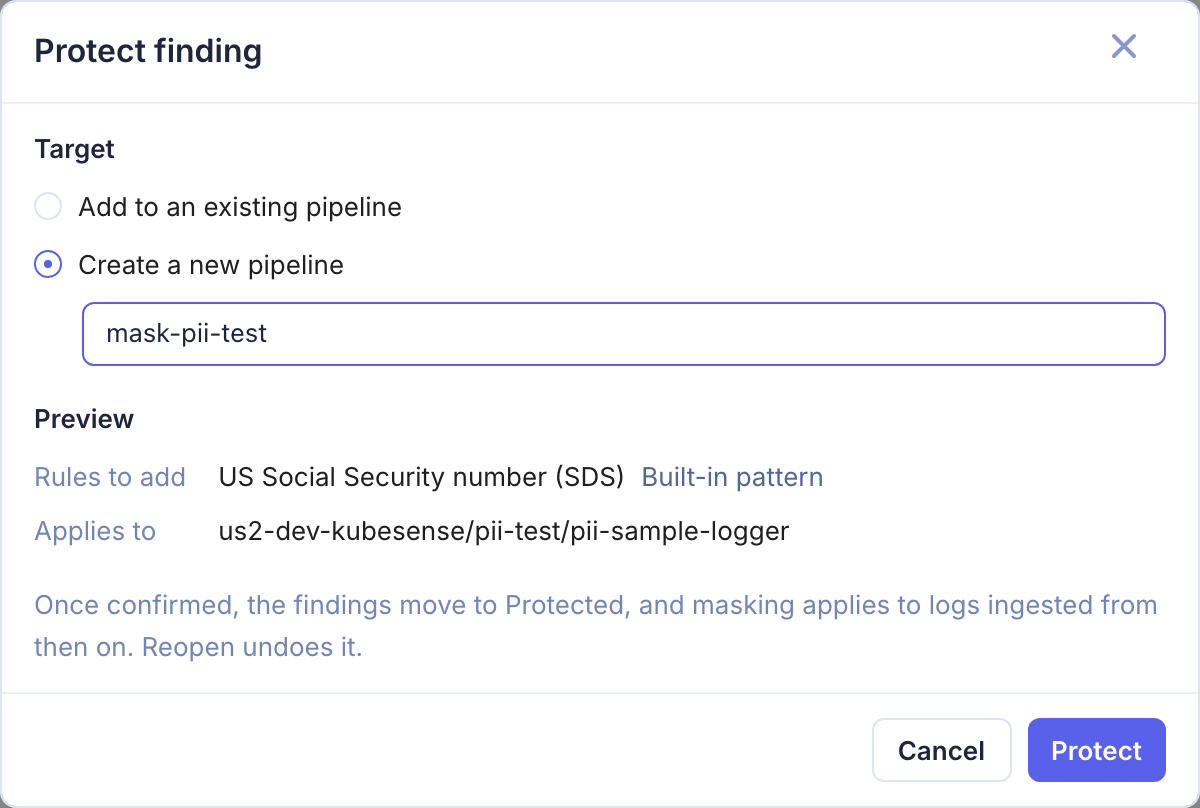
The findings move to Protected, and masking applies to logs ingested from then on. Logs already stored are not changed. Reopen on a finding undoes its Protected status; the pipeline rule stays until you remove it from the pipeline.
Things to Know
- Services outside an existing pipeline — if a selected finding's service is not in the pipeline's Rule Matcher, the preview lists it as not covered, and the finding stays Open. Protect it into a new pipeline, or widen the pipeline's Rule Matcher.
- Disabled pipelines — protecting into a disabled pipeline is refused: its rules would not run.
- Access — Protect needs Log Pipeline write access and edit access to the chosen pipeline, as well as Sensitive Data write.
- A protected finding that keeps matching usually means some of the service's logs reach storage without passing through the pipeline's Protect rule, for example logs outside the pipeline's Rule Matcher.
- Disabling or removing the Protect rule or its pipeline takes the findings out of Protected: they show as Open (or Resolved) again, since nothing masks the data any more.
What Gets Masked
Protect keeps the first three characters of the matched value and replaces the rest with *: 4111111111111111 is stored as 411*************. Only the rule's masked group is masked; the rest of the match stays readable, for example order= in order=123456789012.
Card rules use Luhn validation: a card-shaped number that fails the card checksum, such as an order ID or a timestamp, is left as it is.
Built-in Patterns in Log Pipelines
Protect rules in Logs > Log Pipelines can use the same library directly: see Built-in Patterns. The Library Rules page lists every pattern available for masking.