
Protect
The Protect rule masks sensitive values before indexing while retaining an encrypted original for authorized temporary reveal. Normal searches and log reads see only the searchable masked value.
Use Replace instead when the original value must be permanently rewritten and never recoverable from KubeSense.
Fields
| Field | Required | Description |
|---|---|---|
| Name | Yes | Rule identifier |
| Source Fields | Yes | body and/or flattened attribute names such as phone or user.email |
| Regular Expression | Yes | Pattern containing the sensitive value |
| Sensitive Captures | Yes | One or more named or numbered regex groups to protect |
How It Works
For each selected capture, Protect keeps the first three characters visible by default and replaces the rest with *. The masked text remains searchable. The original is encrypted and is available only through the permission-gated reveal action.
When body is selected, matching captures are masked in the body and wherever the same text appears in string attributes. Protect sees attributes created by earlier Parse or Parse JSON rules. Attribute names use flattened paths such as request.customer.email.
Protect must be the final enabled rule in a pipeline. Adding a Protect rule does not change logs that were already indexed.
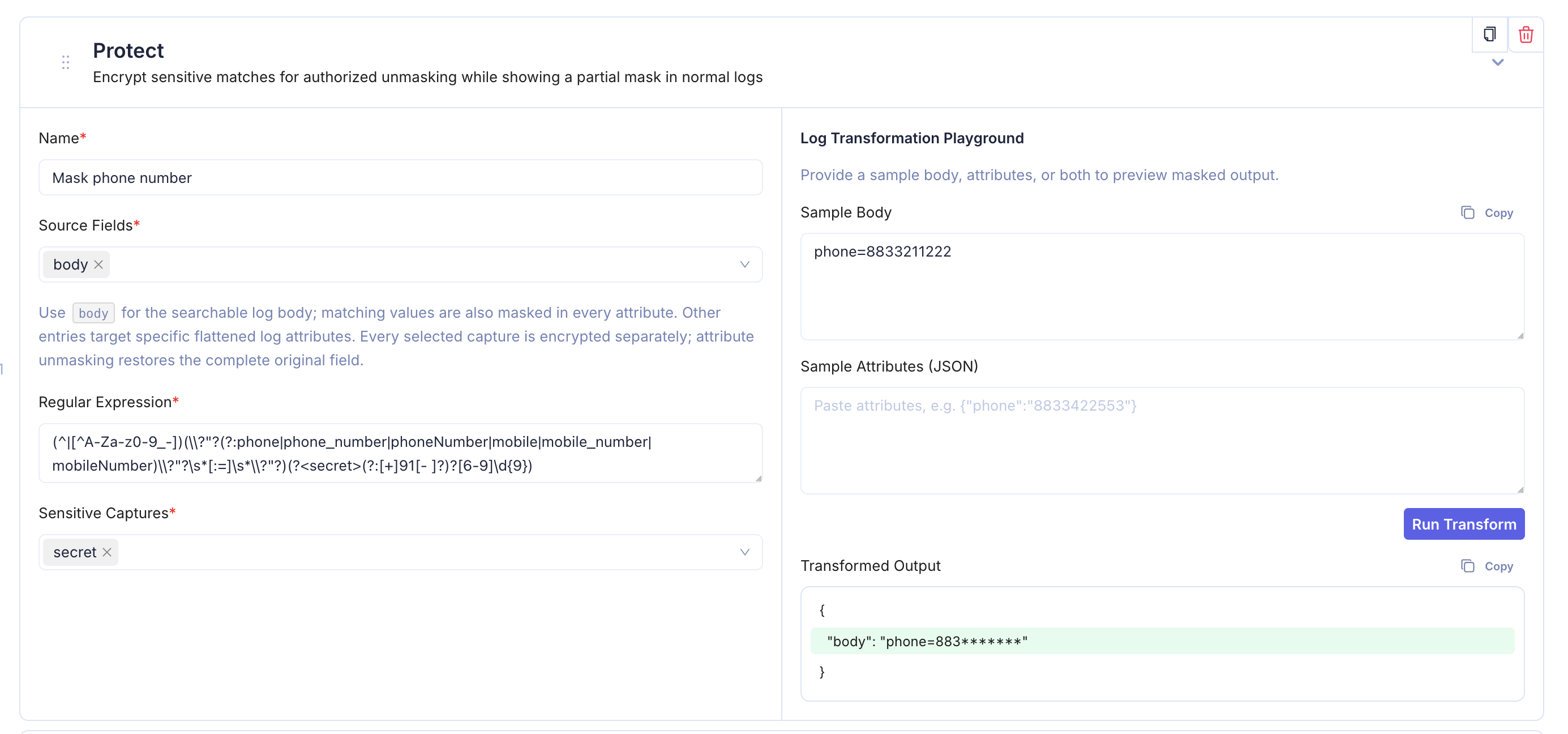
Playground
Protect has two optional sample inputs:
- Sample Body — plain text representing the searchable log body.
- Sample Attributes (JSON) — a JSON object containing attributes to test.
Provide at least one. The result includes only the sections you supplied and shows masked values only—never encrypted values, references, or key information.
For example, a body containing phone=8833211222 is previewed as phone=883*******. If supplied attributes contain the same number, those string values are masked too.
Revealing Protected Values
Users with both Logs access and Logs Sensitive Unmask permission can reveal a protected value from the Log Detail View. Revealed values automatically remask after 30 seconds and can be remasked immediately. Reveal activity is audited.
See Log Detail View for the reveal and copy behavior.
Tips
- Select only the capture group containing the secret, not surrounding labels such as
phone=. - Use multiple source fields or captures when one rule must cover several representations.
- Parse attributes before Protect and keep Protect last.
- Test representative body and attribute values in the playground before saving.